Common Drive Issues in the Anaconda Installer
1. Missing System Drives During Installation
Context
The installation interface fails to display available drives for OS installation.
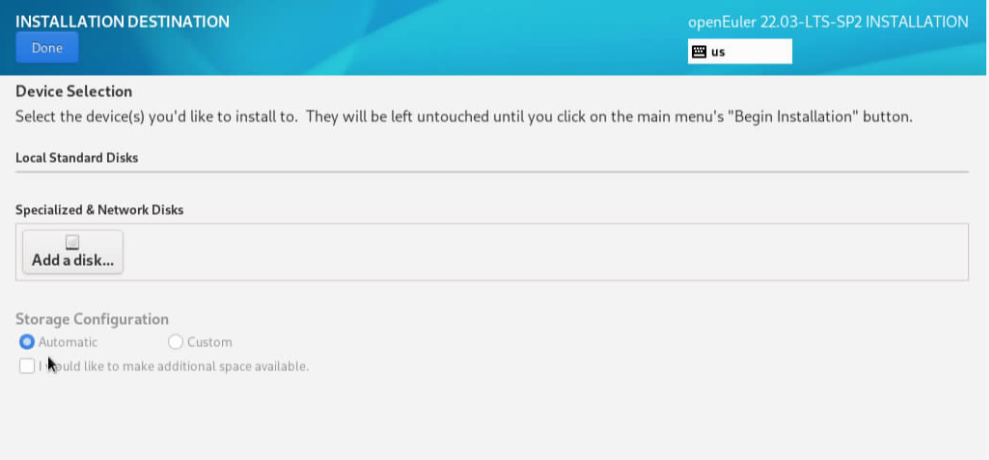
Symptom
- The installation wizard shows no available drives.
- Drive partitions remain visible via
lsblkin the terminal (Ctrl+Alt+F2)
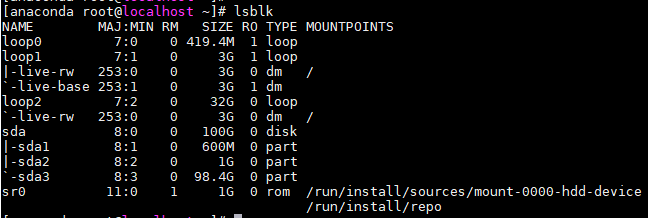
Possible Causes
System logs at /tmp/storage.log indicate drive scanning failures, typically caused by residual partition metadata.
Solution
- Access the terminal (Ctrl+Alt+F2).
- Use
fdiskto remove existing partitions. - Reformat the drive.
2. Installation Hangs on Drive Scan
Context
Installation process freezes during drive scanning.
Symptom
The system becomes unresponsive at drive scanning stage.

Possible Causes
- System logs at /tmp/storage.log show frozen drive scanning operation.
- Manual drive scan commands fail to complete, indicating drive corruption or invalid sector data.
Solution
- Force reboot the system.
- Reformat affected drive.
- Restart the installation process.
版权所有 © 2026 openEuler 保留一切权利
京ICP备2020036654号-1
京公网安备 11030102011597 号