Docker Container Terminates After a Certain Period
Context
A Docker container launches successfully but unexpectedly stops after operating for a duration without other observable errors.
Symptom
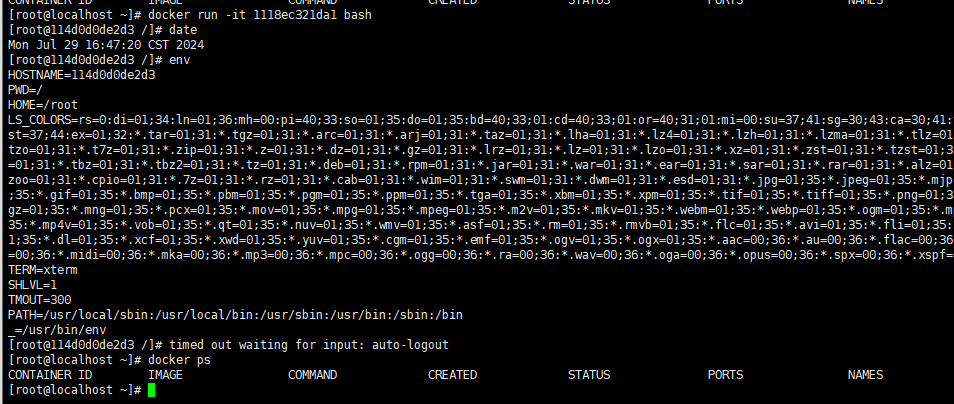
When a Docker container image is executed, the CLI remains inactive before automatically closing after prolonged idleness. This behavior persists even for containers launched in background via docker run -d.
Root Cause
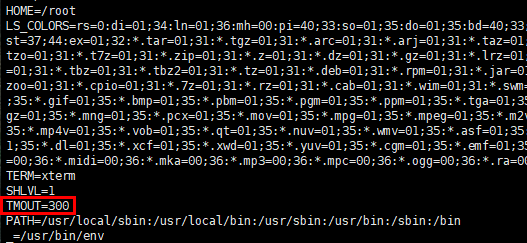
The container image includes a predefined 300-second timeout (TMOUT) setting in /etc/profile. When users access the container via SSH and maintain terminal inactivity beyond this threshold, the system forcibly terminates the session.
Resolution
Deploy the container with existing TMOUT configuration.
shelldocker run -itd XXX bashAdjust container settings through interactive execution.
shelldocker exec -it $container_id bashDisable the timeout by setting
TMOUT=0in /etc/profile: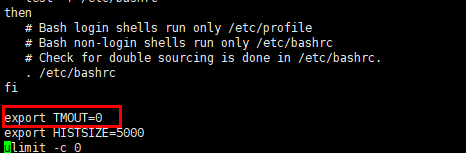
Ensure profile loading by adding
source /etc/profileto /root/.bashrc: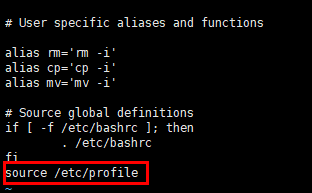
Reinitialize the container to apply permanent changes:
shelldocker restart $container_id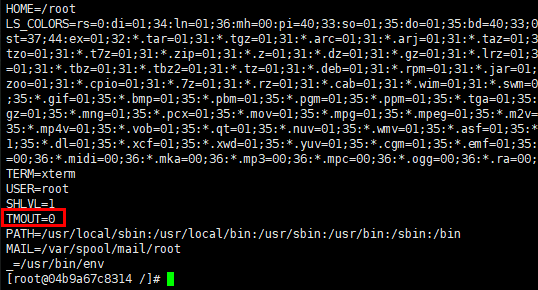
版权所有 © 2026 openEuler 保留一切权利
京ICP备2020036654号-1
京公网安备 11030102011597 号