System File Recovery FAQ
Context
During normal system usage, accidental deletion of system files or unintended modifications may prevent successful system boot. This requires file system recovery/repair or backup of critical data.
Symptom
Missing or modified system files causing boot failure, requiring system file restoration.
Solution
Mount the installation image and switch to the background console with Ctrl+Alt+F2.
The drive will initially show as inactive and unavailable for direct operations.
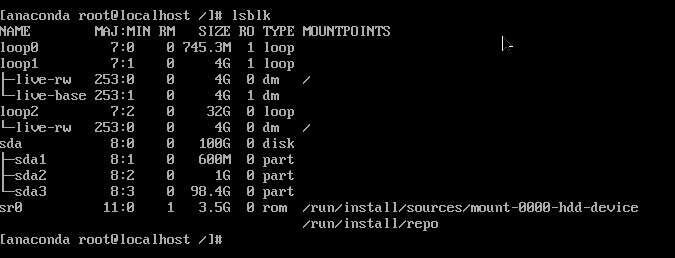
Configure network and enable SSH service:
txtifconfig eth0 xx.xx.xx.xx netmask 255.255.255.0 up route add default gw xx.xx.xx.xx cp /etc/ssh/sshd_config.anaconda /etc/ssh/sshd_config systemctl restart sshdActivate the system volume group:
Use
vgchange -ayto activate detected file systems.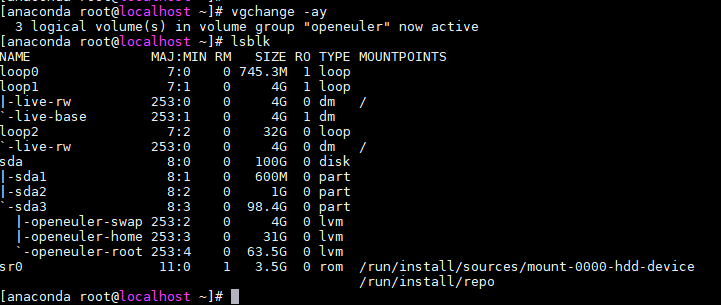
Mount partitions for system operations:
Create a temporary directory
testand mount the root partition /dev/oprnruler/root to it:
Mount the boot partition
/dev/sda2to the temporary system's boot directory: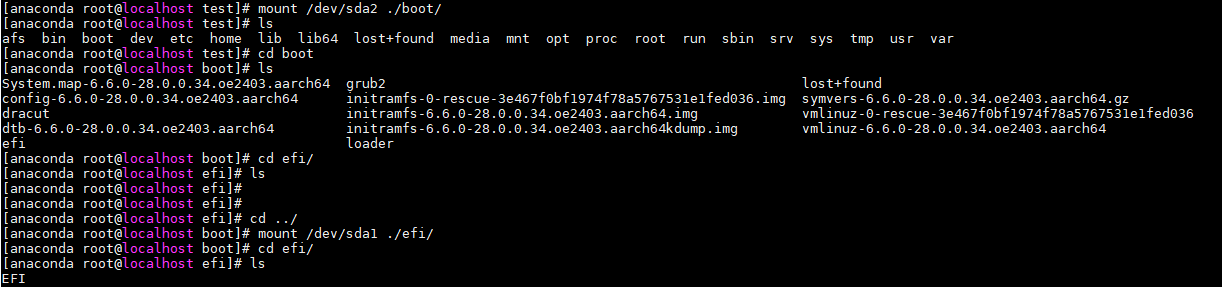
The file system and data are now accessible for modifications.
版权所有 © 2026 openEuler 保留一切权利
京ICP备2020036654号-1
京公网安备 11030102011597 号