Lustre User Guide
Overview
Lustre is an open source parallel file system designed for high scalability, performance, and availability. Lustre runs on Linux and provides POSIX-compliant UNIX file system interfaces.
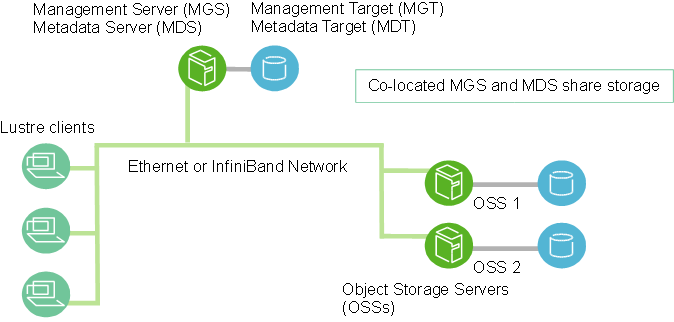
An Lustre cluster contains four main components:
- Management Service (MGS): Stores configuration information for the Lustre file system.
- Metadata Service (MDS): Provides metadata service for the Lustre file systems.
- Object Storage Service (OSS): Stores file data as objects.
- Lustre clients: Mounts the Lustre file system.
These components are connected through Lustre Network(LNet), as shown below figure:
Environment Requirements
Server specifications
- One or more x86 or Arm serves installed with openEuler 22.03 LTS SP4.
- A dedicated drive is reserved for Lustre.
- An Ethernet or InfiniBand NIC is installed.
Notice:
In the production deployment, carefully read Lustre manual chapters 5 and 6 for Lustre hardware configuration and storage RAID requirements.
Installation
Install Lustre all nodes.
Install the Lustre RPM repository package.
sudo dnf install lustre-releaseInstall the Lustre RPM packages.
sudo dnf install lustre lustre-tests
Notice:
The current Lustre RPM packages are compiled based on the kernel in-tree IB driver for the ldiskfs backend. If you need to compile the RPM packages based on third-party IB drivers (such as the MLX IB NIC driver) or compile ZFS backend support, recompile the Lustre source RPM package.
Lustre source RPM download: https://repo.openeuler.org/openEuler-22.03-LTS-SP4/EPOL/update/multi_version/lustre/2.15/source/
Install compilation dependencies.
sudo dnf builddep --srpm lustre-2.15.3-2.oe2203SP4.src.rpmRecompile based on the MLX IB NIC driver.
You need to install the MLX IB NIC driver in advance.
rpmbuild --rebuild --with mofed lustre-2.15.3-2.oe2203SP4.src.rpmRecompile for the ZFS backend.
Use verification branch zfs-2.1-release to compile for the ZFS backend.
git clone -b zfs-2.1-release https://github.com/openzfs/zfs
cd zfs && sh autogen.sh && ./configure --with-spec=redhat && make rpms
sudo dnf install ./*$(arch).rpm
rpmbuild --rebuild --with zfs lustre-2.15.3-2.oe2203SP4.src.rpm
Deployment
Notice:
The following steps are simplified. In the production environment, you are advised to follow the details steps in chapter 4 of the Lustre manual.
Configure the network.
If there are multiple NICs, specify the one(s) for Lustre to use. For example, specify one Ethernet and IB NICs for Lustre.
$ cat /etc/modprobe.d/lustre.conf
options lnet networks="tcp(enp125s0f0),o2ib(enp133s0f0)
Load the Lustre module.
Check if the LNet is normal.
$ sudo modproe lustre
$ sudo lctl list_nids
175.200.20.14@tcp
10.20.20.14@o2ib
Deploy a standalone node.
Run the following commands to build a single-node environment for test and verification:
$ sudo /lib64/lustre/tests/llmount.sh
$ mount
...
192.168.1.203@tcp:/lustre on /mnt/lustre type lustre (rw,checksum,flock,user_xattr,lruresize,lazystatfs,nouser_fid2path,verbose,encrypt)
$ lfs df -h
UUID                       bytes        Used   Available Use% Mounted on
lustre-MDT0000_UUID        95.8M        3.2M       90.5M   4% /mnt/lustre[MDT:0]
lustre-OST0000_UUID       239.0M        3.0M      234.0M   2% /mnt/lustre[OST:0]
lustre-OST0001_UUID       239.0M        3.0M      234.0M   2% /mnt/lustre[OST:1]

filesystem_summary:       478.0M        6.0M      468.0M   2% /mnt/lustre
Deploy a multi-node cluster.
On the MGS/MDS node, add an MDT whose name in the Lustre file system is temp.
$ sudo mkfs.lustre --fsname=temp --mgs --mdt --index=0 /dev/vdb
   Permanent disk data:
Target:     temp:MDT0000
Index:      0
Lustre FS:  temp
Mount type: ldiskfs
Flags:      0x65
              (MDT MGS first_time update )
Persistent mount opts: user_xattr,errors=remount-ro
Parameters:

device size = 81920MB
formatting backing filesystem ldiskfs on /dev/vdb
        target name   temp:MDT0000
        kilobytes     83886080
        options        -J size=3276 -I 1024 -i 2560 -q -O dirdata,uninit_bg,^extents,dir_nlink,quota,project,huge_file,ea_inode,large_dir,^fast_commit,flex_bg -E lazy_journal_init="0",lazy_itable_init="0" -F
mkfs_cmd = mke2fs -j -b 4096 -L temp:MDT0000  -J size=3276 -I 1024 -i 2560 -q -O dirdata,uninit_bg,^extents,dir_nlink,quota,project,huge_file,ea_inode,large_dir,^fast_commit,flex_bg -E lazy_journal_init="0",lazy_itable_init="0" -F /dev/vdb 83886080k
Writing CONFIGS/mountdata

$ sudo mkdir /mnt/lustre-mdt1
$ sudo mount -t lustre /dev/vdb /mnt/lustre-mdt1
Add multiple MDTs in the same way with incrementing values of --index.
On the OSS node, add an OST:
$ sudo lctl list_nids
192.168.1.203@tcp
]$ sudo mkfs.lustre --fsname=temp --mgsnode=192.168.1.203@tcp --ost --index=0 /dev/vdc
   Permanent disk data:
Target:     temp:OST0000
Index:      0
Lustre FS:  temp
Mount type: ldiskfs
Flags:      0x62
              (OST first_time update )
Persistent mount opts: ,errors=remount-ro
Parameters: mgsnode=192.168.1.203@tcp

device size = 51200MB
formatting backing filesystem ldiskfs on /dev/vdc
        target name   temp:OST0000
        kilobytes     52428800
        options        -J size=1024 -I 512 -i 69905 -q -O extents,uninit_bg,dir_nlink,quota,project,huge_file,^fast_commit,flex_bg -G 256 -E resize="4290772992",lazy_journal_init="0",lazy_itable_init="0" -F
mkfs_cmd = mke2fs -j -b 4096 -L temp:OST0000  -J size=1024 -I 512 -i 69905 -q -O extents,uninit_bg,dir_nlink,quota,project,huge_file,^fast_commit,flex_bg -G 256 -E resize="4290772992",lazy_journal_init="0",lazy_itable_init="0" -F /dev/vdc 52428800k
Writing CONFIGS/mountdata
$ sudo mkdir /mnt/lustre-ost1
$ sudo mount -t lustre /dev/vdc /mnt/lustre-ost1
Add multiple OSTs in the same way with incrementing values of --index.
On the client node, mount the Lustre file system and test file read and write:
$ sudo mount -t lustre 192.168.1.203@tcp:/temp /mnt/lustre
$ mount
...
192.168.1.203@tcp:/temp on /mnt/lustre type lustre (rw,checksum,flock,nouser_xattr,lruresize,lazystatfs,nouser_fid2path,verbose,encrypt)
$ lfs df -h
UUID                       bytes        Used   Available Use% Mounted on
temp-MDT0000_UUID          44.4G        4.8M       40.4G   1% /mnt/lustre[MDT:0]
temp-OST0000_UUID          48.2G        1.2M       45.7G   1% /mnt/lustre[OST:0]

filesystem_summary:        48.2G        1.2M       45.7G   1% /mnt/lustre

$ echo "1234asdf"|sudo tee /mnt/lustre/testfile
1234asdf
$ cat /mnt/lustre/testfile
1234asdf
版权所有 © 2026 openEuler 保留一切权利
京ICP备2020036654号-1
京公网安备 11030102011597 号