Secure Boot
Overview
Secure Boot relies on public and private key pairs to sign and verify components in the boot process. A typical boot process uses the previous component to verify the digital signature of the next component. If the verification is successful, the next component runs; if the verification fails, the boot stops. Secure Boot ensures the integrity of each component during system boot and prevents unverified components from being loaded and running, mitigating security threats to the system and user data.
In Secure Boot, the order of components to be verified are: BIOS, shim, GRUB, and vmlinuz (kernel image).
Related EFI boot components are signed by the openEuler signature platform in signcode mode. The public key certificate is integrated into the signature database by the BIOS. During the boot, the BIOS verifies shim. The shim and grub components obtain the public key certificate from the signature database of the BIOS to verify the next-level components.
Scenarios and Solutions
In previous openEuler versions, secure boot components are not signed. Therefore, the secure boot function cannot be directly used to ensure the integrity of system components.
In openEuler 22.03 LTS SP4 and later versions, openEuler uses the community signature platform to sign OS components, including the grub and vmlinuz components, and integrates the community signature root certificate into the shim component.
For the shim component, to facilitate end-to-end secure boot, the signature platform of the openEuler community is used for signature. After external CAs officially operate the secure boot component signature service, their signatures will be integrated into the shim module of openEuler.
Usage
Obtaining the openEuler Certificate
To obtain the openEuler root certificate, visit https://www.openeuler.org/en/security/certificate-center.
Download openEuler Shim Default CA (default-x509ca.cert).
Operations on the BIOS
Import the openEuler root certificate to the BIOS certificate database and enable secure boot in the BIOS to implement secure boot.
For details about how to import the BIOS certificate and enable secure boot, see the documents provided by the BIOS vendor.
Operations on the OS
Viewing database certificate information: mokutil --db
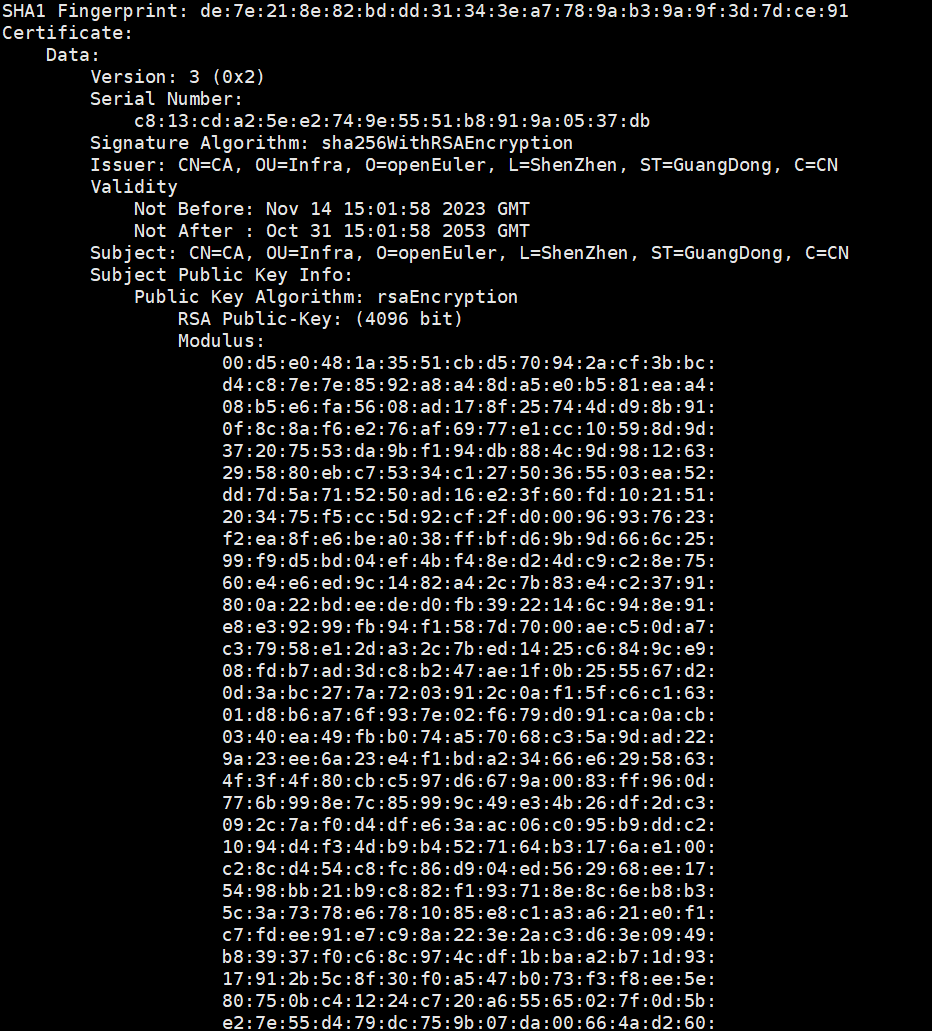
Note: The screenshot displays only some important information.
Viewing the secure boot status: mokutil --sb
- SecureBoot disabled

- SecureBoot enabled

- not supported

Constraints
- Software: The OS must be booted in UEFI mode.
- Architecture: Arm or x86
- Hardware: The BIOS must support verification functions related to secure boot.
版权所有 © 2026 openEuler 保留一切权利
京ICP备2020036654号-1
京公网安备 11030102011597 号