Protection for Interpreted Applications
Background
In the industry, the Linux IMA mechanism is mainly used to perform integrity checks on programs running on the system. It can detect whether files have been tampered with, and its allowlist mechanism ensures that only files that have been authenticated (for example, signed or protected using HMAC) can be executed.
The Linux IMA mechanism supports integrity measurement/appraisal of files accessed through system calls such as read(), exec(), and mmap(). Functionally, IMA can be configured to protect the integrity of the read() system calls used when an interpreter runs a script. In practice, however, IMA digest lists are mainly configured to intercept exec() and mmap(), and they cannot effectively intercept the execution of unauthorized malicious scripts, because IMA cannot distinguish script files from other variable data files. Once integrity protection is configured for read() system calls, other variable configuration files, temporary files, and data files are also brought into the protection scope. Baselines or authentication credentials cannot be generated for these files in advance, which causes integrity check failures. Therefore, in practice, a read()-based measurement/appraisal policy cannot be configured, and targeted interception and protection cannot be implemented:
| Execution Mode | Can Protection Be Provided Through IMA in Practice |
|---|---|
./test.sh | Yes |
bash test.sh | No |
Feature Description
This feature aims to ensure, through kernel system calls, that a script file run in the execution mode (for example, ./test.sh) and a script file run through an interpreter (bash ./test.sh) go through the same permission check process. Details are as follows:
execveat() Support for the AT_CHECK Check Parameter
execveat() is a system call function supported since Linux 3.19/glibc 2.34. This function allows an open file descriptor to be passed in and the file to be executed. This feature extends the AT_CHECK check mechanism for the execveat() system call so that whether a file is executable can be checked without actually executing the file.
When a caller passes in a target file descriptor through the execveat() system call and specifies the AT_CHECK parameter, the kernel first performs a permission check on the passed file descriptor in the system call execution logic. This process is the same as the normal file execution process, and covers checks such as the DAC permission bits, LSM access control rules, and IMA. If the check fails, the system call exits and returns the error code -EACCES. Only after all permission check processes are complete does the execveat() system call determine whether the parameters contain AT_CHECK. If they do, the subsequent execution process is not performed, and the system call exits and returns 0, indicating that the file passes the executable permission check. 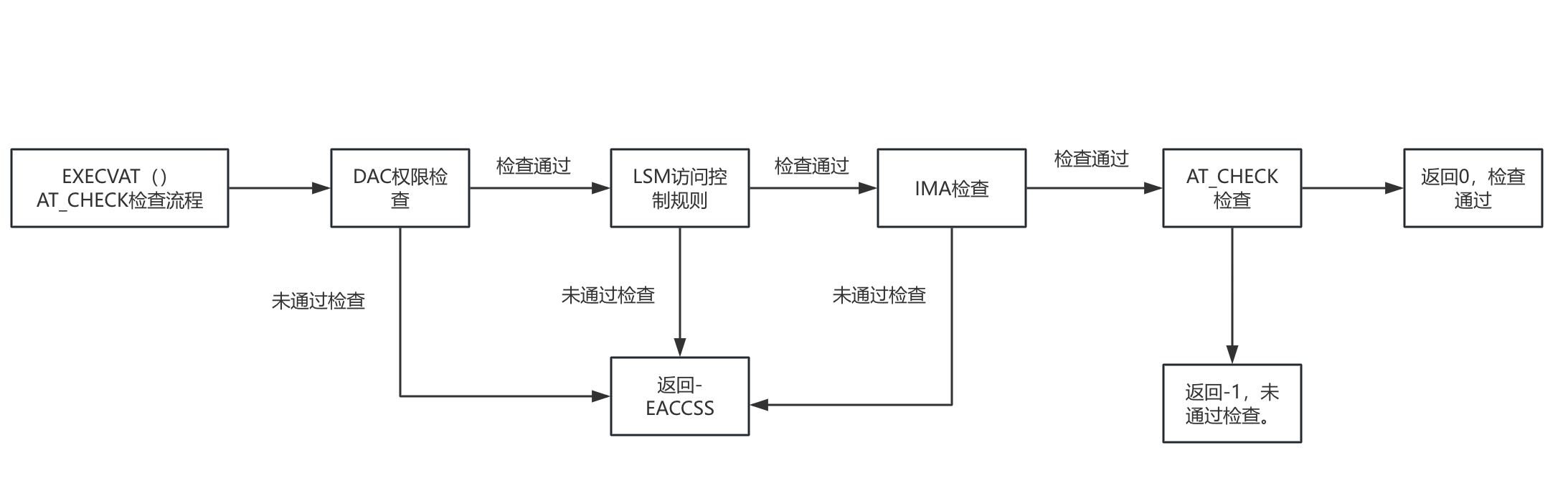
Interpreter Support for Calling execveat to Perform Permission Checks on Programs
On the basis of the execveat()-based AT_CHECK check mechanism, after an interpreter opens the script to be run, it can proactively call the execveat() system call to initiate an executable permission check on the file. The script file can continue to run only after the permission check succeeds. 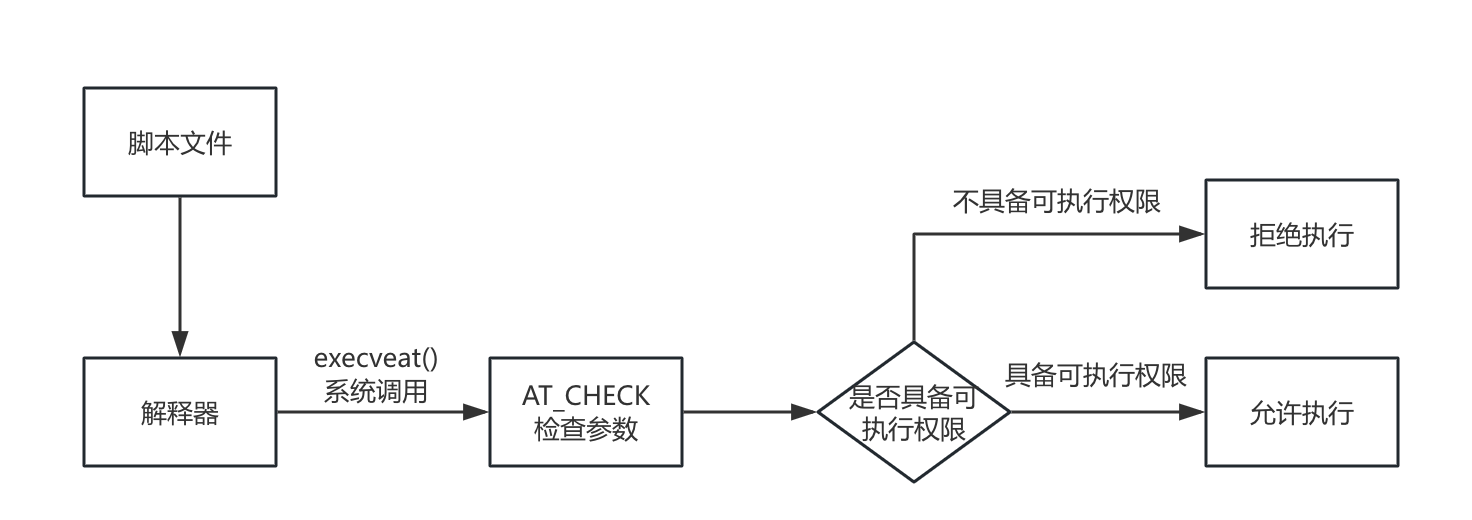
APIs
System Call Interface Description
The function type of the execveat() system call is as follows:
int execveat(int dirfd, const char *pathname,
             char *const _Nullable argv[],
             char *const _Nullable envp[],
             int flags);
This feature involves the new flags parameter AT_CHECK, which is described as follows:
| Parameter | Value | Description |
|---|---|---|
AT_CHECK | 0x10000 | Checks the executable permission on the target file without actually executing the file. |
Kernel Boot Parameter Description
This feature supports the following kernel boot parameters:
| Parameter | Value | Description |
|---|---|---|
exec_check.bash= | 0/1 | The default value is 0. When this parameter is set to 1, the bash interpreter process calls execveat to check the executable permission on a script file before running the script. |
exec_check.java= | 0/1 | The default value is 0. When this parameter is set to 1, the JDK needs to call execveat to check the executable permission on a script file when running class and jar files. |
exec_check.\<other>= | 0/1 | Other interpreters can be extended subsequently. |
Note: The preceding boot parameters are actually read and parsed by each interpreter process. The kernel does not actually use these parameters.
Feature Scope
This feature is supported in openEuler 24.03 LTS SP1 (kernel 6.6) and requires the corresponding kernel version. The supported interpreter types are as follows:
| Interpreter | Target File | Description |
|---|---|---|
bash | shell script file | The bash process checks the executable permission on the opened shell file. |
jdk | class file/jar file | The JVM checks the executable permission on the loaded class and jar files. |
Community developers or users can extend support for other interpreters or similar mechanisms on their own based on this mechanism.
Usage
Using the AT_CHECK Parameter
Prerequisites
The kernel version must be later than 6.6.0-54.0.0.58, and the glibc version must be 2.38-41 or later.
glibc-2.38-41.oe2403sp1.x86_64
kernel-6.6.0-54.0.0.58.oe2403sp1.x86_64
Procedure
You can compile the following test program (test.c) to test the parameter function:
#define _GNU_SOURCE

#include <stdio.h>
#include <stdlib.h>
#include <unistd.h>
#include <fcntl.h>

#define AT_CHECK               0x10000

int main(void)
{
    int fd;
    int access_ret;

    fd = open("./", O_RDONLY);
    access_ret = execveat(fd, "test.sh", NULL, NULL, AT_CHECK);
    perror("execveat");
    printf("access_ret = %d\n", access_ret);
    close(fd);
    return 0;
}
Step 1: Compile the test code:
gcc test.c -o testStep 2: Create the test script test.sh:
echo "sleep 10" > test.shStep 3: If the test script has a valid executable permission, execveat returns 0:
# chmod +x test.sh
# ./test
execveat: Success
access_ret = 0
Step 4: If the test script does not have a valid permission, execveat returns -1, and the error code is Permission denied:
# chmod -x test.sh
# ./test
execveat: Permission denied
access_ret = -1
Checking Script Executable Permissions Using the bash Interpreter
Prerequisites
The kernel version must be later than 6.6.0-54, the glibc version must be 2.38-41 or later, and the bash version must be 5.2.15-13 or later.
bash-5.2.15-13.oe2403sp1.x86_64
glibc-2.38-41.oe2403sp1.x86_64
kernel-6.6.0-54.0.0.58.oe2403sp1.x86_64
Procedure
Step 1: Set the executable permission on all script files in the system.
find / -name "*.sh" -exec chmod +x {} \;Step 2: Set the boot parameter and restart the system. The boot parameter to be added is as follows:
exec_check.bash=1Step 3: Verify that only scripts with the executable permission can be run by the bash interpreter:
# echo "echo hello world" > test.sh
# bash test.sh
bash: line 0: [1402] denied sourcing non-executable test.sh
# chmod +x test.sh
# bash test.sh
hello world
Checking Script Executable Permissions Using the JDK
Prerequisites
Obtain the JDK code that supports this feature:
https://atomgit.com/openeuler/bishengjdk-8/tree/IMA_Glibc2_34Compile the code as follows:
https://atomgit.com/openeuler/bishengjdk-8/wikis/%E4%B8%AD%E6%96%87%E6%96%87%E6%A1%A3/%E6%AF%95%E6%98%87JDK%208%20%E6%BA%90%E7%A0%81%E6%9E%84%E5%BB%BA%E8%AF%B4%E6%98%8EProcedure
Step 1: Ensure the executable permission on all .class and .jar files in the system.
find / -name "*.class" chmod +x {} \;
find / -name "*.jar" chmod +x {} \;
Step 2: Set the boot parameter and restart the system. The boot parameter to be added is as follows:
exec_check.java=1Step 3: Verify that only class or jar files with the executable permission can be run by the JVM:
You can compile the following test program (HelloWorld.java) to test the parameter function:
public class HelloWorld {
    public static void main(String[] args) {
        System.out.println("Hello, World!");
    }
}# javac HelloWorld.java
Access denied to /home/bishengjdk/bishengjdk-8/install/jvm/openjdk-1.8.0_432-internal/lib/tools.jar
# chmod +x /home/bishengjdk/bishengjdk-8/install/jvm/openjdk-1.8.0_432-internal/lib/tools.jar
# javac HelloWorld.java
# java HelloWorld
Access denied to HelloWorld.class
# chmod +x HelloWorld.class
# java HelloWorld
Hello, World!Implementing Integrity Protection for Interpreted Applications with the IMA Digest List
Prerequisites
Enable the IMA digest list function. For details, see the Kernel Integrity Measurement Architecture (IMA) document chapter.
Procedure
Step 1: Generate an IMA digest list for the target application (the procedure is omitted; for details about how to generate a digest list, see the Kernel Integrity Measurement Architecture (IMA) document chapter).
Step 2: Enable the IMA digest list function (the procedure is omitted; for details about how to generate a digest list, see the Kernel Integrity Measurement Architecture (IMA) document chapter). The following example enables the digest list and shell script verification. The configured kernel boot parameters are as follows:
ima_appraise=enforce ima_appraise_digest_list=digest-nometadata ima_policy="appraise_exec_tcb" initramtmpfs module.sig_enforce exec_check.bash=1Step 3: Verify the integrity protection of IMA for bash scripts.
# echo "echo hello world" > test.sh
# chmod +x test.sh
# bash test.sh
bash: line 0: [2520] denied sourcing non-executable test.sh

# Generate a digest list, sign it, and import it. (Details omitted.)
# echo /etc/ima/digest_lists/0-metadata_list-compact-test.sh > /sys/kernel/security/ima/digest_list_data
# bash test.sh
hello world
版权所有 © 2026 openEuler 保留一切权利
京ICP备2020036654号-1
京公网安备 11030102011597 号