
Witty Assistant Web Deployment Guide
Version Information Current Version: v0.10.1 Release Date: January 23, 2026
Product Overview
Witty Assistant Web is an intelligent Q&A tool. The web client of Witty Assistant provides an AI-driven intelligent Q&A interaction interface, supports multiple LLM backends, integrates the MCP protocol. Using the Witty Assistant web client can solve the convenience issue of operating system knowledge acquisition and empower developers and operations personnel with OS domain models. As an operating system knowledge acquisition tool, it supports intelligent Q&A, knowledge base management, agent applications and workflow applications, as well as semantic interface upload. Combined with agent task planning capabilities, it significantly lowers the barrier to developing and using operating system features.
This guide provides deployment instructions for the Witty Assistant intelligent assistant system based on automated scripts, supporting both one-click automatic deployment and manual step-by-step deployment methods.
Component Introduction
| Component Name | Service Port | Service Description |
|---|---|---|
| euler-copilot-framework | 8002 (Internal) | Agent framework core service, responsible for task scheduling and execution |
| euler-copilot-web | 8080 | Web frontend user interface service |
| euler-copilot-rag | 9988 (Internal) | Retrieval Augmented Generation service, supporting document retrieval and analysis |
| authhub-backend-service | 11120 (Internal) | Authentication and authorization service backend |
| authhub-web-service | 8000 | Authentication and authorization service frontend |
| mysql | 3306 (Internal) | MySQL relational database, storing user data and configuration information |
| redis | 6379 (Internal) | Redis cache database, supporting session and temporary data storage |
| minio | 9000/9001 (Internal/External) | MinIO object storage service, for document and file management |
| mongo | 27017 (Internal) | MongoDB document database, storing unstructured data |
| openGauss | 5432 (Internal) | openGauss vector database, supporting semantic retrieval and vector computation |
| secret_inject | No port | Configuration file security injection tool, ensuring sensitive information security |
System Requirements
Software Requirements
| Component | Version Requirements | Remarks |
|---|---|---|
| Operating System | openEuler 22.03 LTS or higher | Officially certified versions recommended |
| Kubernetes | K3s v1.30.2+ (with Traefik Ingress) | Lightweight Kubernetes distribution |
| Package Management | Helm v3.15.3+ | Kubernetes application package management tool |
| Python Environment | Python 3.9.9+ | Model download and script execution environment |
Hardware Specifications
| Resource Type | Minimum Configuration | Production Recommendation | Description |
|---|---|---|---|
| CPU Cores | 4 cores | 16 cores or more | AVX512 instruction set support recommended |
| Memory | 4GB | 64GB | |
| Storage Space | 32GB | 64GB+ | |
| LLM | qwen2.5-14B | qwen2.5-32B | Supports local deployment or API calls |
| GPU Memory (Optional) | NVIDIA RTX A4000 8GB | NVIDIA A100 80GB * 2 | Required only for GPU inference scenarios |
Deployment Prerequisites Description:
- For pure CPU environments, it is recommended to call cloud service models via API or deploy quantized local models
- If a Kubernetes cluster (version ≥1.28) already exists, the K3s installation step can be skipped
Deployment Architecture
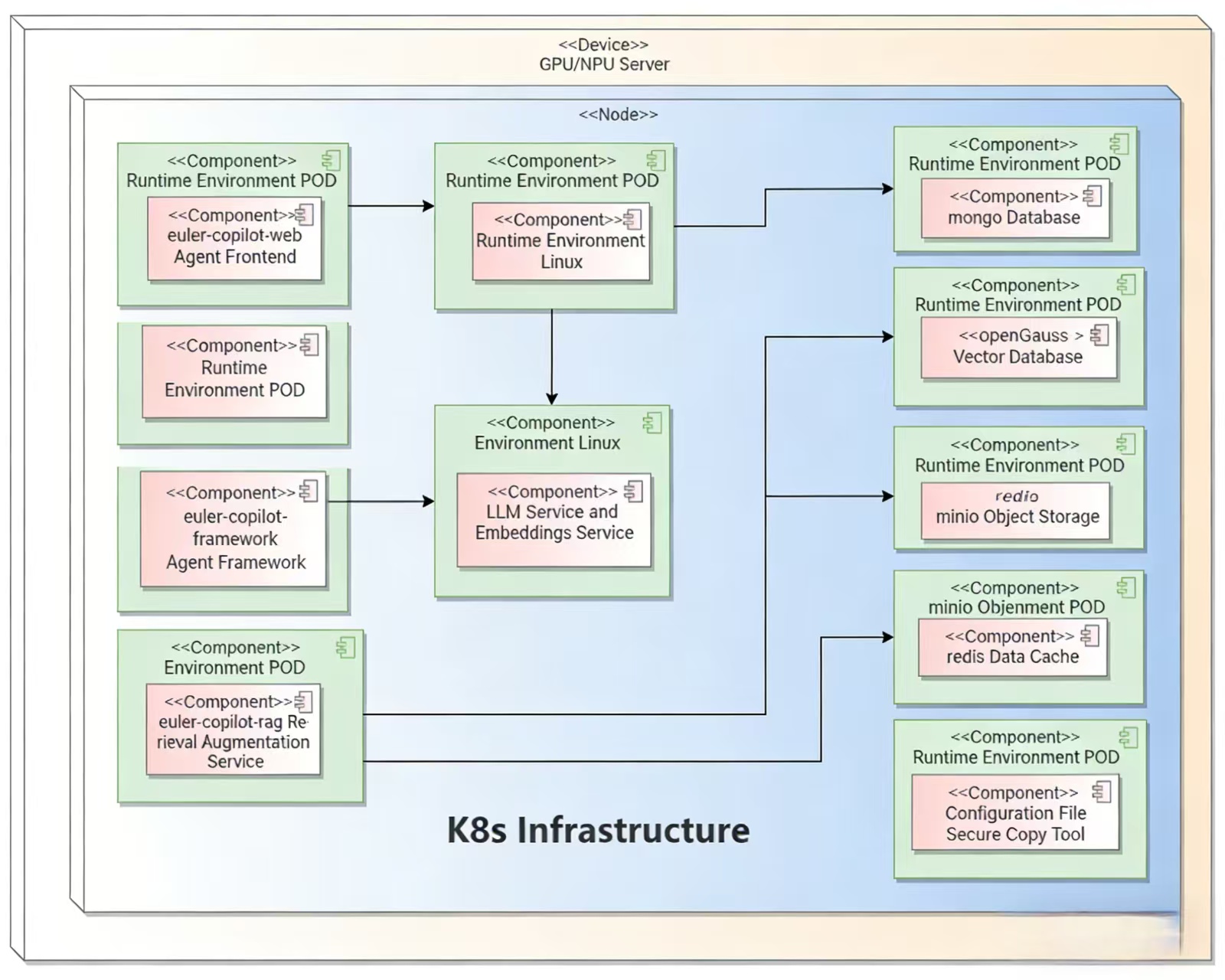
Quick Start
Obtaining Deployment Scripts
Download the latest repository from the Official Git Repository:
# 1. Execute in network-connected environment
cd /home
git clone https://atomgit.com/openeuler/euler-copilot-framework.git -b release-0.10.1# 2. Execute in offline environment
# Switch to release-0.10.1 branch, download ZIP and upload to target server
unzip euler-copilot-framework.tar -d /home
cd /home/euler-copilot-framework/deploy/scriptsObtaining Resources (Execute in Offline Environment)
Manually download the latest images and tools from the Witty Assistant Resource Address:
Resource List:
| Resource Type | File List | Storage Location | Architecture Support |
|---|---|---|---|
| Image Files | euler-copilot-framework:0.10.1-[x86/arm]euler-copilot-web:0.10.1-[x86/arm]data_chain_back_end:0.10.1-[x86/arm]data_chain_web:0.10.1-[x86/arm]authhub:0.9.3-x86authhub-web:0.9.3-x86opengauss:latest-x86redis:7.4-alpine-x86mysql:8-x86minio:empty-x86mongo:7.0.16-x86secret_inject:dev-x86 | /home/eulercopilot/images | x86_64, ARM64 |
| Model Files | bge-m3-Q4_K_M.ggufdeepseek-llm-7b-chat-Q4_K_M.gguf | /home/eulercopilot/models | Universal |
| Deployment Tools | helm-v3.15.0-linux-\{arm64/amd64}.tar.gzk3s-airgap-images-\{arm64/amd64}.tar.zstk3s-\{arm64/amd64}k3s-install.shollama-linux-\{arm64/amd64}.tgz | /home/eulercopilot/tools | x86_64, ARM64 |
# In a network-connected environment, you can execute scripts to save images and transfer to target server
# Enter the script directory
cd /home/euler-copilot-framework/deploy/scripts/9-other-script/

# Execute image save script (specify version and architecture)
bash save_images.sh --version 0.10.1 --arch x86

# Images will be saved to /home/eulercopilot/images, use SCP to transfer image files to target server
scp -r /home/eulercopilot/images/* root@target-server:/home/eulercopilot/images/
Deployment Execution
One-Click Deployment
One-click automatic deployment mode is mainly suitable for users without pre-deployed LLM resources:
bashbash deploy.shtext============================== Witty Assistant Deployment System ============================== 0) One-click Automatic Deployment Mode - Fully automatic installation (recommended for beginners) 1) Manual Step-by-Step Deployment Mode 2) Service Restart Management 3) System Uninstallation and Cleanup 4) Exit Deployment Program ============================== Please select deployment mode [0-4]: 0Automatically installs and configures all necessary components:
- Automatically deploys k3s, helm, Ollama
- Downloads and deploys Deepseek LLM (deepseek-llm-7b-chat)
- Downloads and deploys Embedding model (bge-m3)
- Installs databases, Authhub authentication service, and Witty Assistant application
- Can run in pure CPU environment; if GPU resources are available, GPU drivers must be pre-installed, and acceleration will be automatically utilized
- Automatically configures model interfaces for Witty Assistant calls
Step-by-Step Deployment
Step-by-step deployment mode is mainly suitable for scenarios where LLM interfaces and embedding model interfaces already exist.
Prepare model services in advance:
- Ensure LLM service is deployed or accessible
- Ensure embedding model service is deployed or accessible
- Edit the values.yaml file before deployment, pre-fill model service information, such as each model's API endpoint, key, name, etc.
yaml# Configuration example: models: # LLM for Q&A; requires OpenAI-compatible API answer: # [Required] API endpoint URL (check API provider documentation to confirm if "v1" suffix is needed) endpoint: https://$ip:$port/v1 # [Required] API key; default is empty key: sk-123456 # [Required] Model name name: qwen3-32b # [Required] Model maximum context length; recommended >=8192 ctxLength: 8192 # Model maximum output length, recommended >=2048 maxTokens: 8192 # Model for function calling; specific inference frameworks recommended functionCall: # Inference framework type, default is ollama # Available framework types: ["vllm", "sglang", "ollama", "openai"] backend: openai # [Required] Model endpoint; check API provider documentation to confirm if "v1" suffix is needed # Leave empty to use same configuration as Q&A model endpoint: https://$ip:$port/v1 # API key; leave empty to use same configuration as Q&A model key: sk-123456 # Model name; leave empty to use same configuration as Q&A model name: qwen3-32b # Model maximum context length; leave empty to use same configuration as Q&A model ctxLength: 8192 # Model maximum output length; leave empty to use same configuration as Q&A model maxTokens: 8192 # Model for data embedding embedding: # Inference framework type, default is openai # [Required] Embedding API type: ["openai", "mindie"] type: openai # [Required] Embedding URL (requires "v1" suffix) endpoint: https://$ip:$port/v1 # [Required] Embedding model API key key: sk-123456 # [Required] Embedding model name name: BAAI/bge-m3 # Model for reranking rag retrieval results reranker: # [Required] Reranker interface type: ["guijiliudong", "algorithm", # "bailian", "v1lm", "assecend"] type: guijiliudong # [Required] Reranker URL (requires "/v1/rerank" suffix) endpoint: https://api.siliconflow.cn/v1/rerank # [Required] Reranker model API Key key: sk-123456 # [Required] Reranker model name name: BAAI/bge-reranker-v2-m3 # [Required] Reranker model icon URL icon: https://sf-maas-uat-prod.oss-cn-shanghai.aliyuncs.com/Model_LOGO/BAAI.svgbash# Execute script bash deploy.shbash# Select 1 for manual deployment ============================== Main Deployment Menu ============================== 0) One-click Automatic Deployment 1) Manual Step-by-Step Deployment - Existing Model Services 2) Restart Services 3) Uninstall All Components and Clear Data 4) Exit Program ============================== Please enter option number (0-3): 1bash# Skip steps 3, 4, 5 and execute sequentially ============================== Manual Step-by-Step Deployment Menu ============================== 1) Execute Environment Check Script 2) Install k3s and helm 3) Install Ollama - Can be skipped if model services already exist 4) Deploy Deepseek Model - Can be skipped if model services already exist 5) Deploy Embedding Model - Can be skipped if model services already exist 6) Install Databases 7) Install AuthHub 8) Install Witty Assistant 9) Return to Main Menu ============================== Please enter option number (1-9):
Restart Operations
Select the service to restart and press Enter to execute
bash============================== Service Restart Menu ============================== List of restartable services: 1) authhub-backend 2) authhub 3) framework 4) minio 5) mongo 6) mysql 7) opengauss 8) rag 9) rag-web 10) redis 11) web 12) Return to Main Menu ============================== Please enter the service number to restart (1-12):
Uninstallation Operations
Uninstallation only uninstalls services and clears data, does not uninstall deployment tools
bash============================== Main Deployment Menu ============================== 0) One-click Automatic Deployment 1) Manual Step-by-Step Deployment 2) Uninstall All Components and Clear Data 3) Exit Program ============================== Please enter option number (0-3): 2
Operations Commands
Use the following commands for service and image maintenance
bash# View service status kubectl get pod -n euler-copilotbash# View component logs kubectl logs $pod_name -n euler-copilotbash# Modify LLM configuration cd /home/euler-copilot-framework/deploy/chart/euler_copilot vim values.yaml helm upgrade euler-copilot -n euler-copilot .bash# Check cluster events kubectl get events -n euler-copilotbash# View images k3s crictl images # Remove image k3s crictl rmi $image_id # Import image k3s ctr image import $image_tar
Verify Installation
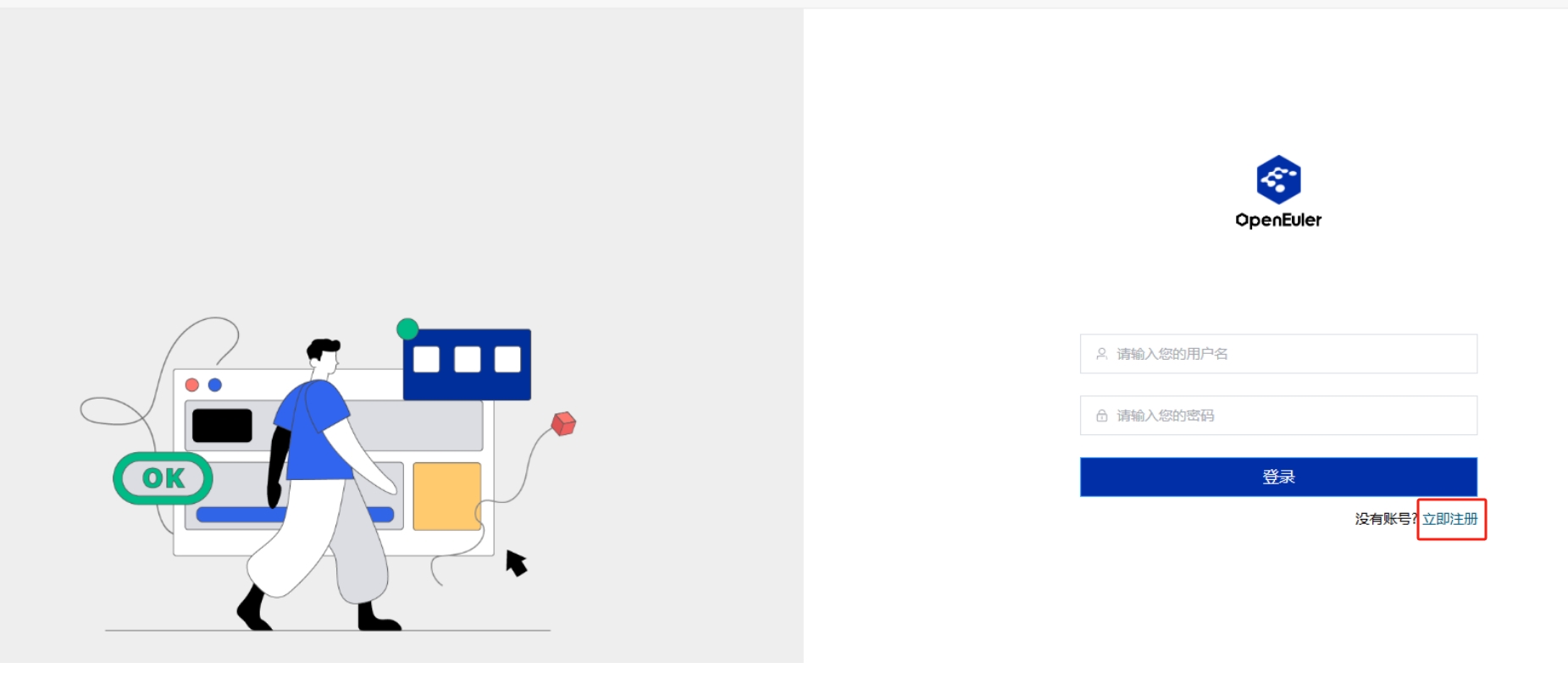
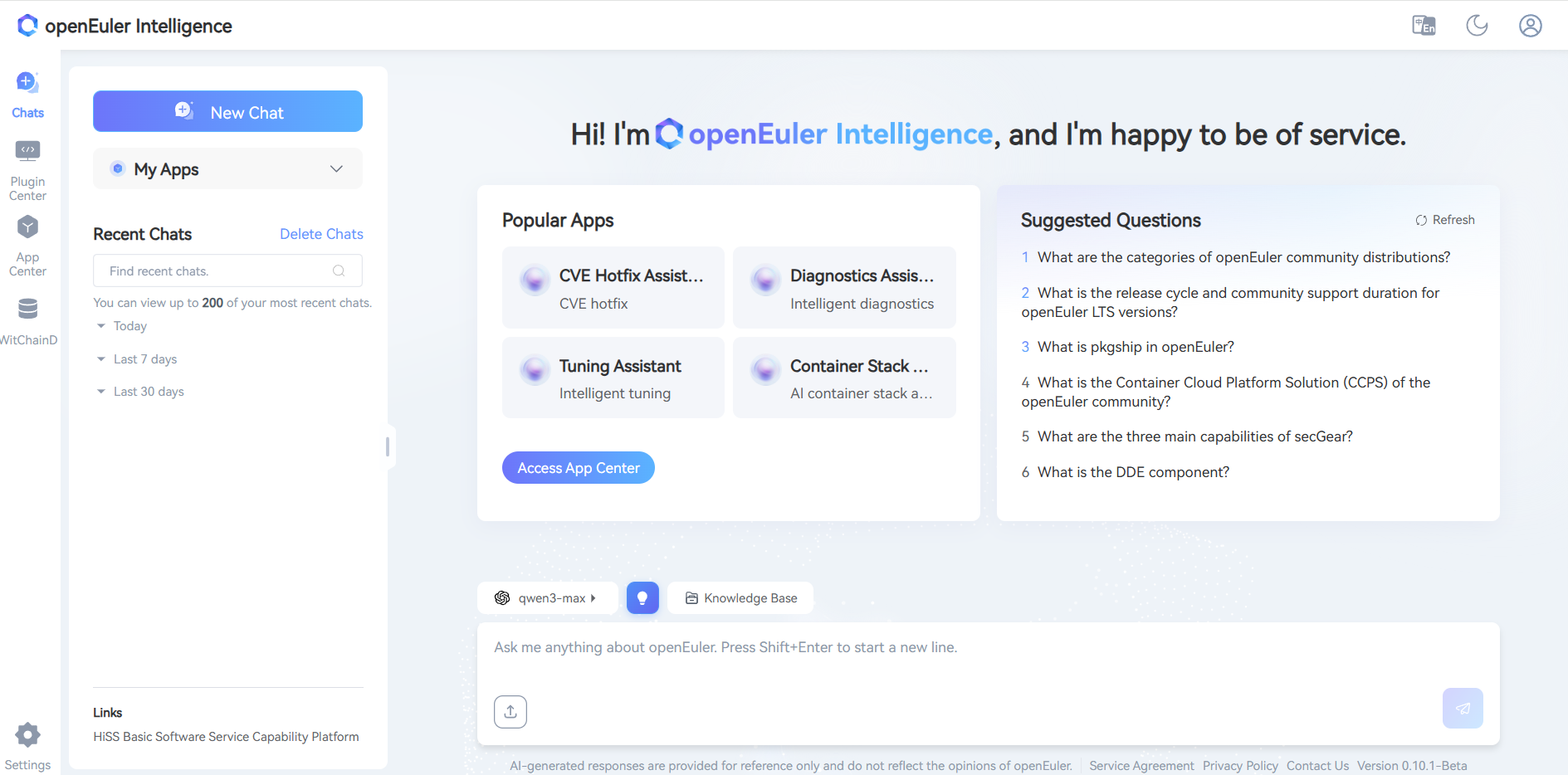
Congratulations, Witty Assistant has been successfully deployed! To start your experience, enter https://$host:30080 in your browser to access the Witty Assistant web page:
On first visit, click Register Now to create an account
Complete the login process
Build Domain-Specific Intelligent Q&A
The knowledge base focuses on efficient document management and intelligent parsing, supporting multiple file formats including xlsx, pdf, doc, docx, pptx, html, json, yaml, md, zip, and txt. The advanced document processing technology carried by this platform, combined with Witty Assistant's powerful retrieval capabilities, aims to provide you with an excellent intelligent Q&A service experience. For detailed operations, please visit the Knowledge Base Management User Guide
Enter Knowledge Base Management System:
- Click Knowledge Base
- Create a new team, click Confirm
- Click Create Asset Library or Import Asset Library
Configure Asset Library
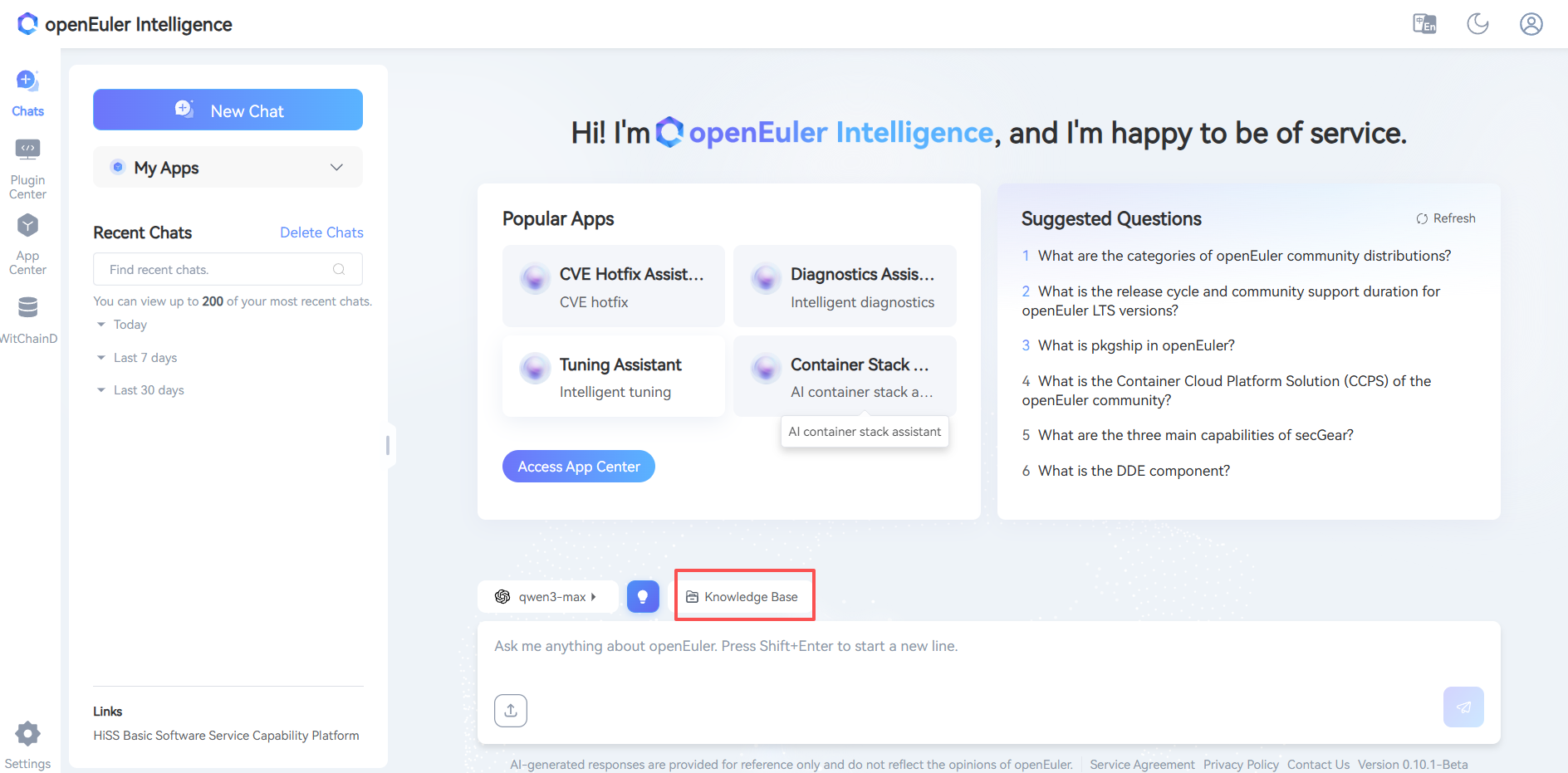
- Click Dialogue
- Click Model
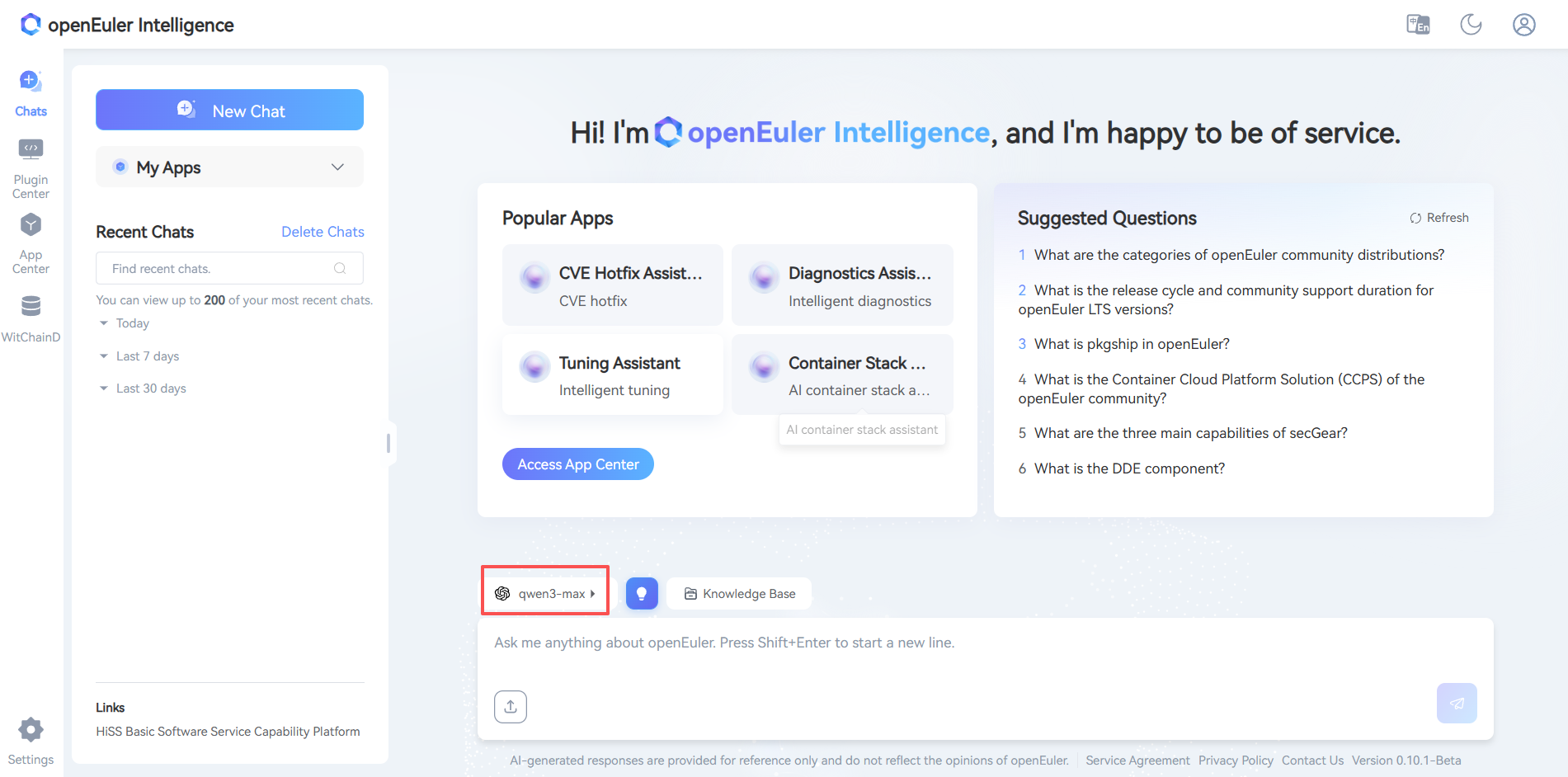
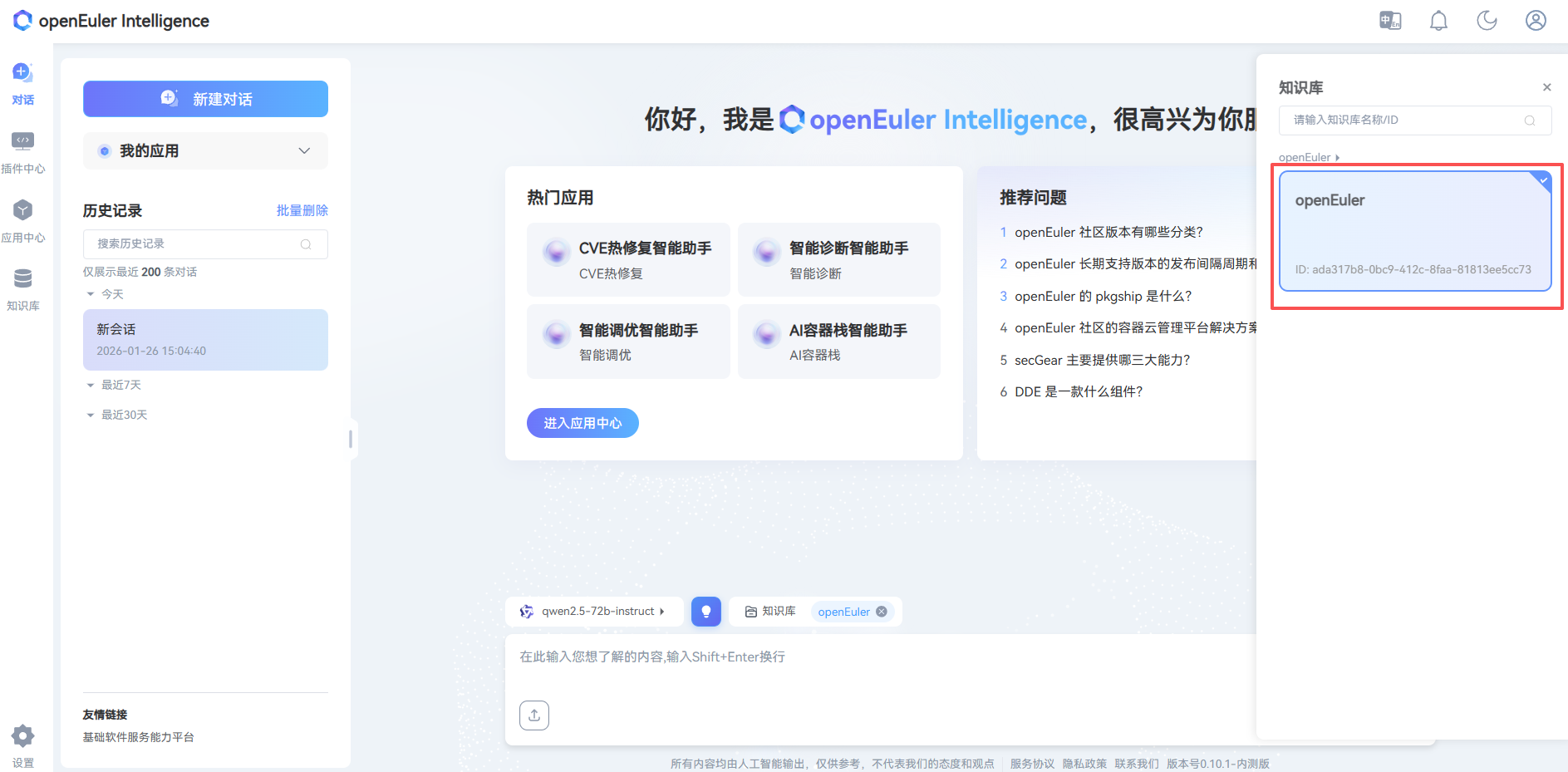
- Click Knowledge Base
- Select Asset Library
Appendix
LLM Preparation
GPU Environment (Based on vLLM)
Install Dependencies:
bash# Basic environment Python >= 3.10 CUDA >= 11.7 GPU Driver Installation: https://www.nvidia.cn/drivers/lookup/ # Install vLLM pip install vllm # For OpenAI compatible web server pip install 'vllm[openai]'Download Model:
bash# Using huggingface-cli pip install huggingface-cli huggingface-cli download --resume-download Qwen/Qwen1.5-14B-Chat --local-dir Qwen1.5-14B-ChatStart Service:
bashpython -m vllm.entrypoints.openai.api_server \ --model /root/models/Qwen1.5-14B-Chat/ \ --served-model-name qwen1.5-14b-chat \ --api-key sk-123456 \ --host 0.0.0.0 \ --port 30000 \ --tensor-parallel-size 8 \ --gpu-memory-utilization 0.7 \ --dtype halfCommon Parameter Descriptions
bash# Core parameters --model /path/to/model # Model path --served-model-name name # Model name in API --api-key sk-xxxxxx # API key (multiple keys can be set, separated by commas) --host 0.0.0.0 # Listening address --port 30000 # Port number # GPU related parameters --tensor-parallel-size 8 # Number of GPUs (tensor parallelism) --gpu-memory-utilization 0.7 # GPU memory utilization --dtype half # Data type (half/float16, bfloat16, float32)Modify Configuration:
bash# Modify model settings vim /home/euler-copilot-framework/deploy/chart/euler_copilot/values.yamlUpdate Service:
bash# Update service helm upgrade -n euler-copilot euler-copilot .bash# Restart framework service kubectl get pod -n euler-copilot kubectl delete pod framework-deploy-65b669fc58-q9bw7 -n euler-copilotcurl LLM Interface
bashcurl http://localhost:30000/v1/chat/completions \ -H "Content-Type: application/json" \ -H "Authorization: Bearer sk-123456" \ -d '{ "model": "qwen1.5-14b-chat", "messages": [ {"role": "system", "content": "You are a helpful assistant"}, {"role": "user", "content": "Hello"} ], "stream": true, "n": 1, "max_tokens": 8192 }'
NPU Environment
Reference: Ascend Image Repository
FAQ
Licensed under the MulanPSL2
 J.G.W.A.B. No. 11030102011597