"Unknown" Errors in pvs or vgs
Symptom
When running pvs or vgs commands, physical volumes (PVs) or volume groups (VGs) may display "unknown" status.

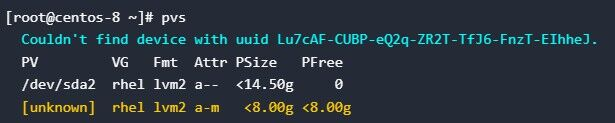
Possible Causes
This issue typically occurs due to corrupted metadata, preventing the system from reading complete information about the storage components. The affected PV or VG becomes unusable until repaired. For verification, you can examine raw disk data using the hexdump utility (see LVM Label Corruption for details).
Solution
Fixing Unrecognized VGs
bash
pvck --repair --file /etc/lvm/backup/vg /dev/sdbVG backup files are stored in /etc/lvm/backup.
Repairing Unrecognized PVs
bash
pvcreate --uuid xxx --restorefile /etc/lvm/backup/vg /dev/sdc
vgcfgrestore --file /etc/lvm/backup/vg vg
vgchange -ay vg
The UUID can be found in the backup files located at /etc/lvm/backup. After performing these repairs, verify the fix by running pvs or vgs again. Normal output indicates successful restoration.
版权所有 © 2026 openEuler 保留一切权利
京ICP备2020036654号-1
京公网安备 11030102011597 号