OpenStack Security Guide
This document is translated from the Upstream Security Guide
[TOC]
Abstract
This book provides best practices and conceptual information for securing OpenStack clouds.
This guide was last updated during the Train release and documents the OpenStack Train, Stein, and Rocky versions. It may not be applicable to EOL versions (for example, Newton). We recommend that you read this document yourself when planning to implement security measures for your OpenStack cloud. This guide is for reference only. The OpenStack security team is based on voluntary contributions from the OpenStack community. You can contact the security community directly on the #OpenStack-Security channel on OFTC IRC, or by sending mail with [Security] in the subject line to the OpenStack-Discussion mailing list.
Contents
Conventions
- Notices
- Command prompts
Introduction
- Acknowledgements
- Why and how we wrote this book
- Introduction to OpenStack
- Security boundaries and threats
- Choosing supporting software
System Documentation
- System documentation requirements
Management
- Continuous system management
- Integrity lifecycle
- Administrative interfaces
Secure Communication
- Introduction to TLS and SSL
- TLS proxies and HTTP services
- Secure reference architecture
Endpoints
- API endpoint configuration recommendations
Identity
- Authentication
- Authentication methods
- Authorization
- Policy
- Tokens
- Domains
- Federated Keystone
- Checklist
Dashboard
- Domain names, dashboard upgrades, and basic web server configuration
- HTTPS, HSTS, XSS, and SSRF
- Frontend caching and session backends
- Static media
- Passwords
- Keys
- Website data
- Cross-origin resource sharing (CORS)
- Debugging
- Checklist
Compute
- Hypervisor selection
- Hardening the virtualization layer
- Hardening compute deployment
- Vulnerability awareness
- How to choose a virtual console
- Checklist
Block Storage
- Volume erasure
- Checklist
Image Storage
- Checklist
Shared File Systems
- Introduction
- Network and security models
- Security services
- Shared access control
- Share type access control
- Policy
- Checklist
Networking
- Network architecture
- Network services
- Network services security best practices
- Securing OpenStack networking services
- Checklist
Object Storage
- Network security
- General transaction security
- Securing storage services
- Securing proxy services
- Object storage authentication
- Other notable items
Secrets Management
- Summary of existing technologies
- Related OpenStack projects
- Use cases
- Key management services
- Key management interfaces
- Frequently asked questions
- Checklist
Message Queue
- Message security
Data Processing
- Introduction to data processing
- Deployment
- Configuration and hardening
Database
- Database backend considerations
- Database access control
- Database transport security
Tenant Data Privacy
- Data privacy issues
- Data encryption
- Key management
Instance Security Management
- Security services for instances
Monitoring and Logging
- Forensics and incident response
Compliance
- Compliance overview
- Understanding the audit process
- Compliance activities
- Attestation and compliance statements
- Privacy
Security Review
- Architecture page guide
Security Checklist
Appendix
- Community support
- Glossary
Conventions
OpenStack documentation uses several typographical conventions.
Notices
Note
A note with additional information that explains a section of the text.Important
Something you must pay attention to before continuing.Tip
An extra but useful practical suggestion.Caution
Useful information to help users avoid mistakes.Warning
Critical information about the risk of data loss or security issues.Command Prompts
$ commandCommands prefixed with the $ prompt can be run by any user (including root).
# commandCommands prefixed with the # prompt must be run by the root user. You can also prefix these commands with sudo (if available) to run them.
Introduction
The OpenStack Security Guide is the product of five days of collaboration by many people. This document aims to provide best practice guidance for deploying a secure OpenStack cloud. It aims to reflect the current state of security in the OpenStack community, and to provide a framework for decisions where specific security controls cannot be listed due to complexity or other environment-specific details.
Acknowledgements
Why and how we wrote this book
- Objectives
- How
Introduction to OpenStack
- Cloud types
- Overview of OpenStack services
Security boundaries and threats
- Security domains
- Bridging security domains
- Threat classification, actors, and attack vectors
Choosing supporting software
- Team expertise
- Product or project maturity
- Common Criteria
- Hardware issues
Acknowledgements
The OpenStack security group would like to thank the following organizations for their contributions to the publication of this book. These organizations are:
Why and how we wrote this book
With the growing popularity of OpenStack and product maturity, security has become a top priority. The OpenStack security group has recognized the need for a comprehensive and authoritative security guide. The OpenStack Security Guide aims to outline security best practices, guidance, and recommendations for improving the security of OpenStack deployments. The authors bring their expertise in deploying and securing OpenStack in a variety of environments.
This guide complements the OpenStack Operations Guide and can be used to harden existing OpenStack deployments or to evaluate the security controls of an OpenStack cloud provider.
Objectives
- Identify security domains in OpenStack
- Provide guidance for securing OpenStack deployments
- Highlight security issues in today's OpenStack and potential mitigations
- Discuss upcoming security features
- Provide community-driven facilities for knowledge acquisition and dissemination
Writing record
As with the OpenStack Operations Guide, we followed a book sprint approach for this book. The book sprint process allows for rapid development and production of a large body of written work. The OpenStack security group's coordinator reinvited Adam Hyde as the facilitator. The project was officially announced at the OpenStack Summit in Portland, Oregon.
Since some key members of the group were close by, the team gathered in Annapolis, Maryland. This was an extraordinary collaboration between members of the public sector intelligence community, Silicon Valley startups, and some large, well-known technology companies. The book sprint took place during the last week of June 2013, with the first edition completed in five days.
The team included:
Bryan D. Payne, Nebula Bryan D. Payne, Ph.D. is the Director of Security Research at Nebula and co-founder of the OpenStack Security Organization (OSSG). Prior to joining Nebula, he worked at
Sandia National Laboratories,the National Security Agency, BAE Systems, and IBM Research. He earned his Ph.D. in Computer Science with a specialization in systems security from the College of Computing at Georgia Tech. Bryan is the editor and lead of the OpenStack Security Guide and has been responsible for the guide's continued growth over the two years following its writing.Robert Clark, Hewlett-Packard
Robert Clark is the Chief Security Architect for HP Cloud Services and co-founder of the OpenStack Security Organization (OSSG). Before being recruited by HP, he worked in the UK intelligence community. Robert has a deep background in threat modeling, security architecture, and virtualization technologies. Robert holds a Master's degree in Software Engineering from the University of Wales.
Keith Basil, Red Hat
Keith Basil is the Chief Product Manager for Red Hat OpenStack, focusing on Red Hat's OpenStack product management, development, and strategy. In the US public sector, Basil brings experience designing authorized, secure, high-performance cloud architectures for federal civilian agencies and contractors.
Cody Bunch, Rackspace
Cody Bunch is a Private Cloud Architect at Rackspace. Cody co-authored the update to The OpenStack Cookbook as well as books about VMware automation.
Malini Bhandaru, Intel
Malini Bhandaru is a security architect at Intel. She has a diverse background, having worked on platform features and performance at Intel, voice products at Nuance, remote monitoring and management at ComBrio, and network commerce at Verizon. She holds a Ph.D. in Artificial Intelligence from the University of Massachusetts Amherst.
Gregg Tally, Johns Hopkins University Applied Physics Laboratory
Gregg Tally is a Principal Engineer in the Asymmetric Operations Division of the JHU/APL Cyber Systems Department. He primarily works on systems security engineering. Previously, he worked at
Sparta,McAfee, andTrusted Information Systemson network security research projects.Eric Lopez, VMware
Eric Lopez is a Senior Solutions Architect in VMware's Networking and Security Business Unit, where he helps customers implement OpenStack and VMware NSX (formerly Nicira's network virtualization platform). Prior to joining VMware (through the company's acquisition of Nicira), he worked at Q1 Labs, Symantec, Vontu, and Brightmail. He holds a B.S. in Electrical Engineering/Computer Science and Nuclear Engineering from UC Berkeley and an MBA from the University of San Francisco.
Shawn Wells, Red Hat
Shawn Wells is the Director of Innovation for Red Hat, focusing on improving the processes for adopting, promoting, and managing open source technologies within the US government. Additionally, Shawn is the upstream maintainer for the SCAP Security Guide project, which develops virtualization and operating system hardening strategies alongside the US military, NSA, and DISA. Shawn was a civilian at the NSA, where he developed SIGINT collection systems using large-scale distributed computing infrastructure.
Ben de Bont, Hewlett-Packard
Ben de Bont is the Chief Strategist for HP Cloud Services. Prior to his current role, Ben led the Information Security group at MySpace and the Incident Response team at MSN Security. Ben holds a Master's degree in Computer Science from Queensland University of Technology.
Nathanael Burton, National Security Agency
Nathanael Burton is a Computer Scientist at the National Security Agency. He has worked at the agency for over 10 years on distributed systems, massive scale hosting, open source initiatives, operating systems, security, storage, and virtualization technologies. He holds a Bachelor's degree in Computer Science from Virginia Tech.
Vibha Fauver
Vibha Fauver, GWEB, CISSP, PMP, has over 15 years of experience in information technology. Her areas of expertise include software engineering, project management, and information security. She holds a Bachelor's degree in Computer and Information Science and a Master's degree in Engineering Management with concentrations and systems engineering certificates.
Eric Windisch, CloudScaling
Eric Windisch is a Principal Engineer at Cloudscaling and has been contributing to OpenStack for over two years. Eric has over a decade of experience in the web hosting industry, building tenant isolation and infrastructure security in hostile environments. He has been building cloud computing infrastructure and automation since 2007.
Andrew Hay, CloudPassage
Andrew Hay is the Director of Application Security Research at CloudPassage, Inc., leading the company's security research efforts and its server security products designed specifically for dynamic public, private, and hybrid cloud hosting environments.
Adam Hyde
Adam facilitated this Book Sprint. He also created the Book Sprint methodology and is the most experienced Book Sprint facilitator. Adam founded FLOSS Manuals, a community of 3,000 people dedicated to developing free manuals about free software. He is also the founder and project manager of Booktype, an open source project for online and print book writing, editing, and publishing.
During the sprint, we were also assisted by Anne Gentle, Warren Wang, Paul McMillan, Brian Schott, and Lorin Hochstein.
This book was produced during a 5-day book sprint. Book sprints are highly collaborative, facilitated processes that bring a group together to produce a book in 3-5 days. It is a powerful facilitated process of a specific methodology created and developed by Adam Hyde. For more information, visit the Book Sprint webpage at BookSprints.
How to contribute to this book
The initial work on this book was done in an over-air-conditioned room that served as the team office throughout the documentation sprint.
For more information about how to contribute to OpenStack documentation, see the OpenStack Documentation Contributor Guide.
Introduction to OpenStack
This guide provides security insights for OpenStack deployments. The target audience is cloud architects, developers, and administrators. Additionally, cloud users will find the guide both educational and helpful in provider selection, while auditors will find it useful as a reference document to support their compliance certification efforts. This guide is also recommended for anyone interested in cloud security.
Every OpenStack deployment contains a wide variety of technologies, including Linux distributions, database systems, message queues, OpenStack components themselves, access control policies, logging services, security monitoring tools, and more. It is not surprising that the security issues involved are equally diverse, and an in-depth analysis of these issues requires some guidance. We strive to find the balance, providing enough background information to understand OpenStack security issues and their handling, and providing external references for further information. The guide can be read from beginning to end or used as a reference.
We briefly introduce the types of clouds (private, public, and hybrid), then provide an overview of OpenStack components and their associated security issues in the rest of this chapter.
Throughout this book, we refer to several types of OpenStack cloud users: administrators, operators, and users. We use these terms to identify the security access level each role has, although in practice we know that different roles are often held by the same person.
Cloud Types
OpenStack is a key enabler for adopting cloud technologies and has several common deployment use cases. These models are commonly referred to as public, private, and hybrid. The following sections introduce these different types of clouds applicable to OpenStack using the National Institute of Standards and Technology (NIST) definition of cloud.
Public Cloud
According to NIST, a public cloud is a cloud made available to the public for consumption. OpenStack public clouds are typically run by service providers and are available to individuals, companies, or any paying customers. In addition to multiple instance types, public cloud providers may also expose a full suite of features such as software-defined networking or block storage.
By their nature, public clouds face higher risks. As a user of a public cloud, you should verify that your chosen provider has the necessary certifications, attestations, and other regulatory considerations. As a public cloud provider, depending on your target customers, you may need to comply with one or more regulations. Additionally, even if regulatory compliance is not required, providers should ensure tenant isolation and protect management infrastructure from external attacks.
Private Cloud
At the other end of the spectrum is the private cloud. As defined by NIST, a private cloud is provisioned for exclusive use by a single organization comprising multiple consumers, such as business units. The cloud may be owned, managed, and operated by the organization, a third party, or some combination thereof, and may exist on-premises or off-premises. Private cloud use cases are diverse, and as a result, their respective security concerns vary.
Community Cloud
NIST defines a community cloud as one whose infrastructure is shared by several specific consumer organizations that have shared concerns, such as mission, security requirements, policy, or compliance considerations. The cloud may be owned, managed, and operated by one or more of the organizations in the community, a third party, or some combination thereof, and may exist on-premises or off-premises.
Hybrid Cloud
NIST defines a hybrid cloud as a composition of two or more distinct cloud infrastructures (such as private, community, or public) that remain unique entities, but are bound together by standardized or proprietary technology that enables data and application portability, such as cloud bursting for load balancing between clouds. For example, an online retailer might display its advertising and catalog on a public cloud that allows elastic configuration. This allows them to handle seasonal loads in a flexible, cost-effective manner. Once customers begin processing their orders, they are transferred to a more secure private cloud that is PCI-compliant.
In this document, we treat community and hybrid clouds similarly, explicitly addressing only the extremes of public and private clouds from a security perspective. Security measures depend on where you are on the private-public continuum.
Overview of OpenStack Services
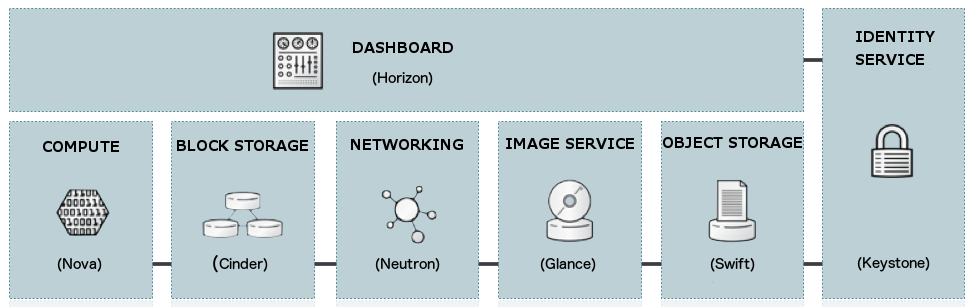
OpenStack uses a modular architecture, providing a set of core services to facilitate scalability and elasticity as core design principles. This chapter briefly reviews OpenStack components, their use cases, and security considerations.
Compute
The OpenStack Compute service (nova) provides services that support managing virtual machine instances at scale, hosting instances for multi-tier applications, development or testing environments, handling "big data" for Hadoop clusters, or high-performance computing.
The Compute service facilitates this management through an abstraction layer that interacts with supported hypervisors (we will discuss this in more detail later).
In later parts of this guide, we focus on the virtualization stack as it relates to hypervisors.
For information about the current state of feature support, see the OpenStack Hypervisor Support Matrix.
Compute security is essential for OpenStack deployments. Hardening techniques should include support for strong instance isolation, secure communication between compute sub-components, and resilience for publicly-facing API endpoints.
Object Storage
The OpenStack Object Storage service (swift) supports storing and retrieving arbitrary data in the cloud. The Object Storage service provides both a native API and an Amazon Web Services S3-compatible API. The service provides high resilience through data replication and can handle petabyte-scale data.
It is important to understand that object storage is different from traditional file system storage. Object storage is best suited for static data, such as media files (MP3s, images, or videos), virtual machine images, and backup files.
Object security should focus on access control and encryption for data in transit and at rest. Other issues may relate to system abuse, storage of illegal or malicious content, and cross-authentication attack vectors.
Block Storage
The OpenStack Block Storage service (cinder) provides persistent block storage for compute instances. The Block Storage service is responsible for managing the lifecycle of block devices, from creating volumes and attaching them to instances, to releasing them.
Security considerations for block storage are similar to those for object storage.
Shared File Systems
The Shared File Systems service (Manila) provides a set of services for managing shared file systems in multi-tenant cloud environments, similar to how OpenStack provides block-based storage management through the OpenStack Block Storage service project. Using the Shared File Systems service, you can create remote file systems, mount file systems to instances, and then read and write data in the file system from the instance.
Networking
The OpenStack Networking service (neutron, formerly known as quantum) provides various networking services for cloud users (tenants), such as IP address management, DNS, DHCP, load balancing, and security groups (network access rules, such as firewall policies). This service provides a framework for software-defined networking (SDN), allowing pluggable integration with various networking solutions.
OpenStack Networking allows cloud tenants to manage their guest network configurations. Security concerns for the Networking service include network traffic isolation, availability, integrity, and confidentiality.
Dashboard
The OpenStack Dashboard (horizon) provides a web-based interface for cloud administrators and cloud tenants. Using this interface, administrators and tenants can provision, manage, and monitor cloud resources. The Dashboard is typically deployed in a public-facing manner, with all the common security concerns of a public web portal.
Identity Service
The OpenStack Identity service (keystone) is a shared service that provides authentication and authorization services across the cloud infrastructure. The Identity service has pluggable support for multiple forms of authentication.
Security concerns for the Identity service include trust in authentication, management of authorization tokens, and secure communication.
Image Service
The OpenStack Image service (glance) provides disk image management services, including image discovery, registration, and delivery of services to the Compute service as needed.
Trusted processes are needed to manage the lifecycle of disk images, along with all the data security issues mentioned earlier.
Data Processing Service
The Data Processing service (sahara) provides a platform for provisioning, managing, and using clusters running common processing frameworks.
Security considerations for data processing should focus on data privacy and secure communication with provisioned clusters.
Other Supporting Technologies
Messaging is used for internal communication between multiple OpenStack services. By default, OpenStack uses an AMQP-based message queue. Like most OpenStack services, AMQP supports pluggable components. Now, the backend can be RabbitMQ, Qpid, or ZeroMQ.
Since most administrative commands flow through the message queue system, message queue security is a major security concern for any OpenStack deployment, which will be discussed in more detail later in this guide.
There are several components that use databases, although it is not explicitly called out. Securing database access is another security concern and will be discussed in more detail later in this guide.
Security Boundaries and Threats
A cloud can be abstracted as a collection of logical components, which we call security domains, because of their functionality, users, and shared security concerns. Threat actors and vectors are categorized according to their motives and access to resources. Our goal is to give you an understanding of security concerns for each domain based on your risk/vulnerability protection objectives.
Security Domains
A security domain includes users, applications, servers, or networks that have common trust requirements and expectations within a system. Typically, they have the same authentication and authorization (AuthN/Z) requirements and users.
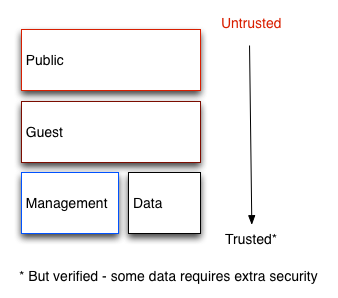
Although you may want to further subdivide these domains (we will discuss where this may be appropriate later), we generally refer to four distinct security domains that form the minimum required for securely deploying any OpenStack cloud. These security domains include:
- Public domain
- Guest domain
- Management domain
- Data domain
We chose these security domains because they can be mapped independently or combined to represent most possible trust zones in a given OpenStack deployment. For example, some deployment topologies may consist of a combination of guest and data domains on one physical network, while other topologies keep these domains separate. In each case, the cloud operator should be aware of appropriate security concerns. Security domains should be mapped for specific OpenStack deployment topologies. Domains and their trust requirements depend on whether the cloud instance is a public, private, or hybrid cloud.
Public
The public security domain is the completely untrusted area of the cloud infrastructure. It may refer to the entire Internet or simply to networks you do not control. Any data transmitted to or from this domain that has confidentiality or integrity requirements should be protected with compensating controls.
This domain should always be considered untrusted.
Guest
The guest security domain is typically used for compute instance-to-instance traffic, handling compute data generated by instances on the cloud, but not handling services that support cloud operations, such as API calls.
If public and private cloud providers do not have strict controls on instance usage and do not allow unrestricted Internet access to virtual machines, this domain should be considered untrusted. Private cloud providers may want to view this network as an internal network, and only do so when appropriate controls are implemented to assert that instances and all associated tenants are trusted.
Management
The management security domain is where service interactions occur. Sometimes called the "control plane," network traffic in this domain transmits confidential data such as configuration parameters, usernames, and passwords. Command and control traffic typically resides in this domain, which requires strong integrity requirements. Access to this domain should be highly restricted and monitored. At the same time, this domain should still follow all security best practices described in this guide.
In most deployments, this domain is considered trusted. However, when considering OpenStack deployments, there are many systems that bridge this domain with other domains, which may reduce the level of trust you can place in this domain. For more information, see Bridging security domains.
Data
The data security domain primarily concerns information related to storage services in OpenStack. Most data transmitted through this network requires a high degree of integrity and confidentiality. In some cases, depending on the deployment type, there may also be strong availability requirements.
The trust level for this network largely depends on deployment decisions, so we will not assign any default trust level to it.
Bridging Security Domains
Bridges are components that exist in multiple security domains. Components that bridge security domains with different trust levels or authentication requirements must be carefully configured. These bridges are often weak points in the network architecture. Bridges should always be configured to meet the highest trust level security requirements of any domain they bridge. In many cases, due to the possibility of attack, security controls for bridges should be a primary concern.
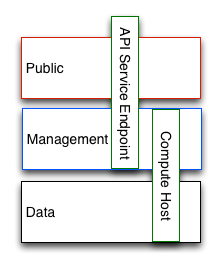
The figure above shows a compute node bridging the data and management domains; therefore, the compute node should be configured to meet the security requirements of the management domain. Similarly, the API endpoint in this figure is bridging the untrusted public domain and the management domain, and should be configured to prevent attacks from propagating from the public domain to the management domain.
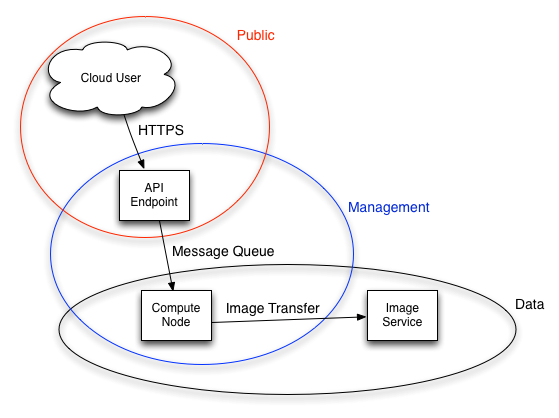
In some cases, developers may want to consider protecting bridges to a higher standard than any domain they reside in. Given the API endpoint example above, an attacker could target the API endpoint from the public domain, exploiting it to compromise or access the management domain.
The design of OpenStack makes separation of security domains difficult. Because core services typically bridge at least two domains, special consideration must be given to applying security controls to them.
Threat Classification, Actors, and Attack Vectors
Most types of cloud deployments (public or private) are subject to some form of attack. In this chapter, we categorize attackers and summarize potential attack types within each security domain.
Threat Actors
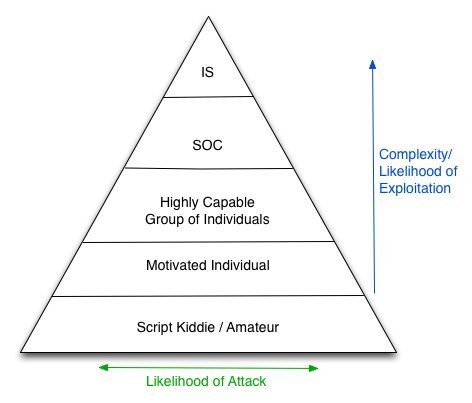
A threat actor is an abstract way of referring to a class of adversaries you may try to defend against. The more capable the actor, the more expensive the security controls required to successfully mitigate and prevent attacks. Security is a trade-off between cost, availability, and defense. In some cases, it may not be possible to protect cloud deployments against all threat actors described here. Those deploying OpenStack clouds will have to decide where the balance point for their deployment/usage lies.
Intelligence agencies
This guide considers this the most capable adversary. Intelligence agencies and other state actors can bring enormous resources to their targets. They possess capabilities beyond any other actor. It is difficult to defend against these actors without extremely strict controls, both human and technical.
Serious organized crime
Capable, economically motivated groups of attackers. Able to fund internal vulnerability development and target research. In recent years, the rise of organizations such as the Russian Business Network, a large enterprise, has demonstrated how cyber attacks can become a commodity. Industrial espionage falls under serious organized crime groups.
Highly capable teams
This refers to "hacker activist" type organizations that typically lack commercial funding but may pose a serious threat to service providers and cloud operators.
Motivated individuals
These attackers act alone, appearing in various forms, such as rogue or malicious employees, disgruntled customers, or small-scale industrial espionage.
Script attackers
Automated vulnerability scanning/exploitation. Non-targeted attacks. Typically, only a nuisance from one of these actors, a compromise can pose a significant risk to an organization's reputation.
Public and private cloud considerations
Private clouds are typically deployed by enterprises or institutions within their networks and behind firewalls. Enterprises have strict policies on what data is allowed to leave their networks, and may even use different clouds for specific purposes. Users of private clouds are typically employees of the organization that owns the cloud and can be held accountable for their actions. Employees typically attend training courses before accessing the cloud and may attend regularly scheduled security awareness training. In contrast, public clouds cannot make any assertions about their users, cloud use cases, or user motivations. For public cloud providers, this immediately pushes the customer security domain into a completely untrusted state.
A notable distinction in the public cloud attack surface is that they must provide Internet access to their services. Instance connectivity, file access over the Internet, and the ability to interact with cloud control structures such as API endpoints and dashboards are prerequisites for public clouds.
Privacy concerns for public and private cloud users are typically opposite. Data generated and stored in a private cloud is typically owned by the cloud operator, who can deploy data loss prevention (DLP) protection, file inspection, deep packet inspection, and prescriptive firewall technologies. In contrast, privacy is one of the main barriers to adopting public cloud infrastructure, as many of the aforementioned controls do not exist.
Outbound attacks and reputation risks
Potential outbound abuse in cloud deployments should be carefully considered. Whether public or private, clouds tend to have abundant available resources. Attackers who establish a foothold in the cloud through hacking or authorized access (such as rogue employees) can make these resources impactful to the entire Internet. Clouds with compute services are ideal for DDoS and brute force engines. This issue is more urgent for public clouds, as their users are largely unaccountable and can quickly spin up large numbers of disposable instances for outbound attacks. If a company becomes known for hosting malware or launching attacks on other networks, it can cause significant damage to the company's reputation. Prevention methods include egress security groups, outbound traffic inspection, customer education and awareness, and fraud and abuse mitigation strategies.
Attack types
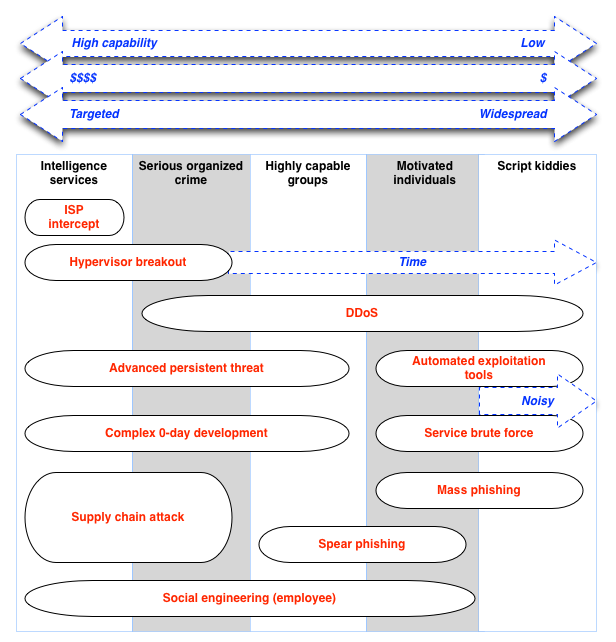
The figure shows the typical types of attacks that may be expected from the actors described in the previous section. Note that this figure does not preclude unexpected attack types.
Attack types
Prescribing normative defenses for each attack form is beyond the scope of this document. The figure above can help you make informed decisions about what types of threats and threat actors you should defend against. For commercial public cloud deployments, this may include preventing serious crime. For those deploying private clouds for government use, more stringent protection mechanisms, including carefully protected facilities and supply chain, should be established. In contrast, those building basic development or testing environments may need less restrictive controls (middle).
Choosing Supporting Software
The supporting software you choose, such as messaging and load balancing, can have serious security implications for your cloud. It is important to make the right choice for your organization. This section provides general guidelines for choosing supporting software.
To choose the best supporting software, consider the following factors:
- Team expertise
- Product or project maturity
- Common Criteria
- Hardware issues
Team expertise
The more familiar your team is with a particular product, its configuration, and its quirks, the less likely configuration errors are to occur. Additionally, distributing employee expertise across the organization can increase system availability, allow division of labor, and mitigate problems when team members are unavailable.
Product or project maturity
The maturity of a given product or project is critical to your security posture. After deploying a cloud, product maturity has many impacts:
- Availability of expertise
- Active developer and user communities
- Timeliness and availability of updates
- Incident response
Common Criteria
Common Criteria is an internationally standardized software evaluation process used by governments and commercial companies to verify that software technologies perform as advertised.
Hardware issues
Consider the supportability of the hardware running the software. Also consider other features available in the hardware and how the software you choose supports these features.
System Documentation
System documentation for OpenStack cloud deployments should follow templates and best practices for enterprise information technology systems in the organization. Organizations often have compliance requirements, which may require a comprehensive system security plan to inventory and document the architecture of a given system. The entire industry faces common challenges related to documenting dynamic cloud infrastructure and keeping information current.
System documentation requirements
- System roles and types
- System inventory
- Network topology
- Services, protocols, and ports
System Documentation Requirements
System roles and types
The two broad node types that typically make up an OpenStack installation are:
Infrastructure nodes
Running services related to the cloud, such as OpenStack Identity services, message queue services, storage, networking, and other services needed to support the cloud.
Compute, storage, or other resource nodes
Providing storage capacity or virtual machines for the cloud.
System inventory
Documentation should provide a general description of the OpenStack environment and cover all systems used (for example, production, development, or testing). Documenting system components, networks, services, and software typically provides the bird's-eye view needed for comprehensive coverage and consideration of security issues, attack vectors, and possible security domain bridge points. System inventory may need to capture ephemeral resources such as virtual machines or virtual disk volumes, which would otherwise be persistent resources in traditional IT systems.
Hardware inventory
Clouds that do not have strict compliance requirements for written documentation may benefit from a Configuration Management Database (CMDB). CMDBs are typically used for hardware asset tracking and overall lifecycle management. By leveraging a CMDB, organizations can quickly identify cloud infrastructure hardware, such as compute nodes, storage nodes, or network devices. CMDBs can help identify assets on the network that may be vulnerable due to inadequate maintenance, insufficient protection, or being superseded and forgotten. If the underlying hardware supports the necessary auto-discovery features, OpenStack provisioning systems can provide some basic CMDB functionality.
Software inventory
Like hardware, all software components in an OpenStack deployment should be documented. Examples include:
- System databases, such as MySQL or MongoDB
- OpenStack software components, such as Identity or Compute
- Supporting components, such as load balancers, reverse proxies, DNS, or DHCP services
An authoritative list of software components can be critical when assessing the impact of vulnerabilities or breaches in libraries, applications, or software categories.
Network topology
Network topology should be provided, highlighting data flows and bridging points between security domains. Network ingress and egress points should be identified along with any OpenStack logical system boundaries. Multiple diagrams may be needed to provide complete visual coverage of the system. Network topology documentation should include virtual networks created on behalf of tenants by the system, as well as virtual machine instances and gateways created by OpenStack.
Services, protocols, and ports
Understanding information about organizational assets is often best practice. Asset tables can help verify security requirements and help maintain standard security components, such as firewall configurations, service port conflicts, security remediation zones, and compliance. Additionally, the table helps understand relationships between OpenStack components. The table may include:
- Services, protocols, and ports used in the OpenStack deployment.
- Overview of all services running in the cloud infrastructure.
It is strongly recommended that OpenStack deployments document information similar to this. This table can be created from information derived from the CMDB or built manually.
An example table is provided below:
| Service | Protocol | Port | Purpose | Used By | Security Domain |
|---|---|---|---|---|---|
| beam.smp | AMQP | 5672/tcp | AMQP messaging service | RabbitMQ | Management domain |
| tgtd | iSCSI | 3260/tcp | iSCSI initiator service | iSCSI | Private (data network) |
| sshd | ssh | 22/tcp | Allows secure login to nodes and guest virtual machines | Various | Configured as needed for management, public, and guest domains |
| mysqld | mysql | 3306/tcp | Database service | Various | Management domain |
| apache2 | http | 443/tcp | Dashboard | Tenants | Public domain |
| dnsmasq | dns | 53/tcp | DNS service | Guest VMs | Guest domain |
Management
A cloud deployment is a constantly changing system. Machines age and fail, software becomes outdated, vulnerabilities are discovered. When errors or omissions occur in configuration, or when software fixes must be applied, these changes must be made in a secure but convenient manner. These changes are typically addressed through configuration management.
It is important to secure cloud deployments from malicious entities that might configure or manipulate them. Because many systems in the cloud adopt compute and network virtualization, OpenStack faces obvious challenges that must be addressed through integrity lifecycle management.
Administrators must issue commands and exercise control over the cloud for various operational functions. Understanding and protecting these command and control facilities is important.
Continuous system management
- Vulnerability management
- Configuration management
- Secure backup and recovery
- Security audit tools
Integrity lifecycle
- Secure boot
- Runtime verification
- Server hardening
Administrative interfaces
- Dashboard
- OpenStack interfaces
- Secure Shell (SSH)
- Administrative utilities
- Out-of-band management interfaces
Continuous System Management
There will always be vulnerabilities in cloud systems, and some of these may be security issues. Therefore, it is essential to be prepared to apply security updates and routine software updates. This involves intelligent use of configuration management tools, which will be discussed below. This also involves knowing when upgrades are needed.
Vulnerability management
Subscribe to the OpenStack Announce mailing list for announcements about security-related changes. Security notifications are also published downstream, such as through Linux distributions that you may subscribe to as part of package updates.
OpenStack components are only a small part of the software in the cloud. It is equally important to stay in sync with all these other components. While some data sources are deployment-specific, cloud administrators must subscribe to the necessary mailing lists to receive notifications of any security updates applicable to their organizational environment. Often, this is as simple as keeping track of upstream Linux distributions.
Note
OpenStack publishes security information through two channels.

- OpenStack Security Advisories (OSSA) are created by the OpenStack Vulnerability Management Team (VMT). They relate to security vulnerabilities in core OpenStack services. For more information about VMT, see the Vulnerability Management Process.
- OpenStack Security Notes (OSSN) are created by the OpenStack Security Group (OSSG) to support the work of the VMT. OSSN addresses issues in supporting software and common deployment configurations. They are referenced in this guide. Security notes are archived at OSSN.
Classification
After receiving a security update notification, the next step is to determine the importance of this update for a given cloud deployment. Having predefined policies in place is useful in this situation. Existing vulnerability rating systems (such as the Common Vulnerability Scoring System (CVSS)) cannot properly account for cloud deployments.
In this example, we introduce a scoring matrix that categorizes vulnerabilities into three categories: privilege escalation, denial of service, and information disclosure. Understanding the type of vulnerability and where it occurs in your infrastructure allows you to make reasonable response decisions.
Privilege escalation describes the ability of a user to operate with the permissions of other users in the system, bypassing appropriate authorization checks. An example of such a vulnerability is when operations performed by guest users allow them to execute unauthorized actions with administrator privileges.
Denial of service refers to vulnerabilities that, when exploited, may cause service or system disruption. This includes both distributed attacks that overwhelm network resources and single-user attacks typically caused by resource allocation errors or system fault defects introduced by input.
Information disclosure vulnerabilities expose information about your system or operations. These vulnerabilities range from debug information disclosure to exposure of critical security data such as authentication credentials and passwords.
| Attacker location/privilege level | ||||
|---|---|---|---|---|
| External | Cloud user | Cloud admin | Control plane | |
| Privilege escalation (level 3) | Critical | n/a | n/a | n/a |
| Privilege escalation (2 levels) | Critical | Critical | n/a | n/a |
| Privilege escalation (level 1) | Critical | Critical | Critical | n/a |
| Denial of service | High | Medium | Low | Low |
| Information disclosure | Critical/High | Critical/High | Medium/Low | Low |
The table illustrates a general approach that weighs the impact of a vulnerability based on where it occurs in your deployment and its impact. For example, a level-1 privilege escalation on the Compute API node may allow a standard user of the API to escalate to have the same permissions as the root user on the node.
We recommend that cloud administrators use this table as a model to help define actions to take for various security levels. For example, security updates at the critical level may require rapid upgrades of the cloud, while updates at lower levels may take longer to complete.
Testing updates
Before deploying any update in a production environment, it should be tested. Typically, this requires having a separate test cloud setup that receives updates first. This cloud should be as close to the production cloud as possible in terms of software and hardware. Updates should be fully tested in terms of performance impact, stability, application impact, and so on. Especially important is verifying that the issue the update theoretically fixes (such as a specific vulnerability) is actually fixed.
Deploying updates
After fully testing an update, it can be deployed to the production environment. This deployment should be fully automated using configuration management tools described below.
Configuration management
Production-quality clouds should always use tools to automate configuration and deployment. This eliminates human error and allows the cloud to scale faster. Automation also helps with continuous integration and testing.
When building an OpenStack cloud, it is strongly recommended to consider configuration management tools or frameworks in design and implementation. Through configuration management, you can avoid many of the pitfalls inherent in building, managing, and maintaining an infrastructure as complex as OpenStack. By generating inventories, playbooks, or templates required by configuration management utilities, you can satisfy many documentation and regulatory reporting requirements. Additionally, configuration management can be part of a Business Continuity Plan (BCP) and Disaster Recovery (DR) plan, where you can rebuild nodes or services back to a known state in a DR event or given compromise state.
Furthermore, when combined with version control systems like Git or SVN, you can track changes that occur to the environment over time and reconcile possible unauthorized changes. For example, if a file like nova.conf or other configuration files does not conform to your standards, your configuration management tool can restore or replace the file and restore your configuration to a known state. Finally, configuration management tools can also be used to deploy updates; streamlining the security patch process. These tools have a wide range of capabilities and are very useful in the field. The key to securing the cloud is to choose one configuration management tool and use it.
There are many configuration management solutions available; at the time of writing, two are particularly strong in supporting OpenStack environments: Chef and Puppet. A non-exhaustive list of tools in this space is provided below:
- Chef
- Puppet
- Salt Stack
- Ansible
Policy changes
Whenever policies or configuration management are changed, it is best to document the activity and back up copies of the new set. Such policies and configurations are typically stored in version-controlled repositories like Git.
Secure backup and recovery
Including backup procedures and policies in the overall system security plan is important. For an overview of OpenStack backup and recovery features and procedures, see the OpenStack Operations Guide section on backup and recovery.
- Ensure that only authenticated users and backup clients can access the backup server.
- Use data encryption options for storing and transmitting backups.
- Use dedicated and hardened backup servers. Logs from backup servers must be monitored daily, and only a few people have access.
- Regularly testing data recovery options, including images stored in secure backups, is a critical part of ensuring disaster recovery readiness. In the event of a security breach or compromise, terminating running instances and restarting from known secure image backups is truly best practice. This helps ensure that compromised instances are eliminated and that clean, trusted versions can be quickly redeployed from backed-up images.
Security audit tools
Security audit tools can complement configuration management tools. Security audit tools automate the process of verifying whether a given system configuration meets a large number of security controls. These tools help bridge the gap from security configuration guidance documents (such as STIGs and NSA guides) to specific system installations. For example, SCAP can compare a running system against predefined configuration profiles. SCAP outputs a report detailing which controls in the profile are met, which fail, and which are not checked.
Combining configuration management and security audit tools creates a powerful combination. Audit tools highlight deployment issues. Configuration management tools simplify the process of changing each system to address audit issues. Used together in this way, these tools help maintain a cloud environment that meets security requirements ranging from basic hardening to compliance verification.
Configuration management and security audit tools add another layer of complexity to the cloud. This complexity comes with additional security concerns. Given their security benefits, we consider this an acceptable trade-off. Guaranteeing operational security for these tools is beyond the scope of this guide.
Integrity Lifecycle
We define the integrity lifecycle as a thoughtful process that ensures we always run the expected software with the expected configuration throughout the cloud. This process starts with secure boot and is maintained through configuration management and security monitoring. This chapter provides advice on how to approach the integrity lifecycle process.
Secure boot
Nodes in the cloud, including compute, storage, networking, service, and hybrid nodes, should have an automated configuration process. This ensures consistent and correct configuration of nodes. It also facilitates security patches, upgrades, fault repairs, and other critical changes. Since this process installs new software with the highest privilege level in the cloud, it is important to verify that the correct software is installed, including the earliest stages of the boot process.
There are several techniques available to verify these early boot stages. These typically require hardware support, such as Trusted Platform Module (TPM), Intel Trusted Execution Technology (TXT), Dynamic Root of Trust Measurement (DRTM), and Unified Extensible Firmware Interface (UEFI) Secure Boot. In this book, we collectively refer to all of these as secure boot technologies. We recommend using secure boot while acknowledging that many parts required for deploying this boot require advanced technical skills to customize for each environment. Using secure boot requires deeper integration and customization than many other recommendations in this guide. TPM technology, while common in business-class laptops and desktops for years, is now available in servers along with supported BIOS. Proper planning is essential for successful secure boot deployment.
A complete tutorial on secure boot deployment is beyond the scope of this book. Instead, we provide here a framework for integrating secure boot technologies with a typical node provisioning process. For more details, cloud architects should refer to relevant specifications and software configuration manuals.
Node provisioning
Nodes should be provisioned using Preboot Execution Environment (PXE). This significantly reduces the effort required to redeploy nodes. A typical process involves nodes receiving various boot stages from a server (i.e., the software executed gradually becomes more complex).
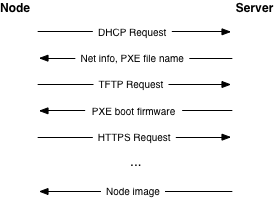
We recommend using a separate isolated network in the management security domain for provisioning. This network handles all PXE traffic, as well as subsequent boot stage downloads described above. Note that the node boot process starts with two insecure operations: DHCP and TFTP. The boot process then uses TLS to download the rest of the information needed to provision the node. This could be an operating system installer, a base installation managed by Chef or Puppet, or even a complete filesystem image written directly to disk.
While using TLS during the PXE boot process is more challenging, common PXE firmware projects (such as iPXE) provide this support. Typically, this involves building PXE firmware with knowledge of the allowed TLS certificate chain so it can properly verify server certificates. This raises the bar for attackers by limiting the amount of insecure plaintext network operations.
Verifying boot
Typically, there are two distinct strategies for verifying the boot process. Traditional secure boot verifies the code running at each step in the process and stops the boot if the code is incorrect. Boot attestation records the code run at each step and provides this information to another computer to prove that the boot process completed as expected. In both cases, the first step is to measure each piece of code before running it. In this context, measurement is actually the SHA-1 hash of the code, taken before execution. The hash is stored in the Platform Configuration Registers (PCRs) of the TPM.
Note
SHA-1 is used here because this is what TPM chips support.Each TPM has at least 24 PCRs. The TCG Generic Server Specification v1.0 from March 2005 defines PCR allocation for boot-time integrity measurements. The following table shows a typical PCR configuration. The context indicates whether these values are determined by node hardware (firmware) or by software provisioned on the node. Some values are influenced by firmware version, disk size, and other low-level information. Therefore, it is important to follow good practices in configuration management to ensure that every system deployed is configured exactly as intended.
| Register | What is measured | Context |
|---|---|---|
| PCR-00 | Core Root of Trust Measurement (CRTM), BIOS code, host platform extensions | Hardware |
| PCR-01 | Host platform configuration | Hardware |
| PCR-02 | Option ROM code | Hardware |
| PCR-03 | Option ROM configuration and data | Hardware |
| PCR-04 | Initial Program Loader (IPL) code. For example, Master Boot Record. | Software |
| PCR-05 | IPL code configuration and data | Software |
| PCR-06 | State transition and wake events | Software |
| PCR-07 | Host platform manufacturer control | Software |
| PCR-08 | Platform-specific, typically kernel, kernel extensions, and drivers | Software |
| PCR-09 | Platform-specific, typically Initramfs | Software |
| PCR-10 to PCR-23 | Platform-specific | Software |
Secure boot may be an option for building clouds, but requires careful planning in terms of hardware selection. For example, ensure you have TPM and Intel TXT support. Then verify how the node hardware vendor populates PCR values. For example, which values are available for verification. Typically, PCR values listed under the software context in the table above are values that cloud architects can directly control. But even these may change as software in the cloud is upgraded. Configuration management should be linked to a PCR policy engine to ensure verification is always up to date.
Every manufacturer must provide BIOS and firmware code for their servers. Different servers, hypervisors, and operating systems will choose to populate different PCRs. In most real-world deployments, it is not possible to verify each PCR against a known good quantity ("golden measurement"). Experience shows that even within a single vendor's product line, the measurement process for a given PCR may be inconsistent. It is recommended to establish baselines for each server and monitor PCR values for unexpected changes. Third-party software may be available to assist with TPM provisioning and monitoring processes, depending on the chosen hypervisor solution.
Initial Program Loader (IPL) code is most likely PXE firmware, assuming the node deployment strategy described above. Therefore, the secure boot or boot attestation process can measure all early boot code, such as BIOS, firmware, PXE firmware, and kernel images. Ensuring that each node has the correct version of these components installed provides a solid foundation for building the rest of the node software stack.
Depending on the chosen strategy, in the event of a failure, the node either will not boot, or it can report the failure to another entity in the cloud. For secure boot to be achieved, the node will not boot, and the provisioning service in the management security domain must recognize this and log the event. For boot attestation, when a failure is detected, the node is already running. In this case, the node should be immediately isolated by disabling its network access. The root cause of the event should then be analyzed. In either case, policy should dictate how to proceed after failure. The cloud may automatically try to reconfigure the node a certain number of times. Or, it may immediately notify the cloud administrator to investigate the issue. The correct policy here is deployment- and failure-mode-specific.
Node hardening
At this point, we know that the node has booted with the correct kernel and underlying components. The next step is to harden the operating system, which starts with a set of industry-recognized hardening controls. The following guides are good examples:
Security Technical Implementation Guide (STIG)
The Defense Information Systems Agency (DISA), part of the US Department of Defense, publishes STIG content applicable to various operating systems, applications, and hardware. These controls are published without any license attached.
Center for Internet Security (CIS) Benchmarks
CIS regularly publishes security benchmarks along with automation tools for applying these security controls. These benchmarks are published under a Creative Commons license with some restrictions.
These security controls are best applied through automated methods. Automation ensures that controls are applied the same way to every system each time, and they also provide a fast method for auditing existing systems. There are several options for automation:
OpenSCAP
OpenSCAP is an open source tool that takes SCAP content (XML files describing security controls) and applies that content to various systems. Most content currently available is applicable to Red Hat Enterprise Linux and CentOS, but these tools work with any Linux or Windows system.
Ansible hardening
The ansible-hardening project provides an Ansible role that applies security controls to various Linux operating systems. It can also be used to audit existing systems. Carefully review each control to determine if it may harm production systems. These controls are based on the Red Hat Enterprise Linux 7 STIG.
Fully hardening a system is a challenging process and may require significant changes to some systems. Some of these changes may affect production workloads. If systems cannot be fully hardened, it is strongly recommended to make the following two changes to improve security without causing significant disruption:
Mandatory Access Control (MAC)
Mandatory Access Control affects all users on the system, including root, where the kernel's job is to review activities against the current security policy. If an activity is not within the allowed policy scope, it is blocked, even for root users. For more details, see the discussion on sVirt, SELinux, and AppArmor below.
Removing packages and stopping services
Ensure that the number of packages installed on the system is as small as possible and the number of running services is as small as possible. Removing unnecessary packages makes patching easier and reduces the number of items on the system that could lead to violations. Stopping unnecessary services reduces the attack surface on the system and makes attacks more difficult.
We also recommend the following additional steps for production nodes:
Read-only file systems
Use read-only file systems wherever possible. Ensure that writable file systems do not allow execution. This can be handled using the noexec, nosuid, and nodev mount options in /etc/fstab.
System verification
Finally, the node kernel should have a mechanism to verify that the rest of the node has booted in a known good state. This provides the necessary link from the boot verification process to verifying the entire system. Steps for doing this are deployment-specific. For example, kernel modules can verify hashes of blocks that make up the file system before mounting the file system using dm-verity.
Runtime verification
Once a node is running, we need to ensure it remains in a good state over time. Broadly speaking, this includes configuration management and security monitoring. Each of these areas has different goals. By examining both, we can better ensure that systems are running as expected. We discuss configuration management in the Management section and security monitoring below.
Intrusion detection systems
Host-based intrusion detection tools are also useful for automatically verifying the inside of the cloud. A wide variety of host-based intrusion detection tools are available. Some are free open source projects, while others are commercial. Typically, these tools analyze data from various sources and generate security alerts based on rule sets and/or training. Typical features include log analysis, file integrity checking, policy monitoring, and rootkit detection. More advanced (typically custom) tools can verify that in-memory process images match the executables on disk and verify the execution state of running processes.
For cloud architects, a key strategic decision is how to handle the output of security monitoring tools. There are practically two choices. The first is to alert humans for investigation and/or corrective action. This can be done by including security alerts in logs or event sources for cloud administrators. The second choice is to have the cloud automatically take some form of remediation, along with logging the event. Remediation can range from reinstalling the node to making minor service configurations. However, automated remediation can be challenging due to the possibility of false positives.
False positives occur when security monitoring tools generate security alerts for benign events. Due to the nature of security monitoring tools, false positives will inevitably occur from time to time. Typically, cloud administrators can tune security monitoring tools to reduce false positives, but this may simultaneously reduce the overall detection rate. These classic trade-offs must be understood and considered when setting up a security monitoring system in the cloud.
The selection and configuration of host-based intrusion detection tools is highly deployment-specific. We recommend starting by exploring the following open source projects, which implement various host-based intrusion detection and file monitoring features.
- OSSEC
- Samhain
- Tripwire
- AIDE
Network intrusion detection tools complement host-based tools. OpenStack does not have built-in specific network IDS, but OpenStack Networking provides a plugin mechanism that can enable different technologies through the Networking API. This plugin architecture will allow tenants to develop API extensions to plug in and configure their own advanced network services, such as firewalls, intrusion detection systems, or VPNs between virtual machines.
Similar to host-based tools, the selection and configuration of network-based intrusion detection tools is deployment-specific. Snort is the leading open source network intrusion detection tool and is a good starting point for learning more.
There are some important security considerations for both network and host-based intrusion detection systems.
- It is important to consider placing network IDS on the cloud (for example, adding it around network boundaries and/or sensitive networks). Placement depends on your network environment, but make sure to consider the impact IDS may have on your services depending on where you choose to add it. Network IDS typically cannot inspect the content of encrypted traffic (such as TLS). However, network IDS may still provide some benefits in identifying anomalous unencrypted traffic on the network.
- In some deployments, it may be necessary to add host-based IDS on sensitive components at security domain bridges. Host-based IDS can detect anomalous activity through compromised or unauthorized processes on the component. IDS should transmit alerts and log information over the management network.
Server hardening
Servers in cloud environments, including undercloud and overcloud infrastructure, should implement hardening best practices. Because operating system and server hardening are common, applicable best practices are not covered here, including but not limited to logging, user account restrictions, and regular updates, but should be applied to all infrastructure.
File integrity management (FIM)
File integrity management (FIM) is the method of ensuring that files such as sensitive system or application configuration files are not corrupted or altered to allow unauthorized access or malicious behavior. This can be done with utilities like Samhain, which creates checksum hashes of specified resources and then periodically verifies those hashes, or with tools like DM-Verity, which can hash block devices and verify those hashes when the system accesses them before presenting them to the user.
These should be put in place to monitor and report changes to system, hypervisor, and application configuration files such as /etc/nova/nova.conf and /etc/keystone/keystone.conf, as well as kernel modules such as virtio. Best practice is to use the lsmod command to show what is regularly loaded on the system to help determine what should or should not be included in FIM checks.
Administrative Interfaces
Administrators must issue commands and exercise control over the cloud for various operational functions. Understanding and protecting these command and control facilities is important.
OpenStack provides multiple management interfaces for operators and tenants:
- OpenStack Dashboard (horizon)
- OpenStack interfaces
- Secure Shell (SSH)
- OpenStack administrative utilities, such as nova-manage and glance-manage
- Out-of-band management interfaces, such as IPMI
Dashboard
The OpenStack Dashboard (horizon) provides a web-based graphical interface for administrators and tenants to provision and access cloud-based resources. The Dashboard communicates with backend services by calling OpenStack APIs.
Features
- As a cloud administrator, the Dashboard provides an overall view of cloud size and status. You can create users and tenants/projects, assign users to tenants/projects, and set limits on resources available to them.
- The Dashboard provides a self-service portal for tenant users to provision their own resources within the limits set by administrators.
- The Dashboard provides GUI support for routers and load balancers. For example, the Dashboard now implements all major networking functions.
- It is an extensible Django web application that allows easy insertion of third-party products and services, such as billing, monitoring, and other management tools.
- The Dashboard can also be branded for service providers and other commercial vendors.
Security considerations
- The Dashboard requires cookies and JavaScript to be enabled in web browsers.
- The web server hosting the Dashboard should be configured to use TLS to ensure data is encrypted.
- The Horizon web service and its OpenStack API used for backend communication are both vulnerable to web attack vectors such as denial of service, so they must be monitored.
- Image files can now be uploaded directly from users' hard drives to the OpenStack Image service through the Dashboard (though there are many deployment/security concerns). For multi-GB images, using the
glanceCLI is still strongly recommended for uploads. - Security groups are created and managed through the Dashboard. Security groups allow L3-L4 packet filtering of security policies to protect virtual machines.
Bibliography
OpenStack.org, ReleaseNotes/Liberty. 2015. OpenStack Liberty Release Notes.
OpenStack Interfaces
The OpenStack API is a RESTful web service endpoint for accessing, configuring, and automating cloud-based resources. Operators and users typically access the API through command-line utilities (such as nova or glance), language-specific libraries, or third-party tools.
Features
- To the cloud administrator, the API provides an overall view of the size and state of the cloud deployment and allows the creation of users, tenants/projects, assigning users to tenants/projects, and specifying resource quotas on a per tenant/project basis.
- The API provides a tenant interface for provisioning, managing, and accessing their resources.
Security considerations
- API services should be configured for TLS to ensure data is encrypted.
- As a web service, the OpenStack API is vulnerable to familiar web attack vectors, such as denial of service attacks.
Secure Shell (SSH)
Using Secure Shell (SSH) access to manage Linux and Unix systems has become industry practice. SSH uses secure cryptographic primitives for communication. Given the scope and importance of SSH in a typical OpenStack deployment, it is important to understand best practices for deploying SSH.
Host key fingerprints
Often overlooked is the SSH host key management requirement. Since most or all hosts in an OpenStack deployment will provide SSH services, it is important to be confident when connecting to these hosts. What cannot be underestimated is that failing to provide a reasonably secure and accessible method for verifying SSH host key fingerprints is ripe for abuse and exploitation.
All SSH daemons have private host keys and provide host key fingerprints at connection time. This host key fingerprint is the hash of an unsigned public key. These host key fingerprints must be known before establishing SSH connections to these hosts. Verifying host key fingerprints helps detect man-in-the-middle attacks.
Typically, host keys are generated when the SSH daemon is installed. The host must have sufficient entropy during host key generation. Insufficient entropy during host key generation can lead to eavesdropping on SSH sessions.
After generating SSH host keys, host key fingerprints should be stored in a secure and queryable location. A particularly convenient solution is using DNS SSHFP resource records as defined in RFC-4255. For security, it is necessary to deploy DNSSEC.
Administrative utilities
OpenStack Management Utilities are open source Python command-line clients that make API calls. Each OpenStack service has a client (for example, nova, glance). In addition to standard CLI clients, most services have administrative command-line utilities for direct database calls. These specialized administrative utilities are slowly being deprecated.
Security considerations
- In some cases, specialized administrative utilities (*-manage) use direct database connections.
- Ensure that .rc files containing credential information are secure.
Bibliography
OpenStack.org, "OpenStack End User Guide" section. 2016. Overview of the OpenStack command-line clients.
OpenStack.org, Setting environment variables using OpenStack RC files. 2016. Download and source the OpenStack RC file.
Out-of-band management interfaces
OpenStack management relies on out-of-band management interfaces (such as the IPMI protocol) to access nodes running OpenStack components. IPMI is a very popular specification for remotely managing, diagnosing, and restarting servers, regardless of whether the operating system is running or the system has crashed.
Security considerations
- Use strong passwords and protect them, or use client TLS authentication.
- Ensure network interfaces are on their own dedicated (management or separate) network. Use firewalls or other network devices to isolate the management domain.
- If you use a web interface to interact with BMC/IPMI, always use a TLS interface such as HTTPS or port 443. This TLS interface should not use self-signed certificates (which is often the default), but should have a trusted certificate with a properly defined fully qualified domain name (FQDN).
- Monitor traffic on the management network. Anomalies may be easier to track compared to busy compute nodes.
Out-of-band management interfaces typically also include graphical console access to computers. These interfaces can usually be encrypted, but it is not necessarily the default. See your system software documentation for encrypting these interfaces.
Bibliography
SANS Technology Institute, InfoSec Handlers Diary Blog. 2012. Hacking a Server That Is Turned Off.
Secure Communication
Inter-device communication is a serious security issue. Between major project bugs like Heartbleed or more advanced attacks like BEAST and CRIME, methods for secure communication over networks are becoming increasingly important. However, it should be remembered that encryption should be applied as part of a larger security strategy. Compromise of an endpoint means that attackers no longer need to break the encryption used, but can instead view and manipulate messages as the system processes them.
This chapter reviews several features related to configuring TLS to protect internal and external resources, and points out specific categories of systems that deserve special attention.
Introduction to TLS and SSL
- Certificate authorities
- TLS libraries
- Encryption algorithms, cipher modes, and protocols
- Summary
TLS Proxies and HTTP Services
- Examples
- HTTP Strict Transport Security
- Perfect Forward Secrecy
Secure Reference Architecture
- SSL/TLS proxy in front
- SSL/TLS on the same physical host as the API endpoint
- SSL/TLS on load balancers
- Encryption separation for external and internal environments
Introduction to TLS and SSL
In some cases, security is needed to ensure confidentiality or integrity of network traffic in OpenStack deployments. This is typically achieved using cryptographic measures such as the Transport Layer Security (TLS) protocol.
In typical deployments, all traffic transmitted over public networks is secured, but security best practices require that internal traffic must also be protected. Relying solely on security domain separation for protection is insufficient. If an attacker gains access to the hypervisor or host resources, compromises an API endpoint, or any other service, they must not be able to easily inject or capture messages, commands, or otherwise affect the cloud's management functions.
All domains should be protected using TLS, including management domain services and intra-service communication. TLS provides mechanisms for ensuring authentication, non-repudiation, confidentiality, and integrity of communication between users and OpenStack services, as well as between OpenStack services themselves.
Due to published vulnerabilities in the Secure Sockets Layer (SSL) protocol, we strongly recommend prioritizing TLS over SSL, and disabling SSL in all cases unless needed for compatibility with outdated browsers or libraries.
Public Key Infrastructure (PKI) is the framework used to secure network communications. It consists of a set of systems and processes to ensure that traffic can be sent securely while verifying the identity of the parties involved. The PKI profile described here is the Internet Engineering Task Force (IETF) Public Key Infrastructure (PKIX) profile developed by the PKIX working group. Core components of PKI include:
Digital certificates
A signed public key certificate is a verifiable data structure containing an entity, its public key, and some other attributes. These certificates are issued by a Certificate Authority (CA). Because certificates are signed by a trusted CA, once verified, the public key associated with the entity is guaranteed to be associated with the stated entity. The most common standard for defining these certificates is the X.509 standard. X.509 v3 is the current standard, detailed in RFC5280. Certificates are issued by a CA as a mechanism for proving the identity of an online entity. The CA digitally signs the certificate by creating a message digest from the certificate and encrypting the digest with its private key.
End entities
Users, processes, or systems that are the subject of a certificate. End entities send their certificate requests to a Registration Authority (RA) for approval. If approved, the RA forwards the request to the Certificate Authority (CA). The CA verifies the request, and if the information is correct, generates and signs the certificate. This signed certificate is then sent to the certificate repository.
Relying parties
The endpoint that receives digitally signed certificates that can be verified with reference to the public key listed on the certificate. Relying parties should be able to verify the chain of certificates, ensure it is not on a CRL, and must also be able to verify the certificate's expiration date.
Certificate Authority (CA)
A CA is a trusted entity, either an end entity or a party that depends on certificates, for certificate policies, management processing, and certificate issuance.
Registration Authority (RA)
An optional system to which the CA delegates certain management functions, which includes functions such as authenticating end entities before the CA issues certificates.
Certificate Revocation List (CRL)
A Certificate Revocation List (CRL) is a list of serial numbers of revoked certificates. In the PKI model, end entities presenting these certificates should not be trusted. Revocation can occur for many reasons, such as key compromise or CA compromise.
CRL issuer
An optional system to which the CA delegates publication of the Certificate Revocation List.
Certificate repository
A location for storing and looking up end entity certificates and Certificate Revocation Lists - sometimes called a certificate bundle.
PKI builds a framework for providing encryption algorithms, cipher modes, and protocols to protect data and authentication. It is strongly recommended to use Public Key Infrastructure (PKI) to protect all services, including using TLS for API endpoints. Encryption or signing of transport or messages alone cannot address all of these issues. The hosts themselves must be secure and implement policies, namespaces, and other controls to protect their private credentials and keys. However, the challenges of key management and protection do not diminish the necessity of these controls or reduce their importance.
Certificate authorities
Many organizations have established Public Key Infrastructure with their own Certificate Authority (CA), certificate policies, and management, which they should use to issue certificates for internal OpenStack users or services. Organizations with public-facing security domains also need certificates signed by widely recognized public CAs. For encrypted communications over the management network, it is recommended not to use public CAs. Instead, we expect and recommend that most deployments deploy their own internal CA.
It is recommended that OpenStack cloud architects consider separate PKI deployments for internal systems and customer-facing services. This allows cloud developers to maintain control over their PKI infrastructure and makes certificate requests, signing, and deployment for internal systems much easier. Advanced configurations can use separate PKI deployments for different security domains. This allows developers to maintain cryptographic isolation of environments, ensuring that certificates issued to one environment are not recognized by another.
Certificates used to support TLS on Internet-facing cloud endpoints (or customer interfaces, where customers are not expected to install anything beyond the standard operating system-provided certificate bundle) should be provisioned with a Certificate Authority installed in the operating system certificate bundle. Typical well-known vendors include Let's Encrypt, Verisign, and Thawte, but there are many others.
There are administrative, policy, and technical challenges in creating and signing certificates. In this area, cloud architects or operators may want to seek advice from industry leaders and vendors, as well as the guidance recommended here.
TLS libraries
Components, services, and applications in the OpenStack ecosystem, or dependencies of OpenStack, have implemented or can be configured to use TLS libraries. TLS and HTTP services in OpenStack typically use the OpenSSL implementation, which has modules validated for FIPS 140-2. However, keep in mind that each application or service may still introduce weaknesses in how it uses the OpenSSL library.
Encryption algorithms, cipher modes, and protocols
It is recommended to use at least TLS 1.2. Older versions such as TLS 1.0, 1.1, and all versions of SSL (the predecessor to TLS) are vulnerable to multiple publicly known attacks and must not be used. TLS 1.2 can be used for broad client compatibility, but be careful when enabling this protocol. Only enable TLS version 1.1 when there is a mandatory compatibility requirement and you understand the risks involved.
When using TLS 1.2 and controlling both the client and server, the cipher suite should be limited to ECDHE-ECDSA-AES256-GCM-SHA384. When not controlling both endpoints and using TLS 1.1 or 1.2, a more general HIGH:!aNULL:!eNULL:!DES:!3DES:!SSLv3:!TLSv1:!CAMELLIA is a reasonable cipher selection.
However, since this book is not intended to be a comprehensive introduction to cryptography, we do not expect to prescribe which specific algorithms or cipher modes should be enabled or disabled in OpenStack services. We want to recommend some authoritative references for more information:
- National Security Agency, Suite B Cryptography
- OWASP Cryptography Guide
- OWASP Transport Layer Protection Cheat Sheet
- SoK: SSL and HTTPS: Revisiting Past Challenges and Evaluating Certificate Trust Model Enhancements
- The Most Dangerous Code in the World: Validating SSL Certificates in Non-Browser Software
- OpenSSL and FIPS 140-2
Summary
Given the complexity of OpenStack components and the number of possible deployments, you must be careful to ensure that each component receives appropriate configuration of TLS certificates, keys, and CA. Subsequent sections will discuss the following services:
- Compute API endpoints
- Identity API endpoints
- Networking API endpoints
- Storage API endpoints
- Message servers
- Database servers
- Dashboard
TLS Proxies and HTTP Services
OpenStack endpoints are HTTP services that provide APIs to end users on public networks and other OpenStack services on management networks. It is strongly recommended that all these requests, whether internal or external, operate using TLS. To achieve this, API services must be deployed behind a TLS proxy capable of establishing and terminating TLS sessions. The following table provides a non-exhaustive list of open source software available for this purpose:
- Pound
- Stud
- Nginx
- Apache httpd
In cases where software termination is insufficient, hardware accelerators may be worth exploring as an alternative. Be sure to note the size of requests that any selected TLS proxy will handle.
Examples
Below we provide examples of recommended configuration settings for enabling TLS in some of the more popular web servers/TLS terminators.
Before diving into the configuration, we briefly discuss the configuration elements of ciphers and their format. For a more exhaustive treatment of available ciphers and OpenSSL cipher list format, see: Ciphers.
ciphers = "HIGH:!RC4:!MD5:!aNULL:!eNULL:!EXP:!LOW:!MEDIUM"Or
ciphers = "kEECDH:kEDH:kRSA:HIGH:!RC4:!MD5:!aNULL:!eNULL:!EXP:!LOW:!MEDIUM"Cipher string options are separated by ":" and "!" provides negation of the element that follows. Element order indicates preference unless overridden by qualifiers like HIGH. Let's take a closer look at the elements in the example strings above.
kEECDH:kEDH
Ephemeral Elliptic Curve Diffie-Hellman (abbreviated as EECDH and ECDHE).
Ephemeral Diffie-Hellman (abbreviated as EDH or DHE) uses prime field groups.
Both methods provide Perfect Forward Secrecy (PFS). For more discussion on properly configuring PFS, see Perfect Forward Secrecy.
Ephemeral elliptic curves require the server to be configured with named curves and provide better security and lower computational cost than prime field groups. However, prime field groups have wider implementation, so typically both are included in the list.
kRSA
Cipher suites using RSA key exchange, authentication, or both respectively.
HIGH
Select the highest security ciphers possible during the negotiation phase. These ciphers typically have key lengths of 128 bits or longer.
!RC4
No RC4. RC4 has weaknesses in the context of TLS V3. See The Security of RC4 in TLS and WPA.
!MD5
No MD5. MD5 does not have collision resistance, so it is not accepted for message authentication codes (MAC) or signatures.
!aNULL:!eNULL
Disallows clear text.
!EXP
Disallows export cipher algorithms, which tend to be weak by design and typically use 40-bit and 56-bit keys.
US export restrictions on cryptographic systems have been lifted and support is no longer required.
!LOW:!MEDIUM
Disallows low (56 or 64-bit long key) and medium (128-bit long key) ciphers because they are vulnerable to brute force attacks (example 2-DES). This rule still allows Triple Data Encryption Standard (Triple DES), also known as Triple Data Encryption Algorithm (TDEA) and Advanced Encryption Standard (AES), each with keys greater than or equal to 128 bits, making them more secure.
Protocols
Protocols are enabled/disabled via SSL_CTX_set_options. It is recommended to disable SSLv2/v3 and enable TLS.
Pound
This Pound example enables AES-NI acceleration, which helps improve performance on systems with processors that support this feature. The default configuration file is located at /etc/pound/pound.cfg on Ubuntu, RHEL, CentOS, /etc/pound.cfg on openSUSE and SUSE Linux Enterprise.
## see pound(8) for details
daemon      1
######################################################################
## global options:
User        "swift"
Group       "swift"
#RootJail   "/chroot/pound"
## Logging: (goes to syslog by default)
##  0   no logging
##  1   normal
##  2   extended
##  3   Apache-style (common log format)
LogLevel    0
## turn on dynamic scaling (off by default)
# Dyn Scale 1
## check backend every X secs:
Alive       30
## client timeout
#Client     10
## allow 10 second proxy connect time
ConnTO      10
## use hardware-acceleration card supported by openssl(1):
SSLEngine   "aesni"
# poundctl control socket
Control "/var/run/pound/poundctl.socket"
######################################################################
## listen, redirect and ... to:
## redirect all swift requests on port 443 to local swift proxy
ListenHTTPS
    Address 0.0.0.0
    Port    443
    Cert    "/etc/pound/cert.pem"
    ## Certs to accept from clients
    ##  CAlist      "CA_file"
    ## Certs to use for client verification
    ##  VerifyList  "Verify_file"
    ## Request client cert - don't verify
    ##  Ciphers     "AES256-SHA"
    ## allow PUT and DELETE also (by default only GET, POST and HEAD)?:
    NoHTTPS11   0
    ## allow PUT and DELETE also (by default only GET, POST and HEAD)?:
    xHTTP       1
    Service
        BackEnd
            Address 127.0.0.1
            Port    80
        End
    End
End
Stud
The cipher line can be adjusted to your needs, but this is a reasonable starting point. The default configuration file is in the /etc/stud directory. However, it is not provided by default.
# SSL x509 certificate file.
pem-file = "
# SSL protocol.
tls = on
ssl = off
# List of allowed SSL ciphers.
# OpenSSL's high-strength ciphers which require authentication
# NOTE: forbids clear text, use of RC4 or MD5 or LOW and MEDIUM strength ciphers
ciphers = "HIGH:!RC4:!MD5:!aNULL:!eNULL:!EXP:!LOW:!MEDIUM"
# Enforce server cipher list order
prefer-server-ciphers = on
# Number of worker processes
workers = 4
# Listen backlog size
backlog = 1000
# TCP socket keepalive interval in seconds
keepalive = 3600
# Chroot directory
chroot = ""
# Set uid after binding a socket
user = "www-data"
# Set gid after binding a socket
group = "www-data"
# Quiet execution, report only error messages
quiet = off
# Use syslog for logging
syslog = on
# Syslog facility to use
syslog-facility = "daemon"
# Run as daemon
daemon = off
# Report client address using SENDPROXY protocol for haproxy
# Disabling this until we upgrade to HAProxy 1.5
write-proxy = off
Nginx
This Nginx example requires TLS v1.1 or v1.2 for maximum security. The ssl_ciphers line can be adjusted to your needs, but this is a reasonable starting point. The default configuration file is /etc/nginx/nginx.conf.
server {
    listen : ssl;
    ssl_certificate ;
    ssl_certificate_key ;
    ssl_protocols TLSv1.1 TLSv1.2;
    ssl_ciphers HIGH:!RC4:!MD5:!aNULL:!eNULL:!EXP:!LOW:!MEDIUM
    ssl_session_tickets off;

    server_name _;
    keepalive_timeout 5;

    location / {

    }
}
Apache
The default configuration file is located at /etc/apache2/apache2.conf on Ubuntu, RHEL, and CentOS, /etc/httpd/conf/httpd.conf on openSUSE and SUSE Linux Enterprise.
<VirtualHost <ip address>:80>
  ServerName <site FQDN>
  RedirectPermanent / https://<site FQDN>/
</VirtualHost>
<VirtualHost <ip address>:443>
  ServerName <site FQDN>
  SSLEngine On
  SSLProtocol +TLSv1 +TLSv1.1 +TLSv1.2
  SSLCipherSuite HIGH:!RC4:!MD5:!aNULL:!eNULL:!EXP:!LOW:!MEDIUM
  SSLCertificateFile    /path/<site FQDN>.crt
  SSLCACertificateFile  /path/<site FQDN>.crt
  SSLCertificateKeyFile /path/<site FQDN>.key
  WSGIScriptAlias / <WSGI script location>
  WSGIDaemonProcess horizon user=<user> group=<group> processes=3 threads=10
  Alias /static <static files location>
  <Directory <WSGI dir>>
    # For http server 2.2 and earlier:
    Order allow,deny
    Allow from all

    # Or, in Apache http server 2.4 and later:
    # Require all granted
  </Directory>
</VirtualHost>
For the Compute API SSL endpoint in Apache, it must be paired with a brief WSGI script.
<VirtualHost <ip address>:8447>
  ServerName <site FQDN>
  SSLEngine On
  SSLProtocol +TLSv1 +TLSv1.1 +TLSv1.2
  SSLCipherSuite HIGH:!RC4:!MD5:!aNULL:!eNULL:!EXP:!LOW:!MEDIUM
  SSLCertificateFile    /path/<site FQDN>.crt
  SSLCACertificateFile  /path/<site FQDN>.crt
  SSLCertificateKeyFile /path/<site FQDN>.key
  SSLSessionTickets Off
  WSGIScriptAlias / <WSGI script location>
  WSGIDaemonProcess osapi user=<user> group=<group> processes=3 threads=10
  <Directory <WSGI dir>>
    # For http server 2.2 and earlier:
    Order allow,deny
    Allow from all

    # Or, in Apache http server 2.4 and later:
    # Require all granted
  </Directory>
</VirtualHost>
HTTP Strict Transport Security
It is recommended that all production deployments use HTTP Strict Transport Security (HSTS). This header prevents browsers from establishing insecure connections after establishing a single secure connection. HSTS is especially important if you have deployed HTTP services on public or untrusted domains. To enable HSTS, configure your web server to send a header with all requests like this:
Strict-Transport-Security: max-age=31536000; includeSubDomainsStart with a short max-age of 1 day during testing, and increase it to a year if testing shows you are not causing problems for your users. Note that once this header is set to a large timeout, it is (by design) very difficult to disable.
Perfect Forward Secrecy
Configuring TLS servers for perfect forward secrecy requires careful planning around key sizes, session IDs, and session tickets. Additionally, for multi-server deployments, shared state is also an important consideration. The Apache and Nginx example configurations above disable the session ticket option to help mitigate some of these issues. Real deployments may want to enable this for improved performance. This can be done safely, but requires special consideration for key management. Such configurations are beyond the scope of this guide. We recommend reading ImperialViolet's How to botch TLS forward secrecy as a starting point for understanding the problem space.
Secure Reference Architecture
It is recommended to use SSL/TLS on both public and management networks for TLS proxies and HTTP services. However, if actually deploying SSL/TLS everywhere is too difficult, we recommend that you evaluate your OpenStack SSL/TLS needs and follow one of the architectures discussed here.
The first thing to do when evaluating your OpenStack SSL/TLS needs is to identify threats. You can categorize these threats into external and internal attacker categories, but since some OpenStack components operate on both public and management networks, the lines often blur.
For public-facing services, the threat is straightforward. Users authenticate to Horizon and Keystone using their usernames and passwords. Users also use their keystone tokens to access API endpoints of other services. If this network traffic is unencrypted, an attacker can intercept passwords and tokens using a man-in-the-middle attack. The attacker can then use these valid credentials to perform malicious operations. All real deployments should use SSL/TLS to protect public-facing services.
For services deployed on management networks, the threat is not as clear due to bridging with network security. There is always the possibility that an administrator with access to the management network decides to perform malicious operations. In this case, SSL/TLS would not help if the attacker is allowed access to private keys. Of course, not everyone on the management network is allowed access to private keys, so using SSL/TLS to protect against internal attackers is still valuable. Even if everyone allowed access to your management network is 100% trusted, there is still the threat of unauthorized users gaining access to your internal network by exploiting misconfigurations or software vulnerabilities. It must be remembered that users run their own code on instances in OpenStack Compute nodes, which are deployed on management networks. If vulnerabilities allow them to break out of the hypervisor, they will have access to your management network. Using SSL/TLS on management networks minimizes the damage an attacker can cause.
SSL/TLS proxy in front
It is widely accepted that it is best practice to encrypt sensitive data as early as possible and decrypt as late as possible. Despite this best practice, it is common to see SSL/TLS proxies used in front of OpenStack services and clear communication used after, as follows:
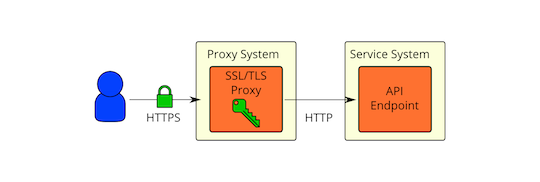
As shown in the figure above, some issues with using SSL/TLS proxies:
- Native SSL/TLS in OpenStack services has worse performance/scalability than SSL proxies (especially for Python implementations like Eventlet).
- Native SSL/TLS in OpenStack services has not been as carefully reviewed/audited as more mature solutions.
- Native SSL/TLS configuration is difficult (not well documented, tested, or consistent across services).
- Privilege separation (OpenStack service processes should not directly access private keys used for SSL/TLS).
- Traffic inspection requires load balancing.
All of the above points are valid, but none of them prevent the use of SSL/TLS on management networks. Let's consider the next deployment model.
SSL/TLS on the same physical host as the API endpoint
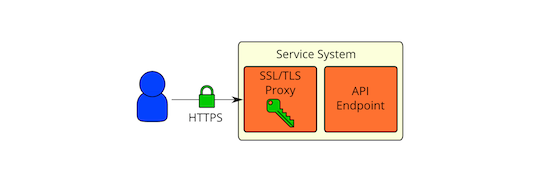
This is very similar to the previous SSL/TLS proxy, but the SSL/TLS proxy is on the same physical system as the API endpoint. The API endpoint is configured to only listen on local network interfaces. All remote communication with the API endpoint goes through the SSL/TLS proxy. With this deployment model, we address many of the points in the SSL/TLS proxy: A well-performing, validated SSL implementation will be used. All services will use the same SSL proxy software, so API endpoint SSL configuration will be consistent. OpenStack service processes will not be able to directly access private keys used for SSL/TLS because you will run the SSL proxy as a different user and restrict access with permissions (and additional mandatory access controls like SELinux). Ideally, we would have the API endpoint listen on Unix sockets so we could use permissions and mandatory access controls to restrict access to it. Unfortunately, based on our testing, this does not currently seem to work in Eventlet. This is a good future development goal.
SSL/TLS on load balancers
What about high availability or load balancing deployments that need to inspect traffic? The previous deployment model (SSL/TLS on the same physical host as the API endpoint) does not allow deep packet inspection because traffic is encrypted. If you only need to inspect traffic for basic routing purposes, load balancers may not need access to unencrypted traffic. HAProxy is able to extract SSL/TLS session IDs during the handshake, which can then be used for session affinity (session ID configuration details here). HAProxy can also use TLS Server Name Indication (SNI) extension to determine where traffic should be routed (SNI configuration details here). These features may cover some of the most common load balancer needs. In this case, HAProxy will be able to pass HTTPS traffic directly to the API endpoint system:
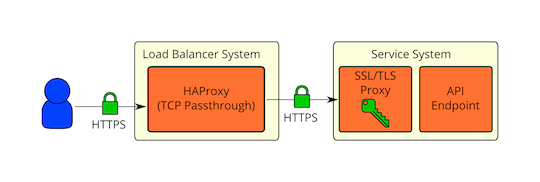
Encryption separation for external and internal environments
What if you want encryption separation for external and internal environments? Public cloud providers may want their public-facing services (or proxies) to use certificates issued by a CA linked to a trusted root CA distributed in popular SSL/TLS web browser software. For internal services, they may instead want to use their own PKI to issue SSL/TLS certificates. This encryption separation can be achieved by terminating SSL at the network boundary and then re-encrypting with internally issued certificates. Traffic will be briefly unencrypted on the public-facing SSL/TLS proxy, but will never be transmitted as plaintext over the network. If deep packet inspection is truly needed on load balancers, the same re-encryption method used to achieve encryption separation can also be used. Below is what this deployment model looks like:
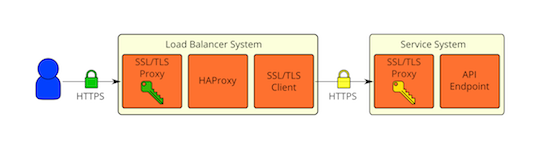
As with most things, there are trade-offs. The main trade-off is between security and performance. Encryption has a cost, but being hacked also has a cost. Security and performance requirements will vary for each deployment, so ultimately how SSL/TLS is used will be a personal decision.
API Endpoints
The process of using an OpenStack cloud begins by querying API endpoints. While public and private endpoints face different challenges, these are high-value assets that can pose significant risks if compromised.
This chapter provides recommendations for security enhancements for both public and private API endpoints.
API endpoint configuration recommendations
- Internal API communication
- Paste and middleware
- API endpoint process isolation and policies
- API endpoint rate limiting
API Endpoint Configuration Recommendations
Internal API communication
OpenStack provides both public and private API endpoints. By default, OpenStack components use publicly defined endpoints. It is recommended to configure these components to use API endpoints in appropriate security domains.
Services choose their respective API endpoints based on the OpenStack service catalog. These services may not respect the listed public or internal API endpoint values. This can cause internal management traffic to be routed to external API endpoints.
Configuring internal URLs in the Identity service catalog
The Identity service catalog should be aware of your internal URL. While not used by default, this feature can be configured to leverage it. Additionally, once this behavior becomes the default, it should be forward-compatible with expected changes.
To register an internal URL for an endpoint, do the following:
$ openstack endpoint create identity \
  --region RegionOne internal \
  https://MANAGEMENT_IP:5000/v3
Replace MANAGEMENT_IP with the management IP address of the controller node.
Configuring applications for internal URLs
You can force certain services to use specific API endpoints. Therefore, it is recommended that each OpenStack service that communicates with another service's API be explicitly configured to access the correct internal API endpoint.
Each project may present inconsistent ways of defining target API endpoints. Future versions of OpenStack are trying to address these inconsistencies by consistently using the Identity service catalog.
Configuration example #1: nova
cinder_catalog_info='volume:cinder:internalURL'
glance_protocol='https'
neutron_url='https://neutron-host:9696'
neutron_admin_auth_url='https://neutron-host:9696'
s3_host='s3-host'
s3_use_ssl=True
Configuration example #2: cinder
glance_host = 'https://glance-server'Paste and middleware
Most API endpoints and other HTTP services in OpenStack use the Python Paste Deploy library. From a security perspective, this library allows manipulation of the request filter pipeline through application configuration. Each element in this chain is called middleware. Changing the order of filters in the pipeline or adding additional middleware may have unpredictable security implications.
Typically, implementers add middleware to extend the basic functionality of OpenStack. We recommend that implementers carefully consider the risks that may arise from adding non-standard software components to their HTTP request pipeline.
For more information about Paste Deploy, see the Python Paste Deploy documentation.
API endpoint process isolation and policies
You should isolate API endpoint processes, especially those in the public security domain, as much as isolation allows. When deployment permits, API endpoints should be deployed on separate hosts for enhanced isolation.
Namespaces
Many operating systems now provide partitioning support. Linux supports namespaces to assign processes to independent domains. System partitioning is discussed in more detail in other parts of this guide.
Network policies
Since API endpoints typically bridge multiple security domains, you must pay special attention to the segmentation of API processes. See Bridging security domains for additional information on this area.
Through careful modeling, you can enforce explicit point-to-point communication between network services using network ACLs and IDS techniques. As a critical cross-domain service, this explicit enforcement is especially effective for OpenStack's message queue services.
To implement policies, you can configure services, host-based firewalls (such as iptables), local policies (SELinux or AppArmor), and optional global network policies.
Mandatory Access Control
You should isolate API endpoint processes from each other and from other processes on the machine. The configuration of these processes should be restricted not only by discretionary access control, but also by mandatory access control. The goal of these enhanced access controls is to help contain and escalate API endpoint security breaches. Through mandatory access control, such breaches severely limit access to resources and provide early alerts for such events.
API endpoint rate limiting
Rate limiting is a method of controlling the frequency at which network-based applications receive events. If reliable rate limiting is not present, applications can be vulnerable to various denial of service attacks. This is especially true for APIs, because the nature of APIs is to accept high-frequency similar request types and operations.
In OpenStack, it is recommended to provide an additional layer of protection for all endpoints, especially public endpoints, through rate limiting proxies or web application firewalls.
When configuring and implementing any rate limiting functionality, operators must carefully plan and consider the individual performance needs of users and services in their OpenStack cloud.
Common solutions for providing rate limiting include Nginx, HAProxy, OpenPose, or Apache modules such as mod_ratelimit, mod_qos, or mod_security.
Identity
The Keystone identity service provides identity, token, directory, and policy services exclusively for the OpenStack family of services. The Identity service is organized as a set of internal services exposed through one or more endpoints. Many of these services are used by frontends in a composable manner. For example, authentication calls verify user and project credentials through the Identity service. If successful, it uses the token service to create and return a token. More information can be found in the Keystone developer documentation.
Authentication
- Invalid login attempts
- Multi-factor authentication
Authentication methods
- Internally implemented authentication methods
- External authentication methods
Authorization
- Establishing formal access control policies
- Service authorization
- Administrative users
- End users
Policy
Tokens
- Fernet tokens
- JWT tokens
Domains
Federated Keystone
- Why use federated identity
Checklist
- Check-Identity-01: Is user/group ownership of configuration files set to keystone?
- Check-Identity-02: Are strict permissions set for Identity configuration files?
- Check-Identity-03: Is TLS enabled for Identity?
- Check-Identity-04: (Obsolete)
- Check-Identity-05: Is max_request_body_size set to default value (114688)?
- Check-Identity-06: Disable admin token in /etc/keystone/keystone.conf
- Check-Identity-07: insecure_debug is false in /etc/keystone/keystone.conf
- Check-Identity-08: Use Fernet tokens in /etc/keystone/keystone.conf
Authentication
Authentication is an integral part of any real OpenStack deployment, and this aspect of system design should be carefully considered. A complete treatment of this topic is beyond the scope of this guide, but the following sections introduce some key topics.
Fundamentally, authentication is the process of confirming identity - that a user is indeed who they claim to be. A familiar example is providing a username and password when logging into a system.
The OpenStack Identity service (keystone) supports multiple authentication methods including username and password, LDAP, and external authentication methods. Upon successful authentication, the Identity service provides the user with an authorization token for subsequent service requests.
Transport Layer Security (TLS) uses X.509 certificates to provide authentication between services and people. Although the default mode for TLS is server-side authentication only, certificates can also be used for client authentication.
Invalid login attempts
Starting with the Newton release, the Identity service can limit access to accounts after multiple failed login attempts. Patterns of repeated failed login attempts are typically indicators of brute force attacks (see Attack types). This type of attack is more prevalent in public cloud deployments.
For older deployments that need this functionality, prevention can be done using an external authentication system that locks accounts after a configured number of failed login attempts. The account can then only be unlocked through further side-channel intervention.
If prevention is not possible, detection can be used to mitigate damage. Detection involves frequently reviewing access control logs to identify unauthorized account access attempts. Possible remediation includes checking the strength of user passwords or blocking the attacker's network source through firewall rules. Firewall rules on Keystone servers that limit the number of connections can be used to reduce attack efficiency, thereby deterring attackers.
Additionally, checking account activity for abnormal login times and suspicious operations and taking corrective actions (such as disabling accounts) is also useful. Credit card providers typically use this approach for fraud detection and alerts.
Multi-factor authentication
Adopt multi-factor authentication for privileged user accounts with network access. The Identity service supports external authentication services through Apache Web servers that can provide this. The server can also enforce client authentication using certificates.
This recommendation can prevent brute force, social engineering, and sniper and mass phishing attacks that may compromise administrator passwords.
Authentication Methods
Internally implemented authentication methods
The authentication service can store user credentials in a SQL database or use an LDAP-compliant directory server. The Identity database can be separate from the database used by other OpenStack services to reduce the risk of credential storage compromise.
When you authenticate using a username and password, the Identity service does not enforce policies recommended in NIST Special Publication 800-118 (draft) regarding password strength, expiration, or failed authentication attempts. Organizations wishing to enforce stricter password policies should consider using extensions to the Identity service or external authentication services.
LDAP simplifies integration of authentication with the organization's existing directory services and user account management processes.
Authentication and authorization policies in OpenStack can be delegated to other services. A typical use case is for organizations seeking to deploy a private cloud that already have an employee and user database in an LDAP system. Using this authentication authority, requests to the Identity service are delegated to the LDAP system, which then authorizes or denies based on its policies. Upon successful authentication, the Identity service generates a token for accessing authorized services.
Note that if the LDAP system has attributes defined for users, such as admin, finance, HR, etc., these attributes must be mapped to roles and groups in the Identity service for use by various OpenStack services. The file /etc/keystone/keystone.conf maps LDAP attributes to Identity attributes.
The Identity service must not be allowed to write to LDAP services used for authentication outside of the OpenStack deployment, as this would allow users with sufficient permissions in keystone to make changes to the LDAP directory. This would allow privilege escalation within the broader organization or facilitate unauthorized access to other information and resources. In such a deployment, user provisioning falls outside the scope of OpenStack deployment.
Note
There is an OpenStack Security Note (OSSN) about keystone.conf permissions.

There is an OpenStack Security Note (OSSN) about potential DoS attacks.
External authentication methods
The organization may want to implement external authentication for compatibility with existing authentication services or to enforce stronger authentication policy requirements. Although passwords are the most common form of authentication, they can be compromised in many ways, including keylogging and password leaks. External authentication services can provide alternative forms of authentication to minimize the risk posed by weak passwords.
These include:
Password policy enforcement
Require user passwords to meet minimum standards for length, character diversity, expiration, or failed login attempts. In an external authentication scheme, this would be the password policy on the original identity store.
Multi-factor authentication
The authentication service requires users to provide information based on what they have (such as one-time password tokens or X.509 certificates) and what they know (such as passwords).
Kerberos
A network protocol that uses "tickets" for mutual authentication to secure communication between clients and servers. Kerberos ticket-granting tickets can securely provide tickets for specific services.
Authorization
The Identity service supports the concepts of groups and roles. Users belong to groups, and groups have a list of roles. OpenStack services reference the roles of users attempting to access the service. The OpenStack policy enforcement middleware considers the policy rules associated with each resource, then considers the user's groups/roles and associations to determine whether access to the requested resource is allowed.
The policy enforcement middleware supports fine-grained access control for OpenStack resources. The behavior of policy is discussed in depth in Policy.
Establishing formal access control policies
Before configuring roles, groups, and users, document the access control policies required for the OpenStack installation. These policies should be consistent with any regulatory or legal requirements of the organization. Future modifications to the access control configuration should be consistent with formal policies. Policies should include conditions and procedures for creating, deleting, disabling, and enabling accounts, as well as assigning permissions to accounts. Review policies periodically and ensure configuration complies with approved policies.
Service authorization
Cloud administrators must define a user with an admin role for each service, as described in the OpenStack Administrator Guide. This service account provides the service with authorization to authenticate users.
Compute and Object Storage services can be configured to use the Identity service to store authentication information. Other options for storing authentication information include using "tempAuth" files, but these should not be deployed in production environments because passwords are displayed in plaintext.
The Identity service supports client authentication with TLS, which may be enabled. In addition to usernames and passwords, TLS client authentication provides an additional factor of authentication, thereby increasing the reliability of user identification. When usernames and passwords may be compromised, it reduces the risk of unauthorized access. However, issuing certificates to users creates additional administrative overhead and cost, which may not be feasible for every deployment.
Note
We recommend that you use client authentication with TLS to authenticate to the Identity service.Cloud administrators should protect sensitive configuration files from unauthorized modification. This can be achieved through mandatory access control frameworks such as SELinux, including /etc/keystone/keystone.conf and X.509 certificates.
Client authentication using TLS requires certificates to be issued to services. These certificates can be signed by an external or internal Certificate Authority. By default, OpenStack services check the validity of certificate signatures against trusted CAs, and connections fail if the signature is invalid or the CA is not trusted. Cloud developers can use self-signed certificates. In this case, validity checking must be disabled, or the certificate must be marked as trusted. To disable verification of self-signed certificates, set insecure=False in the [filter:authtoken] section of the /etc/nova/api.paste.ini file. This setting also disables certificate verification for other components.
Administrative users
We recommend that administrative users authenticate using the Identity service and external authentication services that support 2-factor authentication (such as certificates). This reduces the risk that passwords may be compromised. This recommendation complies with NIST 800-53 IA-2(1) guidance on using multi-factor authentication for privileged account network access.
End users
The Identity service can directly provide end-user authentication or can be configured to use external authentication methods to comply with organizational security policies and requirements.
Policy
Each OpenStack service defines its access policy for its resources in an associated policy file. For example, resources can be the ability to access APIs, attach volumes, or launch instances. Policy rules are specified in JSON format, and the file is called policy.json. The syntax and format of this file is discussed in the configuration reference.
Cloud administrators can modify or update these policies to control access to various resources. Ensure that any changes to access control policies do not inadvertently weaken the security of any resource. Also note that changes to policy.json files take effect immediately and do not require a service restart.
The following example shows how the service restricts access to create, update, and delete resources to users with the cloud_admin role only, which is defined as a combination of role = admin and domain_id = admin_domain_id, while get and list resources are available to users with cloud_admin or admin roles.
{
    "admin_required": "role:admin",
    "cloud_admin": "rule:admin_required and domain_id:admin_domain_id",
    "service_role": "role:service",
    "service_or_admin": "rule:admin_required or rule:service_role",
    "owner" : "user_id:%(user_id)s or user_id:%(target.token.user_id)s",
    "admin_or_owner": "(rule:admin_required and domain_id:%(target.token.user.domain.id)s) or rule:owner",
    "admin_or_cloud_admin": "rule:admin_required or rule:cloud_admin",
    "admin_and_matching_domain_id": "rule:admin_required and domain_id:%(domain_id)s",
    "service_admin_or_owner": "rule:service_or_admin or rule:owner",

    "default": "rule:admin_required",

    "identity:get_service": "rule:admin_or_cloud_admin",
    "identity:list_services": "rule:admin_or_cloud_admin",
    "identity:create_service": "rule:cloud_admin",
    "identity:update_service": "rule:cloud_admin",
    "identity:delete_service": "rule:cloud_admin",

    "identity:get_endpoint": "rule:admin_or_cloud_admin",
    "identity:list_endpoints": "rule:admin_or_cloud_admin",
    "identity:create_endpoint": "rule:cloud_admin",
    "identity:update_endpoint": "rule:cloud_admin",
    "identity:delete_endpoint": "rule:cloud_admin",

}
Tokens
After a user authenticates, a token is generated for authorizing and accessing the OpenStack environment. Tokens can have variable lifetimes; however, the default value for expiry is 1 hour. The recommended expiry value should be set lower to give internal services enough time to complete tasks. If a token expires before a task is completed, the cloud may become unresponsive or stop providing services. For example, the Compute service takes time to transfer disk images to hypervisors for local caching. Expired tokens can be retrieved while a valid service token is in use.
Tokens are typically passed in the structure of a larger context of the Identity service response. These responses also provide a catalog of various OpenStack services. Access endpoints for each service's name, internal access, admin access, and public access are listed.
Tokens can be revoked using the Identity API.
In the Stein release, there are two supported token types: fernet and JWT.
Neither fernet nor JWT tokens require persistence. The Keystone token database no longer suffers from bloat as a side effect of authentication. Pruning of expired tokens happens automatically. Replication across multiple nodes is also no longer required. As long as each keystone node shares the same repository, tokens can be created and validated immediately on all nodes.
Fernet tokens
Fernet tokens are the Stein-supported token provider (default). Fernet is a secure messaging format specifically designed for API tokens. They are lightweight (ranging between 180 and 240 bytes) and reduce the operational overhead of running the cloud. Authentication and authorization metadata are neatly bundled into a message-packed payload, which is then encrypted and signed as a fernet token.
JWT tokens
JSON Web Signature (JWS) tokens were introduced in the Stein release. Compared to fernet, JWS provides potential benefits for operators by limiting the number of hosts that need to share symmetric encryption keys. This helps prevent malicious actors who may have gained a foothold in the deployment from spreading to other nodes.
For more details on the differences between these token providers, see here https://docs.openstack.org/keystone/stein/admin/tokens-overview.html#token-providers
Domains
Domains are high-level containers for projects, users, and groups. Therefore, they can be used for centralized management of all keystone-based identity components. With the introduction of account domains, servers, storage, and other resources can now be logically grouped into multiple projects (formerly known as tenants), which themselves can be grouped under containers similar to master accounts. Additionally, multiple users can be managed in one account domain, and different roles can be assigned to each project.
The Identity V3 API supports multiple domains. Users in different domains may be represented in different authentication backends, or even have different attributes that must be mapped to a set of roles and permissions used in policy definitions for accessing various service resources.
Mappings may be simple if rules can specify access for admin users and users belonging to a tenant only. In other cases, cloud administrators may need to approve mapping routines for each tenant.
Domain-specific authentication drivers allow the Identity service to be configured for multiple domains using domain-specific configuration files. Enabling the driver and setting the domain-specific configuration file location occurs in the [identity] section of the keystone.conf file:
[identity]
domain_specific_drivers_enabled = True
domain_config_dir = /etc/keystone/domains
Any domain without a domain-specific configuration file will use options from the main keystone.conf file.
Federated Identity
Important definitions:
Service Provider (SP)
A system entity that provides services to a principal or other system entity; in this case, OpenStack Identity is the service provider.
Identity Provider (IdP)
Directory services such as LDAP, RADIUS, and Active Directory that allow users to log in using usernames and passwords are typical sources of authentication tokens (such as passwords) at the Identity Provider.
Federated identity is a mechanism for establishing trust between an IdP and an SP; in this case, between the Identity Provider and services provided by the OpenStack Cloud. It provides a secure method for accessing cloud resources such as servers, volumes, and databases using existing credentials across multiple endpoints. Credentials are maintained by the user's IdP.
Why use federated identity?
Two fundamental reasons:
- Reduced complexity makes deployments easier to secure.
- It saves time for you and your users.
- Centralized account management prevents duplicate work within the OpenStack infrastructure.
- Reduce user burden. Single sign-on allows a single authentication method to access many different services and environments.
- Transfer responsibility for password recovery to the IdP.
Further rationale and details can be found in Keystone's documentation on federation.
Checklist
Check-Identity-01: Is user/group ownership of configuration files set to keystone?
Configuration files contain critical parameters and information needed for components to run smoothly. If non-privileged users intentionally or unintentionally modify or delete any parameters or the file itself, it will cause serious availability problems, resulting in denial of service for other end users. Therefore, user and group ownership of such critical configuration files must be set to the component owner. Additionally, containing directories should have the same ownership to ensure new files are properly owned.
Run the following commands:
$ stat -L -c "%U %G" /etc/keystone/keystone.conf | egrep "keystone keystone"
$ stat -L -c "%U %G" /etc/keystone/keystone-paste.ini | egrep "keystone keystone"
$ stat -L -c "%U %G" /etc/keystone/policy.json | egrep "keystone keystone"
$ stat -L -c "%U %G" /etc/keystone/logging.conf | egrep "keystone keystone"
$ stat -L -c "%U %G" /etc/keystone/ssl/certs/signing_cert.pem | egrep "keystone keystone"
$ stat -L -c "%U %G" /etc/keystone/ssl/private/signing_key.pem | egrep "keystone keystone"
$ stat -L -c "%U %G" /etc/keystone/ssl/certs/ca.pem | egrep "keystone keystone"
$ stat -L -c "%U %G" /etc/keystone | egrep "keystone keystone"
Pass: If user and group ownership of all these configuration files is set to keystone. The command above shows output of keystone keystone.
Fail: If the command above returns no output because user or group ownership may be set to any user other than keystone.
Recommended for: Internally implemented authentication methods.
Check-Identity-02: Are strict permissions set for Identity configuration files?
Similar to the previous check, it is recommended to set strict access permissions for such configuration files.
Run the following commands:
$ stat -L -c "%a" /etc/keystone/keystone.conf
$ stat -L -c "%a" /etc/keystone/keystone-paste.ini
$ stat -L -c "%a" /etc/keystone/policy.json
$ stat -L -c "%a" /etc/keystone/logging.conf
$ stat -L -c "%a" /etc/keystone/ssl/certs/signing_cert.pem
$ stat -L -c "%a" /etc/keystone/ssl/private/signing_key.pem
$ stat -L -c "%a" /etc/keystone/ssl/certs/ca.pem
$ stat -L -c "%a" /etc/keystone
Additionally, broader restrictions can be made: if the containing directory is set to 750, it guarantees that newly created files in this directory have the required permissions.
Pass: If permissions are set to 640 or stricter, or if the containing directory is set to 750.
Fail: If permissions are not set to at least 640/750.
Recommended for: Internally implemented authentication methods.
Check-Identity-03: Is TLS enabled for Identity?
OpenStack components communicate with each other using various protocols, and communication may involve sensitive or confidential data. Attackers may attempt to eavesdrop on channels to access sensitive information. Therefore, all components must communicate with each other using secure communication protocols such as HTTPS.
If using an HTTP/WSGI server for Identity, TLS should be enabled on the HTTP/WSGI server.
Pass: If TLS is enabled on the HTTP server.
Fail: If TLS is not enabled on the HTTP server.
Recommended for: Secure communication.
Check-Identity-04: (Obsolete)
Check-Identity-05: Is max_request_body_size set to default value (114688)?
The parameter max_request_body_size defines the maximum body size per request in bytes. If no maximum size is defined, an attacker can construct arbitrarily large requests, causing the service to crash and ultimately leading to a denial of service attack. Setting a maximum value ensures that any malicious oversized requests are blocked, thereby ensuring the continued availability of the component.
Pass: If the value of the parameter max_request_body_size in /etc/keystone/keystone.conf is set to the default value (114688) or some reasonable value set according to your environment.
Fail: If the parameter max_request_body_size value is not set.
Check-Identity-06: Disable admin token in /etc/keystone/keystone.conf
Admin tokens are typically used to bootstrap Identity. This token is the most valuable identity asset and can be used to obtain cloud administrator privileges.
Pass: If admin_token under the [DEFAULT] section in /etc/keystone/keystone.conf is disabled. And, AdminTokenAuthMiddleware under [filter:admin_token_auth] is removed from /etc/keystone/keystone-paste.ini.
Fail: If admin_token is set under the [DEFAULT] section and AdminTokenAuthMiddleware exists in keystone-paste.ini.
Recommendation
Disabling `admin_token` means its value is `<none>`.Check-Identity-07: insecure_debug is false in /etc/keystone/keystone.conf
If insecure_debug is set to true, the server will return information in HTTP responses that may allow unauthenticated or authenticated users to obtain more information than normal, such as additional details about why authentication failed.
Pass: If insecure_debug under the [DEFAULT] section in /etc/keystone/keystone.conf is false.
Fail: If insecure_debug under the [DEFAULT] section in /etc/keystone/keystone.conf is true.
Check-Identity-08: Use Fernet tokens in /etc/keystone/keystone.conf
The OpenStack Identity service provides uuid and fernet as token providers. uuid tokens must be persisted and should be considered insecure.
Pass: If the value of the provider parameter under [token] in /etc/keystone/keystone.conf is set to fernet.
Fail: If the value of the provider parameter under [token] is set to uuid.
Dashboard
The Dashboard (horizon) is the OpenStack dashboard that provides users with a self-service portal to configure their own resources within limits set by administrators. This includes provisioning users, defining instance flavors, uploading virtual machine (VM) images, managing networks, setting up security groups, launching instances, and accessing instances through the console.
The Dashboard is based on the Django web framework, ensuring that Django's secure deployment practices are directly applied to Horizon. This guide provides a set of Django security recommendations. More information can be found by reading the Django documentation.
The Dashboard comes with default security settings and has deployment and configuration documentation.
Domain names, dashboard upgrades, and basic web server configuration
- Domain names
- Basic web server configuration
- Allowed hosts
- Image uploads
HTTPS, HSTS, XSS, and SSRF
- Cross-site scripting (XSS)
- Cross-site request forgery (CSRF)
- Cross-frame scripting (XFS)
- HTTPS
- HTTP Strict Transport Security (HSTS)
Frontend caching and session backends
- Frontend caching
- Session backends
Static media
Passwords
Keys
Website data
Cross-origin resource sharing (CORS)
Debugging
Checklist
- Check-Dashboard-01: Is user/group ownership of configuration files set to root/horizon?
- Check-Dashboard-02: Are strict permissions set for Horizon configuration files?
- Check-Dashboard-03: Is DISALLOW_IFRAME_EMBED set to True?
- Check-Dashboard-04: Is CSRF_COOKIE_SECURE set to True?
- Check-Dashboard-05: Is SESSION_COOKIE_SECURE set to True?
- Check-Dashboard-06: Is SESSION_COOKIE_HTTPONLY set to True?
- Check-Dashboard-07: Is PASSWORD_AUTOCOMPLETE set to False?
- Check-Dashboard-08: Is DISABLE_PASSWORD_REVEAL set to True?
- Check-Dashboard-09: Is ENFORCE_PASSWORD_CHECK set to True?
- Check-Dashboard-10: Is PASSWORD_VALIDATOR configured?
- Check-Dashboard-11: Is SECURE_PROXY_SSL_HEADER configured?
Domain Names, Dashboard Upgrades, and Basic Web Server Configuration
Domain names
Many organizations typically deploy web applications in subdomains of their overall organizational domain. It is natural for users to expect openstack.example.org. In this context, applications deployed in the same second-level namespace are common. This naming structure is very convenient and simplifies the maintenance of name servers.
We strongly recommend deploying the Dashboard in a second-level domain, such as https://openstack.example.org or https://horizon.openstack.example.org, rather than deploying the Dashboard on a shared subdomain at any level, such as https://example.com. We also recommend not deploying to bare internal domains, such as https://horizon/. These recommendations are based on browser same-origin policy restrictions.
If the Dashboard is deployed in a domain that also hosts user-generated content, the recommendations in this guide cannot effectively prevent known attacks, even if this content resides on a separate subdomain. User-generated content can contain any type of script, image, or uploaded content. Most major web presences (including googleusercontent.com, fbcdn.com, github.io, and twimg.co) use this approach to isolate user-generated content from cookies and security tokens.
If you do not follow the recommendations regarding second-level domains, avoid using cookie-backed session storage and adopt HTTP Strict Transport Security (HSTS). When deployed on a subdomain, the security of the Dashboard is equivalent to deploying the lowest-security application in the same second-level domain.
Basic web server configuration
The Dashboard should be deployed as a WSGI application behind an HTTPS proxy (such as Apache or Nginx). If Apache is not already in use, we recommend Nginx because it is lightweight and easier to configure correctly.
When using Nginx, we recommend gunicorn as the WSGI host with an appropriate number of synchronous worker threads. When using Apache, we recommend mod_wsgi for hosting the Dashboard.
Allowed hosts
Use the ALLOWED_HOSTS configuration setting provided by the OpenStack Dashboard to specify fully qualified hostnames. With this setting in place, if the value in the "Host:" header of an incoming HTTP request does not match any value in this list, an error is raised and the requester cannot proceed. Failure to configure this option, or using wildcards in specified hostnames, will make the Dashboard vulnerable to security issues associated with fake HTTP host headers.
For more details, see the Django documentation.
Horizon image uploads
We recommend that implementers disable HORIZON_IMAGES_ALLOW_UPLOAD unless they have implemented plans to prevent resource exhaustion and denial of service.
HTTPS, HSTS, XSS, and SSRF
Cross-site scripting (XSS)
Unlike many similar systems, the OpenStack Dashboard allows the full Unicode character set in most fields. This means developers have less freedom to make mistakes that open attack vectors for cross-site scripting (XSS).
The Dashboard provides developers with tools to avoid creating XSS vulnerabilities, but they are only effective if developers use them correctly. Audit any custom Dashboards, paying particular attention to the use of the mark_safe function, use with custom template tags is_safe, use of the safe template tag, any locations where auto-escaping is turned off, and any JavaScript that may evaluate improperly escaped data.
Cross-site request forgery (CSRF)
Django has dedicated middleware for cross-site request forgery (CSRF). For more details, see the Django documentation.
The OpenStack Dashboard is designed to prevent developers from introducing cross-site scripting vulnerabilities when introducing threads using custom Dashboards. Audit Dashboards that use multiple JavaScript instances for vulnerabilities, such as improper use of the @csrf_exempt decorator. Any Dashboard that does not follow these security settings should be carefully evaluated before relaxing restrictions.
Cross-frame scripting (XFS)
Legacy browsers are still vulnerable to cross-frame scripting (XFS) vulnerabilities, so the OpenStack Dashboard provides an option DISALLOW_IFRAME_EMBED to allow additional security hardening without using iframes in deployments.
HTTPS
Deploy the Dashboard behind a secure HTTPS server using valid trusted certificates from a recognized Certificate Authority (CA). Certificates issued by private organizations are only applicable when the trust root is pre-installed in all user browsers.
Configure HTTP requests to the Dashboard domain to redirect to fully qualified HTTPS URLs.
HTTP Strict Transport Security (HSTS)
HTTP Strict Transport Security (HSTS) is strongly recommended.
Note
If you use an HTTPS proxy in front of your web server rather than using an HTTP server with HTTPS capabilities, modify the `SECURE_PROXY_SSL_HEADER` variable. See the Django documentation for information on modifying the `SECURE_PROXY_SSL_HEADER` variable.For more specific recommendations and server configuration for HTTPS configuration (including HSTS configuration), see the "Secure Communication" chapter.
Frontend Caching and Session Backends
Frontend caching
We do not recommend using frontend caching tools in the Dashboard. The Dashboard is rendering dynamic content directly generated by OpenStack API requests, and a frontend caching layer (such as varnish) may prevent correct content from being displayed. In Django, static media is served directly by Apache or Nginx and already benefits from web host caching.
Session backends
The default session backend for Horizon django.contrib.sessions.backends.signed_cookies stores user data in signed but unencrypted cookies stored in the browser. Since each Dashboard instance is stateless, the aforementioned method provides the easiest ability to scale session backends.
It should be noted that in this type of implementation, sensitive access tokens will be stored in the browser and will be transmitted with each request. The backend ensures the integrity of session data, even though the transmitted data is only encrypted via HTTPS.
If your architecture allows shared storage and you have properly configured caching, we recommend setting SESSION_ENGINE to django.contrib.sessions.backends.cache and using a cache-based session backend with memcached as the cache. Memcached is an efficient in-memory key-value store for storing data blocks, usable in high-availability and distributed environments, and easy to configure. However, you need to ensure there is no data leakage. Memcached uses spare RAM to store frequently accessed data blocks, like a memory cache for repeatedly accessed information. Since memcached uses local memory, it does not incur the overhead of database and file system usage, resulting in data being accessed directly from RAM rather than from disk.
We recommend using memcached instead of local in-memory cache because it is fast, retains data longer, is multi-process safe, and can share cache across multiple servers while still being treated as a single cache.
To enable memcached, do the following:
SESSION_ENGINE = 'django.contrib.sessions.backends.cache'
CACHES = {
    'BACKEND': 'django.core.cache.backends.memcached.MemcachedCache'
}
For more details, see the Django documentation.
Static Media
Static media for the Dashboard should be deployed to a subdomain of the Dashboard domain and served by a web server. Using an external content delivery network (CDN) is also acceptable. This subdomain should not set cookies or serve user-provided content. Media should also be served over HTTPS.
Django media settings are documented in the Django documentation.
The default Dashboard configuration uses django_compressor to compress and minify CSS and JavaScript content before serving. This process should be done statically before deploying the Dashboard, rather than using default in-request dynamic compression, and the generated files should be copied to CDN servers along with deployed code. Compression should be done in a non-production build environment. If this is not feasible, we recommend completely disabling resource compression. Build-time compression dependencies (less, Node.js) should not be installed on production machines.
Passwords
Password management should be an integral part of cloud management planning. An authoritative tutorial on passwords is beyond the scope of this book; however, cloud administrators should refer to best practices recommended in NIST Special Publication on Enterprise Password Management, Chapter 4.
Whether through the Dashboard or other applications, browser-based OpenStack cloud access introduces additional considerations. Modern browsers support some form of password storage and auto-fill for remembered sites. This is very useful when using strong passwords that are not easy to remember or type, but can cause the browser to become a weak link if the physical security of the client is compromised. If the browser's password storage itself is not protected by a strong password, or if password storage is allowed to remain unlocked during sessions, unauthorized access to the system can easily be obtained.
Password management applications like KeePassX and Password Safe are very useful because most applications support generating strong passwords and regular reminders to generate new passwords. Most importantly, password storage remains unlocked only briefly, reducing the risk of password leakage and unauthorized resource access through browser or system intrusion.
Keys
The Dashboard relies on a shared SECRET_KEY setting for certain security functions. The key should be a randomly generated string of at least 64 characters and must be shared between all active Dashboard instances. Leaking this key may allow remote attackers to execute arbitrary code. Rotating this key invalidates existing user sessions and cache. Do not commit this key to public repositories.
Cookies
Session cookies should be set to HTTPONLY:
SESSION_COOKIE_HTTPONLY = TrueNever configure CSRF or session cookies to have a wildcard domain with a leading dot. When deploying with HTTPS, Horizon's session and CSRF cookies should be protected:
CSRF_COOKIE_SECURE = True
SESSION_COOKIE_SECURE = True
Cross-origin Resource Sharing (CORS)
Configure your web server to send restrictive CORS headers with each response, allowing only the Dashboard domain and protocol:
Access-Control-Allow-Origin: https://example.com/Never allow wildcard origins.
Debugging
It is recommended to set the DEBUG setting to False in production environments. If DEBUG is set to True, Django will display stack traces and sensitive web server state information when exceptions are raised.
Checklist
Check-Dashboard-01: Is user/group ownership of configuration files set to root/horizon?
Configuration files contain critical parameters and information needed for components to run smoothly. If non-privileged users intentionally or unintentionally modify or delete any parameters or the file itself, it will cause serious availability problems, resulting in denial of service for other end users. Therefore, user ownership of such critical configuration files must be set to root and group ownership must be set to horizon.
Run the following command:
$ stat -L -c "%U %G" /etc/openstack-dashboard/local_settings.py | egrep "root horizon"Pass: If user and group ownership of configuration files are set to root and horizon respectively. The command above shows output of root horizon.
Fail: If the command above returns no output because user and group ownership may be set to any user other than root or any group other than horizon.
Check-Dashboard-02: Are strict permissions set for Horizon configuration files?
Similar to the previous check, it is recommended to set strict access permissions for such configuration files.
Run the following command:
$ stat -L -c "%a" /etc/openstack-dashboard/local_settings.pyPass: If permissions are set to 640 or stricter. Permissions of 640 translate to owner r/w, group r, and no permissions for others, i.e., "u=rw,g=r,o=". Note that when using Check-Dashboard-01: Is user/group ownership of configuration files set to root/horizon? with permissions set to 640, the root user has read/write access and Horizon has read access to these configuration files. Access permissions can also be verified using the following command. This command is only available on your system if it supports ACLs.
$ getfacl --tabular -a /etc/openstack-dashboard/local_settings.py
getfacl: Removing leading '/' from absolute path names
# file: etc/openstack-dashboard/local_settings.py
USER   root     rw-
GROUP  horizon  r--
mask            r--
other           ---
Fail: If permissions are not set to at least 640.
Check-Dashboard-03: Is the parameter DISALLOW_IFRAME_EMBED set to True?
DISALLOW_IFRAME_EMBED can be used to prevent the OpenStack Dashboard from being embedded in iframes.
Legacy browsers are still vulnerable to cross-frame scripting (XFS) vulnerabilities, so this option allows additional security hardening without using iframes in deployments.
The default setting is True.
Pass: If the value of the parameter DISALLOW_IFRAME_EMBED in /etc/openstack-dashboard/local_settings.py is set to True.
Fail: If the value of the parameter DISALLOW_IFRAME_EMBED in /etc/openstack-dashboard/local_settings.py is set to False.
Recommended for: HTTPS, HSTS, XSS, and SSRF.
Check-Dashboard-04: Is the parameter CSRF_COOKIE_SECURE set to True?
CSRF (Cross-site Request Forgery) is an attack that forces end users to execute unauthorized commands on web applications they are currently authenticated to. Successful CSRF vulnerabilities may compromise end user data and operations. If the target end user has administrator privileges, this may compromise the entire web application.
Pass: If the value of the parameter CSRF_COOKIE_SECURE in /etc/openstack-dashboard/local_settings.py is set to True.
Fail: If the value of the parameter CSRF_COOKIE_SECURE in /etc/openstack-dashboard/local_settings.py is set to False.
Recommended for: Cookies.
Check-Dashboard-05: Is the parameter SESSION_COOKIE_SECURE set to True?
The "SECURE" cookie attribute instructs web browsers to only send cookies over encrypted HTTPS (SSL/TLS) connections. This session protection mechanism is mandatory to prevent session ID leakage through MitM (man-in-the-middle) attacks. It ensures that attackers cannot simply capture session IDs from web browser traffic.
Pass: If the value of the parameter SESSION_COOKIE_SECURE in /etc/openstack-dashboard/local_settings.py is set to True.
Fail: If the value of the parameter SESSION_COOKIE_SECURE in /etc/openstack-dashboard/local_settings.py is set to False.
Recommended for: Cookies.
Check-Dashboard-06: Is the parameter SESSION_COOKIE_HTTPONLY set to True?
The "HTTPONLY" cookie attribute instructs web browsers to not allow scripts (such as JavaScript or VBscript) to access cookies through the DOM document.cookie object. This session ID protection is required to prevent session ID theft through XSS attacks.
Pass: If the value of the parameter SESSION_COOKIE_HTTPONLY in /etc/openstack-dashboard/local_settings.py is set to True.
Fail: If the value of the parameter SESSION_COOKIE_HTTPONLY in /etc/openstack-dashboard/local_settings.py is set to False.
Recommended for: Cookies.
Check-Dashboard-07: Is PASSWORD_AUTOCOMPLETE set to False?
A common feature used by applications for user convenience is locally caching passwords in browsers (on client computers) and "pre-typing" them in all subsequent requests. While this feature is very user-friendly for regular users, it also introduces a flaw because anyone using the same account on the client computer can easily access the user account, potentially leading to user account compromise.
Pass: If the value of the parameter PASSWORD_AUTOCOMPLETE in /etc/openstack-dashboard/local_settings.py is set to off.
Fail: If the value of the parameter PASSWORD_AUTOCOMPLETE in /etc/openstack-dashboard/local_settings.py is set to on.
Check-Dashboard-08: Is DISABLE_PASSWORD_REVEAL set to True?
Similar to the previous check, it is recommended not to show password fields.
Pass: If the value of the parameter DISABLE_PASSWORD_REVEAL in /etc/openstack-dashboard/local_settings.py is set to True.
Fail: If the value of the parameter DISABLE_PASSWORD_REVEAL in /etc/openstack-dashboard/local_settings.py is set to False.
Note
This option was introduced in the Kilo release.Check-Dashboard-09: Is ENFORCE_PASSWORD_CHECK set to True?
Setting ENFORCE_PASSWORD_CHECK to True will display an "Admin Password" field on the "Change Password" form to verify that it is indeed the administrator logged in who wants to change the password.
Pass: If the value of the parameter ENFORCE_PASSWORD_CHECK in /etc/openstack-dashboard/local_settings.py is set to True.
Fail: If the value of the parameter ENFORCE_PASSWORD_CHECK in /etc/openstack-dashboard/local_settings.py is set to False.
Check-Dashboard-10: Is PASSWORD_VALIDATOR configured?
Allows regular expression validation of user password complexity.
Pass: If the value of the parameter PASSWORD_VALIDATOR in /etc/openstack-dashboard/local_settings.py is set to any value other than the default that allows all "regex": ".*".
Fail: If the value of the parameter PASSWORD_VALIDATOR in /etc/openstack-dashboard/local_settings.py is set to allow all "regex": ".*".
Check-Dashboard-11: Is SECURE_PROXY_SSL_HEADER configured?
If the OpenStack Dashboard is deployed behind a proxy, and the proxy strips the X-Forwarded-Proto header from all incoming requests, or sets the X-Forwarded-Proto header and sends it to the Dashboard but only for requests that originally came in over HTTPS, then you should consider configuring SECURE_PROXY_SSL_HEADER.
More information can be found in the Django documentation.
Pass: If the value of the parameter SECURE_PROXY_SSL_HEADER in /etc/openstack-dashboard/local_settings.py is set to 'HTTP_X_FORWARDED_PROTO', 'https'.
Fail: If the value of the parameter SECURE_PROXY_SSL_HEADER in /etc/openstack-dashboard/local_settings.py is not set to 'HTTP_X_FORWARDED_PROTO', 'https' or is commented out.
Compute
The OpenStack Compute service (nova) runs in many locations throughout the cloud and interacts with various internal services. The OpenStack Compute service provides multiple configuration options that may be deployment-specific.
In this chapter, we introduce general best practices for Compute security, as well as specific known configurations that can lead to security issues. The nova.conf file and /var/lib/nova locations should be protected. Controls such as centralized logging, policy.json files, and mandatory access control frameworks should be implemented.
Hypervisor selection
- Hypervisors in OpenStack
- Incorporating exclusion criteria
- Team expertise
- Product or project maturity
- Authentication and attestation
- Common Criteria
- Encryption standards
- FIPS 140-2
- Hardware issues
- Hypervisor vs. bare metal
- Hypervisor memory optimization
- KVM kernel samepage merging
- Xen transparent page sharing
- Security considerations for memory optimization
- Other security features
- Bibliography
Hardening the virtualization layer
- Physical hardware (PCI passthrough)
- Virtual hardware (QEMU)
- Minimizing the QEMU codebase
- Compiler hardening
- Secure encrypted virtualization
- Mandatory access control
- sVirt: SELinux and virtualization
- Labels and categories
- SELinux users and roles
- Booleans
Hardening compute deployment
- OpenStack Vulnerability Management Team
- OpenStack Security Notes
- OpenStack-dev mailing list
- Hypervisor mailing lists
Vulnerability awareness
- OpenStack Vulnerability Management Team
- OpenStack Security Notes
- OpenStack-discuss mailing list
- Hypervisor mailing lists
How to choose a virtual console
- Virtual Network Computing (VNC)
- Simple Protocol for Independent Computing Environments (SPICE)
Checklist
- Check-Compute-01: Is user/group ownership of configuration files set to root/nova?
- Check-Compute-02: Are strict permissions set for configuration files?
- Check-Compute-03: Is Keystone used for authentication?
- Check-Compute-04: Is a secure protocol used for authentication?
- Check-Compute-05: Is Nova's communication with Glance secure?
Hypervisor Selection
Hypervisors in OpenStack
Whether OpenStack is deployed within a private data center or as a public cloud service, the underlying virtualization technology provides enterprise-class capabilities in terms of scalability, resource efficiency, and uptime. Although this high-level benefit is common across most OpenStack-supported hypervisor technologies, there are significant differences in the security architecture and capabilities of each hypervisor, especially when considering security threat vectors unique to elastic OpenStack environments. As applications consolidate onto a single Infrastructure-as-a-Service (IaaS) platform, instance isolation at the hypervisor level becomes critical. Requirements for secure isolation apply across commercial, government, and military communities.
Within the OpenStack framework, you can choose from many hypervisor platforms and corresponding OpenStack plugins to optimize your cloud environment. In the context of this guide, the focus is on hypervisor selection considerations as they relate to feature sets critical to security. However, these considerations are not intended to be an exhaustive investigation of the pros and cons of specific hypervisors. NIST provides additional guidance in Special Publication 800-125 "Guide to Security for Full Virtualization Technologies."
Selection criteria
As part of the hypervisor selection process, you must consider many important factors to help improve your security posture. Specifically, you must be familiar with the following:
- Team expertise
- Product or project maturity
- Common Criteria
- Authentication and attestation
- Hardware issues
- Hypervisor vs. bare metal
- Other security features
Additionally, the following security-related criteria are strongly recommended when evaluating hypervisors for OpenStack deployment: Does the hypervisor have Common Criteria certification? If so, to what level? Is the underlying cryptography third-party certified?
Team expertise
Most likely, the most important aspect when choosing a hypervisor is your staff's expertise in managing and maintaining a particular hypervisor platform. The more familiar your team is with a given product, its configuration, and its quirks, the less likely configuration errors are to occur. Additionally, distributing employee expertise across the organization on a given hypervisor can increase system availability, allow division of labor, and mitigate problems when team members are unavailable.
Product or project maturity
The maturity of a given hypervisor product or project is also critical to your security posture. After deploying a cloud, product maturity has many impacts: The maturity of a given hypervisor product or project is also critical to your security posture. After deploying a cloud, product maturity has many impacts:
- Availability of expertise
- Active developer and user communities
- Timeliness and availability of updates
- Incident response
One of the biggest indicators of hypervisor maturity is the size and vitality of the community around it. Since this relates to security, the quality of the community affects the availability of expertise if you need additional cloud operators. This also indicates the widespread deployment of the hypervisor, which in turn leads to the readiness of reference architectures and best practices.
Additionally, the quality of the community, as it revolves around open source hypervisors like KVM or Xen, has a direct impact on the timeliness of bug fixes and security updates. When investigating commercial and open source hypervisors, you must look at their release and support cycles, as well as the time difference between publishing bugs or security issues and patches or responses. Finally, OpenStack Compute supported features vary depending on the chosen hypervisor. See the OpenStack Hypervisor Support Matrix for hypervisor support of OpenStack Compute features.
Authentication and attestation
Another consideration when choosing a hypervisor is the availability of various formal certifications and attestations. Although they may not be requirements for a specific organization, these certifications and attestations illustrate the maturity, production readiness, and thoroughness of testing that a particular hypervisor platform has undergone.
Common Criteria
Common Criteria is an internationally standardized software evaluation process used by governments and commercial companies to verify that software technologies perform as advertised. In the government sector, NSTISSP No. 11 mandates that US government agencies can only procure software that has received Common Criteria certification, a policy in effect since July 2002.
Note
OpenStack has not received Common Criteria certification, but many available hypervisors have been certified.
Beyond verifying technical capabilities, the Common Criteria process also evaluates how the technology is developed.
- How is source code management performed?
- How is user access to build systems granted?
- Is the technology cryptographically signed before distribution?
The KVM hypervisor has received Common Criteria certification from the US government and commercial distributions. These have been verified to separate the runtime environments of virtual machines from each other, providing the underlying technology for implementing instance isolation. In addition to virtual machine isolation, KVM has received Common Criteria certification for:
"...provide system-inherent separation mechanisms to the resources of virtual
machines. This separation ensures that large software component used for
virtualizing and simulating devices executing for each virtual machine
cannot interfere with each other. Using the SELinux multi-category
mechanism, the virtualization and simulation software instances are
isolated. The virtual machine management framework configures SELinux
multi-category settings transparently to the administrator."
Although many hypervisor vendors (such as Red Hat, Microsoft, and VMware) have received Common Criteria certification, their underlying certified feature sets vary, but we recommend evaluating vendor claims to ensure they at least meet the following requirements:
| Audit | The system provides the ability to audit a wide range of events, including individual system calls and events generated by trusted processes. Audit data is collected in regular files in ASCII format. The system provides a program for searching audit records. System administrators can define a rule base to limit auditing to events they are interested in. This includes the ability to limit auditing to specific events, specific users, specific objects, or all of these combinations. Audit records can be transmitted to remote audit daemons. |
| Discretionary Access Control | Discretionary Access Control (DAC) restricts access to ACL-based file system objects, which include standard UNIX permissions for users, groups, and others. Access control mechanisms also protect IPC objects from unauthorized access. The system includes the ext4 file system, which supports POSIX ACL. This allows defining access permissions for files in such file systems down to the granularity of individual users. |
| Mandatory Access Control | Mandatory Access Control (MAC) restricts access to objects based on labels assigned to subjects and objects. Sensitivity labels are automatically attached to processes and objects. Access control policies enforced using these labels are derived from the Bell-LaPadula model. SELinux categories are attached to virtual machines and their resources. If a virtual machine's category matches the category of the accessed resource, access control policies enforced using these categories grant the virtual machine access to the resource. The TOE implements non-hierarchical categories to control access to virtual machines. |
| Role-based Access Control | Role-based Access Control (RBAC) |
| Role-based Access Control | Role-based Access Control (RBAC) allows role separation without all-powerful system administrators. |
| Object reuse | File system objects, memory, and IPC objects are cleared before being reused by processes belonging to other users. |
| Security management | Management of system security-critical parameters is performed by administrative users. A set of commands requiring root privileges (or specific roles when using RBAC) are used for system administration. Security parameters are stored in specific files protected by the system's access control mechanisms against unauthorized access by non-administrative users. |
| Secure communication | The system supports defining trusted channels using SSH. Password-based authentication is supported. In the evaluated configuration, these protocols support only a limited number of cipher suites. |
| Storage encryption | The system supports encrypting block devices, providing storage confidentiality through dm_crypt. |
| TSF protection | At runtime, kernel software and data are protected by hardware memory protection mechanisms. The kernel's memory and process management components ensure that user processes cannot access kernel storage or storage belonging to other processes. Non-kernel TSF software and data are protected by DAC and process isolation mechanisms. In the evaluated configuration, root user ID owns directories and files that define TSF configuration. Typically, files and directories containing internal TSF data, such as configuration files and batch job queues, are also protected by DAC permissions and are not readable. The system as well as hardware and firmware components require physical protection to prevent unauthorized access. The system kernel mediates all access to hardware mechanisms itself, except for CPU instruction functions visible to programs. Additionally, mechanisms are provided to prevent stack overflow attacks. |
Cryptographic standards
Multiple encryption algorithms are available in OpenStack for identification and authorization, data transmission, and data-at-rest protection. When choosing a hypervisor, we recommend the following algorithm and implementation standards:
| Algorithm | Key Length | Intended Purpose | Security Function | Enforcement Standard |
|---|---|---|---|---|
| AES | 128, 192, or 256 bits | Encryption/decryption | Protected data transmission, data-at-rest protection | RFC 4253 |
| TDES | 168 bits | Encryption/decryption | Protected data transmission | RFC 4253 |
| RSA | 1024, 2048, or 3072 bits | Authentication, key exchange | Identification and authentication, protected data transmission | U.S. NIST FIPS PUB 186-3 |
| DSA | L=1024, N=160 bits | Authentication, key exchange | Identification and authentication, protected data transmission | U.S. NIST FIPS PUB 186-3 |
| Serpent | 128, 192, or 256 bits | Encryption/decryption | Data-at-rest protection | http://www.cl.cam.ac.uk/~rja14/Papers/serpent.pdf |
| Twofish | 128, 192, or 256 bits | Encryption/decryption | Data-at-rest protection | https://www.schneier.com/paper-twofish-paper.html |
| SHA-1 | Message digest | Data-at-rest protection, protected data transmission | U.S. NIST FIPS PUB 180-3 | |
| SHA-2 (224, 256, 384, or 512 bits) | Message digest | Data-at-rest protection, identification and authentication | U.S. NIST FIPS PUB 180-3 |
FIPS 140-2
In the United States, the National Institute of Standards and Technology (NIST) certifies cryptographic algorithms through a process called the Cryptographic Module Validation Program. NIST-certified algorithms comply with Federal Information Processing Standard 140-2 (FIPS 140-2), ensuring:
"... Products validated as conforming to FIPS 140-2 are accepted by the Federal
agencies of both countries [United States and Canada] for the protection of
sensitive information (United States) or Designated Information (Canada).
The goal of the CMVP is to promote the use of validated cryptographic
modules and provide Federal agencies with a security metric to use in
procuring equipment containing validated cryptographic modules."
When evaluating underlying hypervisor technology, consider whether the hypervisor has received FIPS 140-2 certification. According to US government policy, not only is FIPS 140-2 compliance mandatory, but formal certification indicates that a given implementation of cryptographic algorithms has been reviewed to ensure compliance with module specifications, cryptographic module ports and interfaces; roles, services, and authentication; finite state models; physical security; operating environments; cryptographic key management; electromagnetic interference/electromagnetic compatibility (EMI/EMC); self-tests; design assurance; and mitigation of other attacks.
Hardware issues
When evaluating hypervisor platforms, consider the supportability of the hardware running the hypervisor. Also consider other features available in the hardware and how the hypervisor you choose for your OpenStack deployment supports these features. For this, each hypervisor has its own Hardware Compatibility List (HCL). When selecting compatible hardware, from a security perspective, it is important to understand in advance which hardware-based virtualization technologies are important.
| Description | Technology | Explanation |
|---|---|---|
| I/O MMU | VT-d / AMD-Vi | Required for secure PCI passthrough |
| Intel Trusted Execution Technology | Intel TXT / SEM | Required for dynamic attestation services |
| PCI-SIG I/O virtualization | SR-IOV, MR-IOV, ATS | Required to allow secure sharing of PCI Express devices |
| Network virtualization | VT-c | Improves network I/O performance on hypervisors |
Hypervisor vs. bare metal
It is important to recognize the differences between using Linux Containers (LXC) or bare metal systems versus using hypervisors like KVM. Specifically, the focus of this security guide is primarily based on having a hypervisor and virtualization platform. However, if your implementation requires using bare metal or LXC environments, you must be aware of the special differences in that environment's deployment.
Before reprovisioning, ensure that end users have properly cleaned up node data. Additionally, before reusing a node, hardware must be guaranteed not to have been tampered with or otherwise compromised.
Note
While OpenStack has a bare metal project, discussion of the special security implications of running bare metal is beyond the scope of this book.
Due to time constraints of the book sprint, the team chose to use KVM as the hypervisor in our example implementations and architecture.
Note
There is an OpenStack Security Note about using LXC in Compute.
Hypervisor memory optimization
Many hypervisors use memory optimization techniques to over-commit memory to guest virtual machines. This is a useful feature that can be used to deploy very dense compute clusters. One way to achieve this is through deduplication or memory page sharing. When two virtual machines have the same data in memory, it is beneficial to have them reference the same memory.
Typically, this is achieved through Copy-on-Write (COW) mechanisms. These mechanisms have been proven vulnerable to side-channel attacks, where one VM can infer the state of another VM, and may not be suitable for multi-tenant environments where not all tenants are trusted or share the same trust level.
KVM kernel samepage merging
Introduced in Linux kernel version 2.6.32, Kernel Samepage Merging (KSM) integrates the same memory pages between Linux processes. Since each guest virtual machine under the KVM hypervisor runs in its own process, KSM can be used to optimize memory usage between virtual machines.
Xen transparent page sharing
XenServer 5.6 contains a memory over-commit feature called Transparent Page Sharing (TPS). TPS scans memory in 4 KB blocks for any duplicates. When found, the Xen Virtual Machine Monitor (VMM) discards one of the duplicates and records a reference to the second copy.
Security considerations for memory optimization
Traditionally, memory deduplication systems are vulnerable to side-channel attacks. Both KSM and TPS have been proven vulnerable to some form of attack. In academic research, attackers were able to identify software packages and versions running on neighboring virtual machines by analyzing memory access times on the attacker virtual machine, as well as software downloads and other sensitive information.
If cloud deployments require strong tenant separation (as is the case for public clouds and some private clouds), developers should consider disabling TPS and KSM memory optimization.
Other security features
Another consideration when choosing a hypervisor platform is the availability of specific security features. In particular, features such as XSM or Xen Security Modules for Xen Server, sVirt, Intel TXT, or AppArmor.
The table below lists these features by common hypervisor platform.
| XSM | sVirt | TXT | AppArmor | cgroups | MAC policies | |
|---|---|---|---|---|---|---|
| KVM | X | X | X | X | X | |
| Xen | X | X | ||||
| ESXi | X | |||||
| Hyper-V |
Note
Features in this table may not apply to all hypervisors and may not map directly between hypervisors.Bibliography
- Sunar, Eisenbarth, Inci, Irazoqui Apecechea. Fine-grained attacks on Xen and VMware are possible! 2014.
- Artho, Yagi, Iijima, Kuniyasu Suzaki. Threats from memory deduplication to guest operating systems. 2011.
- KVM: Kernel-based Virtual Machine. Kernel Samepage Merging. 2010. http://www.linux-kvm.org/page/KSM
- Xen Project, Xen Security Modules: XSM-FLASK. 2014. http://wiki.xen.org/wiki/Xen_Security_Modules_:_XSM-FLASK
- SELinux Project, SVirt. 2011. http://selinuxproject.org/page/SVirt
- Intel.com, Trusted Computing Pool with Intel Trusted Execution Technology (Intel TXT). http://www.intel.com/txt
- AppArmor.net, AppArmor home. 2011.
- Kernel.org, CGroups. 2004. https://www.kernel.org/doc/Documentation/cgroup-v1/cgroups.txt
- Computer Security Resource Center. Guide to Security for Full Virtualization Technologies. 2011. http://csrc.nist.gov/publications/nistpubs/800-125/SP800-125-final.pdf
- National Information Assurance Partnership, National Security Telecommunications and Information Systems Security Policy. 2003. http://www.niap-ccevs.org/cc-scheme/nstissp_11_revised_factsheet.pdf
Hardening the Virtualization Layer
At the beginning of this chapter, we discuss instance use of physical and virtual hardware, associated security risks, and some recommendations for mitigating these risks. We then discuss how to use secure encrypted virtualization technology to encrypt the memory of virtual machines on AMD-based machines that support this technology. At the end of this chapter, we discuss sVirt, an open source project for integrating SELinux mandatory access control with virtualization components.
Physical hardware (PCI passthrough)
Many hypervisors provide a feature called PCI passthrough. This allows instances to directly access hardware on the node. For example, this can be used to allow instances to access video cards or GPUs that provide Compute Unified Device Architecture (CUDA) for high-performance computing. There are two types of security risks with this feature: direct memory access and hardware infection.
Direct Memory Access (DMA) is a feature that allows certain hardware devices to access arbitrary physical memory addresses in the host. Video cards typically have this capability. However, instances should not be granted arbitrary physical memory access, as this would give them a comprehensive view of the host system and other instances running on the same node. In these cases, hardware vendors use Input/Output Memory Management Units (IOMMU) to manage DMA access. We recommend that cloud architects ensure hypervisors are configured to use this hardware feature.
KVM: How to assign devices using VT-d in KVM
Xen: Xen VTd Howto
Note
IOMMU functionality is sold as VT-d by Intel and as AMD-Vi by AMD.
Hardware infection occurs when an instance makes malicious modifications to firmware or other parts of the device. Since this device is used by other instances or the host operating system, malicious code may spread to these systems. The end result is that one instance can run code outside its security domain. This is a significant vulnerability because resetting the state of physical hardware is harder than resetting virtual hardware and can lead to additional exposure, such as access to the management network.
The solution to the hardware infection problem is domain-specific. The strategy is to determine how instances modify hardware state, then determine how to reset any modifications when the instance is done using the hardware. For example, one option may be to reflash firmware after use. A balance must be struck between hardware longevity and security, as some firmware fails after a large number of writes. TPM technology, as described in Secure boot, is a solution for detecting unauthorized firmware changes. Whatever strategy is chosen, the risks associated with such hardware sharing must be understood in order to properly mitigate them for a given deployment scenario.
Due to the risks and complexity associated with PCI passthrough, it should be disabled by default. If enabled for specific needs, appropriate processes must be in place to ensure hardware is clean before being reissued.
Virtual hardware (QEMU)
When running virtual machines, virtual hardware is the software layer that provides the hardware interface to virtual machines. Instances use this functionality for networking, storage, video, and other devices they may need. With this in mind, most instances in the environment will exclusively use virtual hardware, with few instances requiring direct hardware access. The major open source hypervisors use QEMU to implement this functionality. While QEMU fulfills an important need for virtualization platforms, it has proven to be a very challenging software project. Many features in QEMU are implemented through low-level code that is difficult for most developers to understand. The hardware virtualized by QEMU includes many legacy devices with their own set of quirks. In summary, QEMU has been the source of many security issues, including hypervisor breakout attacks.
Taking proactive steps to harden QEMU is important. We recommend taking three specific steps:
- Minimize the codebase.
- Use compiler hardening.
- Use mandatory access control, such as sVirt, SELinux, or AppArmor.
Ensure that your iptables has a default policy for filtering network traffic and consider reviewing existing rule sets to understand each rule and determine whether the policy needs to be expanded.
For installations where the controller has limited access to all instances in the cluster, indirect access can be configured due to restrictions on floating IP addresses or security rules. This allows certain instances to be designated as proxy gateways for other instances in the cluster.
This configuration can only be enabled when defining node group templates that will form the data processing cluster. It is provided as a runtime option and can be enabled during cluster provisioning.
Rootwrap
When creating custom topologies for network access, it may be necessary to allow non-root users to run proxy commands. For these cases, the oslo rootwrap package is used to provide tools for non-root users to run privileged commands. This configuration requires the user associated with the Data Processing controller application to be on the sudoers list, and the option must be enabled in the configuration file. Alternatively, an alternate rootwrap command can be provided.
Example: Enable rootwrap usage and show the default command
[DEFAULT]
use_rootwrap=True
rootwrap_command='sudo sahara-rootwrap /etc/sahara/rootwrap.conf'
For more information about the rootwrap project, refer to the official documentation: https://wiki.openstack.org/wiki/Rootwrap
Logging
Monitoring the output of the service controller is a powerful forensic tool, as described in more detail in Monitoring and Logging. The Data Processing service controller provides several options for setting the location and level of logging.
Example: Set the log level above warning and specify the output file.
[DEFAULT]
verbose = true
log_file = /var/log/data-processing.log
Bibliography
OpenStack.org, Welcome to Sahara! 2016. Sahara project documentation
Apache Software Foundation, Welcome to Apache Hadoop! 2016. Apache Hadoop project
Apache Software Foundation, Hadoop in Secure Mode. 2016. Hadoop secure mode documentation
Apache Software Foundation, HDFS User Guide. 2016. Hadoop HDFS documentation
Apache Software Foundation, Spark. 2016. Spark project
Apache Software Foundation, Spark Security. 2016. Spark security documentation
Apache Software Foundation, Apache Storm. 2016. Storm project
Apache Software Foundation, Apache Zookeeper. 2016. Zookeeper project
Apache Software Foundation, Apache Oozie Workflow Scheduler for Hadoop. 2016. Oozie project
Apache Software Foundation, Apache Hive. 2016. Hive
Apache Software Foundation, Welcome to Apache Pig. 2016. Pig
Apache Software Foundation, Cloudera product documentation. 2016. Cloudera CDH documentation
Hortonworks, Hortonworks. 2016. Hortonworks Data Platform documentation
MapR Technologies, Apache Hadoop for MapR Converged Data Platform. 2016. MapR project
Databases
The choice of database server is an important consideration for the security of an OpenStack deployment. Many factors should be considered when deciding which database server to use, but within the scope of this book, only security considerations will be discussed. OpenStack supports multiple database types. For more information, refer to the OpenStack Administrator Guide.
The Security Guide currently focuses primarily on PostgreSQL and MySQL.
- Database backend considerations
- Security references for database backends
- Database access control
- OpenStack database access model
- Database authentication and access control
- Requiring user accounts to require SSL transport
- Authentication using X.509 certificates
- OpenStack service database configuration
- Nova-conductor
- Database transport security
- Database server IP address binding
- Database transport
- MySQL SSL configuration
- PostgreSQL SSL configuration
Database backend considerations
PostgreSQL has many desirable security features, such as Kerberos authentication, object-level security, and encryption support. The PostgreSQL community has done well in providing reliable guidance, documentation, and tools to facilitate positive security practices.
MySQL has a large community, is widely adopted, and provides high availability options. MySQL is also capable of providing enhanced client authentication through plugin authentication mechanisms. Fork distributions in the MySQL community provide many options to consider. It is important to select a specific implementation of MySQL based on a comprehensive assessment of the security posture and the level of support provided for a given distribution.
Security references for database backends
Users deploying MySQL or PostgreSQL are advised to refer to existing security guides. Some references are listed below:
MySQL databases:
OWASP MySQL hardening
MySQL pluggable authentication
Security in MySQL
PostgreSQL formats:
- OWASP PostgreSQL hardening
- Overall security in PostgreSQL databases
Database access control
Each core OpenStack service (compute, identity, network, block storage) stores state and configuration information in a database. In this chapter, we discuss how databases are currently used in OpenStack. We also explore security concerns and the security consequences of database backend selection.
OpenStack database access model
All services in OpenStack projects access a single database. Currently, there is no reference policy for creating table-based or row-based database access restrictions.
In OpenStack, there is no general provision for fine-grained control over database operations. Access rights and privileges are granted solely based on whether a node has access to the database. In this case, nodes with access to the database may have full permissions for DROP, INSERT, or UPDATE functions.
Fine-grained access control
By default, each OpenStack service and its processes access the database using a shared set of credentials. This makes it particularly difficult to audit database operations and revoke access to the database for services and their processes.
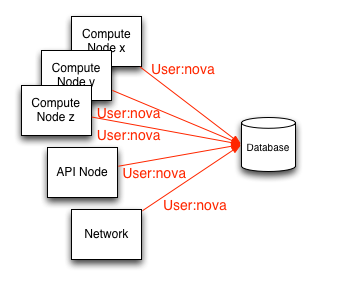
Nova-conductor
Compute nodes are the least trusted services in OpenStack because they host tenant instances. The nova-conductor service was introduced as a database proxy, acting as an intermediary between compute nodes and the database. We will discuss its consequences later in this chapter.
We strongly recommend:
- All database communication is isolated from the management network
- Use TLS to protect communication
- Create unique database user accounts for each OpenStack service endpoint (as shown in the figure below)
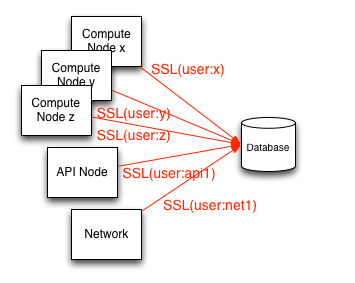
Database authentication and access control
Given the risks of accessing the database, we strongly recommend creating unique database user accounts for each node that needs to access the database. Doing so helps with better analysis and auditing to ensure compliance, or if a node is compromised, by isolating compromised hosts by deleting that node's access to the database when it is detected. When creating these per-service endpoint database user accounts, care should be taken to ensure they are configured to require TLS. Alternatively, for enhanced security, it is recommended to configure database accounts using X.509 certificate authentication in addition to username and password.
Permissions
A separate database administrator (DBA) account should be created and protected, which has full permissions to create/delete databases, create user accounts, and update user permissions. This simple separation of responsibilities approach helps prevent accidental misconfiguration, reduces risk, and limits the scope of damage.
The permissions of database user accounts created for OpenStack services and each node should be limited to databases related to the service to which that node belongs.
Requiring user accounts to require SSL transport
Configuration example #1: (MySQL)
GRANT ALL ON dbname.* to 'compute01'@'hostname' IDENTIFIED BY 'NOVA_DBPASS' REQUIRE SSL;Configuration example #2: (PostgreSQL)
In the pg_hba.conf file:
hostssl dbname compute01 hostname md5Note that this command only adds the capability to communicate over SSL and is non-exclusive. Other access methods that may allow unencrypted transport should be disabled so that SSL is the only access method.
The md5 parameter defines the authentication method as hashed passwords. We provide a secure authentication example in the following section.
OpenStack service database configuration
If the database server is configured to use TLS transport, the certificate authority information for the initial connection string in SQLAlchemy queries needs to be specified.
MySQL :sql_connection string example
sql_connection = mysql://compute01:NOVA_DBPASS@localhost/nova?charset=utf8&ssl_ca=/etc/mysql/cacert.pemAuthentication using X.509 certificates
Security can be enhanced by requiring authentication using X.509 client certificates. Authenticating to a database in this way provides better identity assurance for clients establishing connections to the database and ensures that communication is encrypted.
Configuration example #1: (MySQL)
GRANT ALL on dbname.* to 'compute01'@'hostname' IDENTIFIED BY 'NOVA_DBPASS' REQUIRE SUBJECT
'/C=XX/ST=YYY/L=ZZZZ/O=cloudycloud/CN=compute01' AND ISSUER
'/C=XX/ST=YYY/L=ZZZZ/O=cloudycloud/CN=cloud-ca';
Configuration example #2: (PostgreSQL)
hostssl dbname compute01 hostname certOpenStack service database configuration
If the database server is configured to require X.509 certificate authentication, the corresponding SQLAlchemy query parameters need to be specified for the database backend. These parameters specify the certificate, private key, and certificate authority information for the initial connection string.
MySQL X.509 certificate authentication :sql_connection string example:
sql_connection = mysql://compute01:NOVA_DBPASS@localhost/nova?
charset=utf8&ssl_ca = /etc/mysql/cacert.pem&ssl_cert=/etc/mysql/server-cert.pem&ssl_key=/etc/mysql/server-key.pem
Nova-conductor
OpenStack Compute provides a sub-service called nova-conductor for proxying database connections, whose primary purpose is to have nova compute nodes connect to nova-conductor to meet data persistence needs rather than communicating directly with the database.
Nova-conductor receives requests via RPC and performs operations on behalf of the calling service without granting fine-grained access to the database, its tables, or the data within them. Nova-conductor essentially abstracts direct database access from compute nodes.
The advantage of this abstraction is that it restricts services to performing methods using parameters, similar to stored procedures, thereby preventing mass system direct access to or modification of database data. This is done without these procedures being stored or executed within the context or scope of the database itself, which is a common criticism of typical stored procedures.
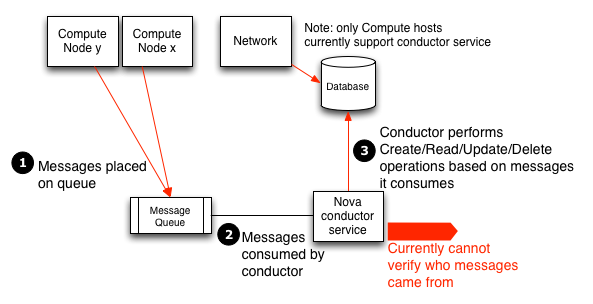
Unfortunately, this solution complicates the task of enabling finer-grained access control and auditing data access capabilities. Because the nova-conductor service receives requests via RPC, it highlights the importance of improving message-passing security. Any node with access to the message queue can execute the methods provided by nova-conductor and effectively modify the database.
Note that since nova-conductor only applies to OpenStack Compute, direct database access from compute hosts may still be required for the operation of other OpenStack components (such as Telemetry, networking, and block storage).
To disable nova-conductor, put the following in the nova.conf file (on the compute host):
[conductor]
use_local = true
Database transport security
This chapter describes issues related to network communication between database servers. This includes IP address binding and using TLS to encrypt network traffic.
Database server IP address binding
To isolate sensitive database communication between services and the database, it is strongly recommended that the database server be configured to only allow communication with the database through an isolated management network. This is achieved by restricting the database server to bind the network socket interface or IP address for incoming client connections.
Restricting MySQL bind address
In my.cnf:
[mysqld]
...
bind-address <ip address or hostname of management network interface>
Restricting PostgreSQL listen address
In postgresql.conf:
listen_addresses = <ip address or hostname of management network interface>Database transport
In addition to restricting database communication to the management network, we also strongly recommend that cloud administrators configure their database backends to require TLS. Using TLS for database client connections protects communication from tampering and eavesdropping. As the next section will discuss, using TLS also provides a framework for performing database user authentication through X.509 certificates, commonly referred to as PKI. The following is a guide on how to configure TLS for the two popular database backends MySQL and PostgreSQL.
Note
When installing certificate and key files, ensure that file permissions are restricted, such as `chmod 0600`, and ownership is limited to the database daemon user to prevent unauthorized access by other processes and users on the database server.MySQL SSL configuration
The following lines should be added to the system-wide MySQL configuration file:
In my.cnf:
[[mysqld]]
...
ssl-ca = /path/to/ssl/cacert.pem
ssl-cert = /path/to/ssl/server-cert.pem
ssl-key = /path/to/ssl/server-key.pem
(Optional) If you wish to restrict the SSL cipher set used for encrypted connections. For cipher lists and syntax for specifying cipher strings, refer to ciphers:
ssl-cipher = 'cipher:list'PostgreSQL SSL configuration
The following lines should be added to the system-wide PostgreSQL configuration file. postgresql.conf
ssl = true(Optional) If you wish to restrict the SSL cipher set used for encrypted connections. For cipher lists and syntax for specifying cipher strings, refer to ciphers:
ssl-ciphers = 'cipher:list'The server certificate, key, and Certificate Authority (CA) files should be placed in the $PGDATA directory of the following files:
$PGDATA/server.crt- Server certificate$PGDATA/server.key- Private key corresponding toserver.crt$PGDATA/root.crt- Trusted certificate authority$PGDATA/root.crl- Certificate revocation list
Tenant Data Privacy
OpenStack is designed to support multi-tenancy, and these tenants are likely to have different data requirements. As a cloud builder or operator, you must ensure that your OpenStack environment addresses data privacy issues and regulations. In this chapter, we discuss data residency and disposal related to OpenStack implementations.
- Data privacy issues
- Data residency
- Data disposal
- Data encryption
- Volume encryption
- Ephemeral disk encryption
- Object storage objects
- Block storage performance and backends
- Network data
- Key management
- Bibliography:
Data privacy issues
Data residency
Over the past few years, data privacy and isolation have been recognized as major obstacles to cloud adoption. In the past, concerns about who owns data in the cloud and whether cloud operators can be trusted as final custodians of this data have been significant issues.
Many OpenStack services maintain data and metadata belonging to tenants or referencing tenant information.
Tenant data stored in OpenStack clouds may include the following items:
- Object storage objects
- Compute instance ephemeral file system storage
- Compute instance memory
- Block storage volume data
- Public keys for compute access
- VM images in the Image service
- Compute snapshots
- Data passed to OpenStack Compute through configuration drive extensions
Metadata stored by OpenStack clouds includes the following non-exhaustive items:
- Organization name
- User's "real name"
- The number or size of running instances, buckets, objects, volumes, and other quota-related items
- Hours of running instances or storing data
- User's IP address
- Internally generated private keys used for compute image bundling
Data disposal
OpenStack operators should strive to provide a certain level of tenant data disposal assurance. Best practices recommend that operators clean up cloud system media (digital and non-digital) before disposal, release from organizational control, or release for reuse. Given the specific security domain and sensitivity of information, cleanup methods should implement appropriate levels of strength and integrity.
"The cleanup process removes information from the media so that it cannot be retrieved or reconstructed. Cleanup techniques, including clearing, purging, cryptographic erasure, and destruction, prevent disclosure of information to unauthorized individuals when reusing or releasing such media for disposal. NIST Special Publication 800-53 Revision 4
NIST adopts general data disposal and cleanup guidelines in recommended security controls. Cloud operators should:
- Track, record, and verify media cleanup and disposal operations.
- Test cleanup equipment and procedures to verify they perform as expected.
- Clean portable removable storage devices before connecting them to cloud infrastructure.
- Destroy cloud system media that cannot be cleaned.
In OpenStack deployments, you need to address the following issues:
- Secure data erasure
- Instance memory cleanup
- Block storage volume data
- Compute instance ephemeral storage
- Bare metal server cleanup
Data not securely deleted
In OpenStack, certain data may be deleted but is not considered securely deleted in the context of the NIST standard above. This typically applies to most or all of the defined metadata and information stored in the database. This can be fixed through automated vacuuming and periodic free space erasure through database and/or system configuration.
Instance memory cleanup
The handling of instance memory is hypervisor-specific. This behavior is not defined in OpenStack Compute, although hypervisors are generally expected to make best efforts to clean up memory when deleting and/or creating instances.
Xen explicitly allocates dedicated memory regions for instances and cleans up data when instances (or domains in Xen terminology) are destroyed. KVM largely relies on Linux page management; a set of complex rules related to KVM paging are defined in KVM documentation.
Note that using Xen's memory ballooning feature may lead to information leakage. We strongly recommend avoiding this feature.
For these and other hypervisors, we recommend referring to hypervisor-specific documentation.
Cinder volume data
The use of OpenStack volume encryption is strongly recommended. This is discussed in the "Data Encryption" section under "Volume Encryption" below. When using this feature, data destruction is accomplished by securely deleting encryption keys. End users can select this feature when creating volumes, but note that the administrator must first perform a one-time setup of volume encryption. For instructions on this setup, refer to "Volume Encryption" under the "Block Storage" section of the "Configuration Reference."
If the OpenStack volume encryption feature is not used, other methods are usually more difficult to enable. If a backend plugin is used, there may be independent encryption methods or non-standard overlay solutions. OpenStack Block Storage plugins store data in various ways. Many plugins are vendor or technology specific, while others are more DIY solutions around file systems (such as LVM or ZFS). Methods for securely destroying data vary by plugin, by vendor solution, and by file system.
Some backends (such as ZFS) support copy-on-write to prevent data leakage. In these cases, reading from never-written blocks will always return zero. Other backends (such as LVM) may not inherently support this feature, so the block storage plugin is responsible for overwriting previously written blocks before handing them to users. Be sure to check what guarantees your chosen volume backend provides and see what intermediaries are available for guarantees not provided.
Image service delayed delete feature
The OpenStack Image service has a delayed delete feature that waits for image deletion for a defined period. If there are security concerns, it is recommended to disable this feature by editing the etc/glance/glance-api.conf file and setting the delayed_delete option to False.
Compute soft delete feature
OpenStack Compute has a soft delete feature that keeps deleted instances in a soft-deleted state for a defined period. Instances can be recovered during this period. To disable the soft delete feature, edit the etc/nova/nova.conf file and leave the reclaim_instance_interval option empty.
Compute instance ephemeral storage
Note that the OpenStack ephemeral disk encryption feature provides an improved method for ephemeral storage privacy and isolation, both during active use and when destroying data. Like encrypted block storage, data can be effectively destroyed simply by deleting the encryption key.
Providing alternative measures for data privacy when creating and destroying ephemeral storage will depend to some extent on the chosen hypervisor and OpenStack Compute plugin.
The libvirt plugin for compute can maintain ephemeral storage directly on the file system or in LVM. File system storage typically does not overwrite data when deleted, but can guarantee that dirty disk regions are not provided to users.
When using LVM-backed block-based ephemeral storage, OpenStack Compute software must securely erase blocks to prevent information leakage. Information leakage vulnerabilities related to improperly erased ephemeral block storage devices have existed in the past.
File system storage is a more secure solution for ephemeral block storage devices than LVM, as dirty disk regions cannot be provided to users. However, note that user data will not be destroyed, so it is recommended to encrypt the backing file system.
Bare metal server cleanup
The bare metal server driver for compute is under development and has since moved to a separate project called ironic. At the time of writing, ironically, there seems to be no solution for cleaning up tenant data residing in physical hardware.
Additionally, tenants of bare metal systems can modify system firmware. TPM technology as described in Secure Boot provides a solution for detecting unauthorized firmware changes.
Data encryption
This option is available for implementers to encrypt tenant data, whether this data is stored on disk or transmitted over the network, such as the OpenStack volume encryption feature described below. This goes beyond the general recommendation that users encrypt their own data before sending it to a provider.
The importance of encrypting data on behalf of tenants is largely related to the risk that providers may face attackers accessing tenant data. There may be government requirements, policy requirements for each strategy, private contracts, or even case law related to private contracts with public cloud providers. It is recommended to conduct a risk assessment and seek legal counsel before selecting a tenant encryption strategy.
Per-instance or per-object encryption is preferable to encryption at the project, per-tenant, per-host, and per-cloud aggregate levels in descending order. This recommendation is contrary to the complexity and difficulty of implementation. Currently, in some projects, it is difficult or impossible to implement encryption as loose as per-tenant. We recommend that implementers make their best effort to encrypt tenant data.
Generally, data encryption is positively correlated with the ability to reliably destroy tenant and per-instance data by simply discarding the key. It should be noted that when doing so, it becomes very important to destroy these keys in a reliable and secure manner.
Opportunities to encrypt data for users are present:
- Object storage objects
- Network data
Volume encryption
The volume encryption feature in OpenStack supports per-tenant privacy protection. Starting from the Kilo release, the following features are supported:
- Create and use encrypted volume types, launch via dashboard or command line interface
- Enable encryption and select parameters such as encryption algorithm and key size
- Volume data contained in iSCSI packets is encrypted
- Support for encrypted backups if the original volume is encrypted
- Dashboard indicates volume encryption status. Includes indication that volume is encrypted and includes encryption parameters such as algorithm and key size
- Interact with the key management service through secure wrappers
- Backend key storage supports volume encryption for enhanced security (e.g., Hardware Security Modules (HSM) or KMIP servers can be used as barbican backend key storage)
Ephemeral disk encryption
The ephemeral disk encryption feature addresses data privacy issues. Ephemeral disks are temporary workspaces used by the virtual host operating system. Without encryption, sensitive user information may be accessible on this disk, and residual information may remain after the disk is unmounted. Starting from the Kilo release, the following ephemeral disk encryption features are supported:
- Create and use encrypted LVM ephemeral disks (note: currently OpenStack Compute service only supports encrypted ephemeral disks in LVM format)
- Compute configuration,
nova.confhas the following default parameters in the "[ephemeral_storage_encryption]" section- Option: 'cipher = AES-XTS-plain64'
- This field sets the cipher and mode used for encrypting ephemeral storage. NIST recommends AES-XTS specifically for disk storage, which is shorthand for AES encryption using XTS encryption mode. Available ciphers depend on kernel support. On the command line, enter "cryptsetup benchmark" to determine available options (and view benchmark results), or go to /proc/crypto
- Option: 'enabled = false'
- To use ephemeral disk encryption, set the option: 'enabled = true'
- Option: 'key_size = 512'
- Note that the backend key manager may have key size limitations, and 'key_size = 256' may be required, which only provides a 128-bit AES key size. In addition to the encryption key required by AES, XTS also requires its own "tweak key". This is usually expressed as a single large key. In this case, with the 512-bit setting, AES uses 256 bits and XTS uses 256 bits. (See NIST)
- Option: 'cipher = AES-XTS-plain64'
- Compute configuration,
- Interact with the key management service through secure wrappers
- Key management service will support data isolation by providing ephemeral disk encryption keys for each tenant
- Backend key storage supports ephemeral disk encryption for enhanced security (e.g., HSM or KMIP servers can be used as barbican backend key storage)
- When using the key management service, when ephemeral disks are no longer needed, simply deleting the key replaces overwriting the ephemeral disk storage area
Object storage objects
Object storage (swift) supports optional encryption of static object data on storage nodes. Object data encryption is designed to reduce the risk of reading user data when unauthorized parties gain physical access to disks.
Static data encryption is implemented by middleware, which may be included in the proxy server WSGI pipeline. This feature is internal to the swift cluster and is not exposed through the API. Clients are unaware that swift services internally encrypt this data; internally encrypted data should not be returned to clients through the swift API.
The following data is encrypted at rest in swift:
- Object content. For example, the content of the object PUT request body
- Entity tags (ETag) of objects with non-zero content
- All custom user object metadata values. For example, metadata sent with PUT or POST request headers using the
X-Object-Meta-prefix
Any data or metadata not included in the above list is not encrypted, including:
- Account, container, and object names
- Account and container custom user metadata values
- All custom user metadata names
- Object content type values
- Object size
- System metadata
For more information on deploying, operating, or implementing object storage encryption, refer to the swift developer documentation on object encryption.
Block storage performance and backends
When the operating system is enabled, hardware acceleration features available in current Intel and AMD processors can be used to enhance OpenStack Volume Encryption performance. Both the OpenStack volume encryption feature and the OpenStack ephemeral disk encryption feature use dm-crypt to protect volume data. dm-crypt is a transparent disk encryption feature in Linux kernel version 2.6 and later. When volume encryption is enabled, encrypted data is sent via iSCSI to block storage, thereby protecting both data in transit and data at rest. When hardware acceleration is used, the performance impact of both encryption features is minimized.
While we recommend using the OpenStack volume encryption feature, block storage supports multiple alternative backends for providing mountable volumes, some of which may also provide volume encryption. Due to the large number of backends and the need to obtain information from each vendor, specifying recommendations for implementing encryption in any one vendor is beyond the scope of this guide.
Network data
Tenant data for compute can be encrypted via IPsec or other tunnels. This is not common or standard in OpenStack, but it is an option for motivated and interested implementers.
Similarly, encrypted data remains encrypted when transmitted over the network.
Key management
To address the frequently mentioned tenant data privacy and limiting cloud provider liability issues, the OpenStack community has a growing interest in making data encryption more widespread. For end users, encrypting their data before saving it to the cloud is relatively easy, which is a viable path for tenant objects such as media files, database archives, etc. In some cases, client-side encryption is used to encrypt data saved by virtualization technology, which requires client interaction (such as providing keys) to decrypt data for future use. To seamlessly protect data and make it accessible without burdening customers with managing their keys, and interactively provide key management services in OpenStack. Providing encryption and key management services as part of OpenStack can simplify the adoption of static data security and address customer concerns about privacy or data misuse, while also limiting cloud provider liability. This helps reduce the liability of providers when handling tenant data during incident investigations in multi-tenant public clouds.
Volume encryption and ephemeral disk encryption features rely on a key management service (such as barbican) to create and securely store keys. The key manager is pluggable to facilitate deployments that require third-party Hardware Security Modules (HSM) or using the Key Management Interoperability Protocol (KMIP), which is supported by an open source project called PyKMIP.
Bibliography
- OpenStack.org, Welcome to the barbican developer documentation! 2014. Barbican developer documentation
- oasis-open.org, OASIS Key Management Interoperability Protocol (KMIP). 2014. KMIP
- PyKMIP library
- Confidential management Confidential management
Instance Security Management
One of the advantages of running instances in a virtualized environment is that it opens up new opportunities for security controls that are usually not available when deployed on bare metal. Several techniques can be applied to the virtualization stack to bring better information assurance to cloud tenants.
OpenStack deployments or users with strong security requirements may need to consider deploying these techniques. Not all scenarios apply. In some cases, the use of technology in the cloud may be excluded due to prescriptive business requirements. Similarly, certain technologies inspect instance data, such as running state, which may be undesirable for system users.
In this chapter, we explore these technologies and describe scenarios where they can be used to enhance instance or underlying instance security. We also try to highlight places where there may be privacy concerns. These include data injection, introspection, or providing entropy sources. In this section, we focus on the following additional security services:
- Entropy for instances
- Scheduling instances to nodes
- Trusted images
- Instance migration
- Monitoring, alerts, and reporting
- Updates and patches
- Firewalls and other host-based security controls
- Security services for instances
- Entropy for instances
- Scheduling instances to nodes
- Trusted images
- Instance migration
- Monitoring, alerts, and reporting
- Updates and patches
- Firewalls and other host-based security controls
Security services for instances
Entropy for instances
We consider entropy to be the quality and source of random data available to instances. Cryptographic techniques usually rely heavily on randomness, requiring high-quality entropy pools to draw from. Virtual machines often have difficulty obtaining sufficient entropy to support these operations, called entropy starvation. Entropy starvation can manifest as seemingly unrelated things. For example, slow boot times may be caused by instances waiting for SSH key generation. Entropy starvation may also cause users to use lower-quality entropy sources in instances, reducing the overall security of applications running in the cloud.
Fortunately, cloud architects can solve these problems by providing high-quality entropy sources for cloud instances. This can be achieved by having sufficient Hardware Random Number Generators (HRNG) in the cloud to support instances. In this case, "sufficient" is somewhat domain-specific. For daily operations, modern HRNGs may produce enough entropy to support 50-100 compute nodes. High-bandwidth HRNGs (such as those provided by Intel Ivy Bridge and newer processors with RdRand instructions) may handle more nodes. For a given cloud, architects need to understand application requirements to ensure sufficient entropy is available.
Virtio RNG is a random number generator that defaults to using /dev/random as the entropy source but can be configured to use hardware RNG or tools like the Entropy Gathering Daemon (EGD) to provide a method for fair and secure distribution of entropy across distributed systems. Virtio RNG is enabled using the hw_rng attribute in the metadata used to create instances.
Scheduling instances to nodes
Before creating an instance, a host must be selected for image instantiation. This selection is determined by how nova-scheduler dispatches compute and volume requests.
This is the FilterScheduler, the default scheduler for OpenStack Compute, although other schedulers exist (see the Scheduling section in the OpenStack Configuration Reference). This works with "filter hints" to decide where instances are launched. This host selection process allows administrators to meet many different security and compliance requirements. For example, depending on the type of cloud deployment, if data isolation is the primary concern, you can choose to let tenant instances reside on the same host as much as possible. Conversely, for availability or fault tolerance reasons, you can try to have tenant instances reside on as many different hosts as possible.
Filter schedulers are divided into four main categories:
Resource-based filters
These filters create instances based on the utilization of a set of hypervisor hosts and can trigger on available or used attributes such as RAM, IO, or CPU utilization.
Image-based filters
This delegates instance creation based on the image used (e.g., the operating system of the VM or the type of image used).
Environment-based filters
This filter creates instances based on external details, such as being within a specific IP range, across availability zones, or on the same host as other instances.
Custom conditions
This filter delegates instance creation based on conditions provided by users or administrators, such as trust or metadata analysis.
Multiple filters can be applied simultaneously. For example, a filter is used to ensure that instances are created on members of a specific set of hosts, and the ServerGroupAntiAffinity filter is used to ensure that the same instance is not created on another set of specific hosts. ServerGroupAffinity These filters should be carefully analyzed to ensure they do not conflict with each other and cause rules that prevent instance creation.
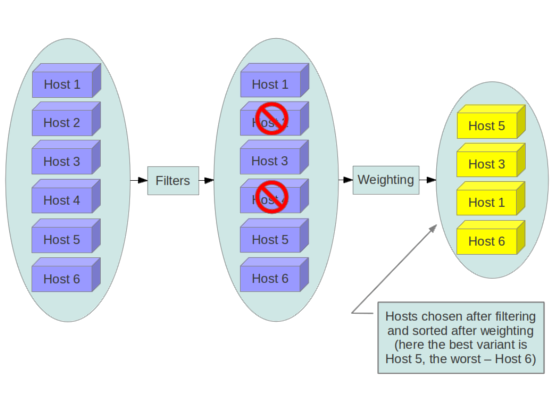
GroupAffinity and GroupAntiAffinity filters conflict and should not be enabled simultaneously.
The DiskFilter filter is capable of over-subscribing disk space. While this is usually not a problem, it can be an issue for thin-provisioned storage devices, and this filter should be used with well-tested quotas.
We recommend that you disable filters that can analyze user-provided or actionable content, such as metadata.
Trusted images
In cloud environments, users use pre-installed images or images they upload themselves. In both cases, users should be able to ensure that the images they are using have not been tampered with. The ability to verify images is a fundamental requirement for security. A chain of trust is required from the image source to the target where the image is used. This can be achieved by signing images obtained from trusted sources and verifying signatures before use. Various methods for obtaining and creating verified images are discussed below, followed by an introduction to image signature verification functionality.
Image creation process
OpenStack documentation provides guidance on how to create images and upload them to the Image service. Additionally, it is assumed that you have a process for installing and hardening operating systems. Therefore, the following provides additional guidance on how to ensure images are securely transmitted to OpenStack. There are multiple options for obtaining images. Each step has specific steps that help verify image provenance.
The first option is to obtain boot media from a trusted source.
$ mkdir -p /tmp/download_directorycd /tmp/download_directory
$ wget http://mirror.anl.gov/pub/ubuntu-iso/CDs/precise/ubuntu-12.04.2-server-amd64.iso
$ wget http://mirror.anl.gov/pub/ubuntu-iso/CDs/precise/SHA256SUMS
$ wget http://mirror.anl.gov/pub/ubuntu-iso/CDs/precise/SHA256SUMS.gpg
$ gpg --keyserver hkp://keyserver.ubuntu.com --recv-keys 0xFBB75451
$ gpg --verify SHA256SUMS.gpg SHA256SUMSsha256sum -c SHA256SUMS 2>&1 | grep OK
The second option is to use the OpenStack VM image guide. In this case, you need to follow your organization's operating system hardening guidelines or guidelines provided by a trusted third party (such as Linux STIG).
The final option is to use an automated image builder. The following example uses the Oz image builder. The OpenStack community has recently created a new tool worth exploring: disk-image-builder. We have not yet evaluated this tool from a security perspective.
RHEL 6 CCE-26976-1 example, which helps implement NIST 800-53 Section AC-19(d) in OZ.
<template>
<name>centos64</name>
<os>
  <name>RHEL-6</name>
  <version>4</version>
  <arch>x86_64</arch>
  <install type='iso'>
  <iso>http://trusted_local_iso_mirror/isos/x86_64/RHEL-6.4-x86_64-bin-DVD1.iso</iso>
  </install>
  <rootpw>CHANGE THIS TO YOUR ROOT PASSWORD</rootpw>
</os>
<description>RHEL 6.4 x86_64</description>
<repositories>
  <repository name='epel-6'>
  <url>http://download.fedoraproject.org/pub/epel/6/$basearch</url>
  <signed>no</signed>
  </repository>
</repositories>
<packages>
  <package name='epel-release'/>
  <package name='cloud-utils'/>
  <package name='cloud-init'/>
</packages>
<commands>
  <command name='update'>
  yum update
  yum clean all
  rm -rf /var/log/yum
  sed -i '/^HWADDR/d' /etc/sysconfig/network-scripts/ifcfg-eth0
  echo -n > /etc/udev/rules.d/70-persistent-net.rules
  echo -n > /lib/udev/rules.d/75-persistent-net-generator.rules
  chkconfig --level 0123456 autofs off
  service autofs stop
  </command>
</commands>
</template>
It is recommended to avoid manual image building processes as they are complex and error-prone. Additionally, using automated systems like Oz for image building, or using configuration management utilities like Chef or Puppet for post-boot image hardening, enables you to generate consistent images and track whether base images comply with their respective hardening guidelines over time.
If you subscribe to a public cloud service, you should contact the cloud provider to get an overview of the process used to generate their default images. If the provider allows you to upload your own images, you need to ensure that you can verify that images have not been modified before using them to create instances. For this, refer to the section on image signature verification below, and if signatures are not available, refer to the following paragraphs.
Images are transmitted from the Image service on nodes to the Compute service. This transmission should be protected by running over TLS. Once images are on nodes, they are verified using basic checksums and then their disks are expanded according to the size of the instance to be launched. If the same image is later launched on this node with the same instance size, it will be launched from the same expanded image. Since this expanded image is not re-verified before launch by default, it may have been tampered with. Users will not be aware of tampering unless manual inspection of files in the generated image is performed.
Image signature verification
Some features related to image signatures are now available in OpenStack. Starting from the Mitaka release, the Image service can verify these signed images, and to provide a complete chain of trust, the Compute service can optionally perform image signature verification before launching images. Successful signature verification before instance launch ensures that signed images have not been changed. When this feature is enabled, unauthorized image modifications (such as modifying images to include malware or rootkits) can be detected.
Administrators can enable instance signature verification by setting the verify_glance_signatures flag to True in the /etc/nova/nova.conf file. When enabled, the Compute service automatically verifies signed instances when retrieving them from the Image service. If this verification fails, the instance will not be launched. The OpenStack Operations Guide provides guidance on how to create and upload signed images and how to use this feature. For more information, see Adding signed images in the Operations Guide.
Instance migration
OpenStack and the underlying virtualization layer provide the ability to migrate instances in real-time between OpenStack nodes, enabling you to perform rolling upgrades of OpenStack compute nodes seamlessly without instance downtime. However, live migration also carries significant risks. To understand the risks involved, the following are the high-level steps performed during live migration:
- Start the instance on the target host
- Transfer memory
- Stop the guest and sync disks
- Transfer state
- Start the guest
Live migration risks
During various stages of the live migration process, the contents of running instances, memory, and disks are transmitted over the network in plain text. Therefore, some risks need to be addressed when using live migration. The following exhaustive list details some of these risks:
- Denial of Service (DoS): If a failure occurs during migration, instances may be lost.
- Data leakage: Memory or disk transfers must be handled securely.
- Data manipulation: If memory or disk transfers are not handled securely, attackers can manipulate user data during migration.
- Code injection: If memory or disk transfers are not handled securely, attackers can manipulate executables in disks or memory during migration.
Live migration mitigations
There are several methods to mitigate some of the risks associated with live migration. The following list details some of these methods:
- Disable live migration
- Isolated migration network
- Encrypt live migration
Disable live migration
Currently, live migration is enabled by default in OpenStack. Live migration can be disabled by adding the following lines to the nova policy.json file:
{
    "compute_extension:admin_actions:migrate": "!",
    "compute_extension:admin_actions:migrateLive": "!",
}
Migration network
As a general practice, live migration traffic should be restricted to the management security domain, see Security boundaries and threats. For live migration traffic, due to its plain text nature and the fact that you are transmitting the disks and memory contents of running instances, it is recommended to further isolate live migration traffic to a dedicated network. Isolating traffic to a dedicated network can reduce exposure risk.
Encrypt live migration
If there is a sufficient business case to keep live migration enabled, libvirtd can provide encrypted tunnels for live migration. However, this feature is currently not exposed in the OpenStack Dashboard or nova-client command, and can only be accessed through manual libvirtd configuration. The live migration process will then change to the following high-level steps:
- Instance data is copied from the hypervisor to libvirtd.
- An encrypted tunnel is created between libvirtd processes on the source and target hosts.
- The target libvirtd host copies the instance back to the underlying hypervisor.
Monitoring, alerts, and reporting
Since OpenStack virtual machines are server images capable of being replicated across hosts, best practices for logging apply equally to physical and virtual hosts. Operating system-level and application-level events should be logged, including events related to host and data access, user additions and deletions, permission changes, and other events specified by the environment. Ideally, you can configure these logs to be exported to a log aggregator that collects log events, correlates them for analysis, and stores them for reference or further action. A common tool for achieving this is the ELK stack, which consists of Elasticsearch, Logstash, and Kibana.
These logs should be reviewed regularly, such as being viewed in real-time by a Network Operations Center (NOC), or if the environment is not large enough to require a NOC, logs should undergo a regular log review process.
Many times, interesting events trigger alerts that are sent to responders for action. Usually, this alert takes the form of an email containing relevant messages. An interesting event could be a major failure or a known indicator of a pending failure. Two common utilities for managing alerts are Nagios and Zabbix.
Updates and patches
Hypervisors run independent virtual machines. This hypervisor can run in the operating system or directly on hardware (called bare metal). Updates to the hypervisor do not propagate down to virtual machines. For example, if the deployment uses XenServer and has a set of Debian virtual machines, updates to XenServer do not update anything running on the Debian virtual machines.
Therefore, we recommend assigning clear ownership of virtual machines and having these owners responsible for hardening, deploying, and the continuous functioning of the virtual machines. We also recommend deploying updates regularly. These patches should be tested in an environment as close to production as possible to ensure the stability of the issue behind the patch and the solution.
Firewalls and other host-based security controls
The most common operating systems include host-based firewalls to enhance security. While we recommend that virtual machines run as few applications as possible (to the point of single-purpose instances if possible), all applications running on virtual machines should be analyzed to determine which system resources the applications need access to, the minimum privilege level required to run, and the expected network traffic entering and leaving the virtual machine. This expected traffic should be added to the host-based firewall as allowed traffic (or whitelisted), along with any necessary logging and administrative communication such as SSH or RDP. All other traffic should be explicitly denied in the firewall configuration.
On Linux virtual machines, the above application configuration files can be combined with tools like audit2allow to build SELinux policies to further protect sensitive system information on most Linux distributions. SELinux uses a combination of users, policies, and security contexts to partition the resources that applications need to run and distinguish them from other unnecessary system resources.
OpenStack provides security groups for hosts and networks to add defense-in-depth for virtual machines in a given project. These rules are similar to host-based firewalls in that they allow or deny incoming traffic based on port, protocol, and address, but security group rules only apply to incoming traffic, while host-based firewall rules can apply to both incoming and outgoing traffic. Host and network security group rules may also conflict and deny legitimate traffic. We recommend ensuring that security groups are correctly configured for the networks being used. For details, see Security groups in this guide.
Monitoring and Logging
In cloud environments, hardware, operating systems, hypervisors, OpenStack services, cloud user activities (such as creating instances and attaching storage), networks, and end users using applications running on various instances are all mixed together.
The basics of logging: configuring, setting log levels, log file locations, how to use and customize logging, and how to collect logs centrally, are all well covered in the OpenStack Operations Guide.
- Forensics and event response
- Monitoring use cases
- Bibliography
Forensics and event response
The generation and collection of logs is an important part of securely monitoring OpenStack infrastructure. Logs provide visibility into the daily operations of administrators, tenants, and guests, as well as activities in compute, networking, and storage and other components that make up an OpenStack deployment.
Logs are valuable not only for proactive security and continuous compliance activities but are also a valuable source of information for investigating and responding to incidents.
For example, analyzing access logs from the Identity service or its alternative authentication system alerts us to failed logins, their frequency, source IP, whether events are limited to selected accounts, and other relevant information. Log analysis supports detection.
Steps can be taken to mitigate potential malicious activities, such as blacklisting IP addresses, recommending password hardening for users, or deactivating accounts deemed dormant.
Monitoring use cases
Event monitoring is a more proactive approach to protecting the environment, providing real-time detection and response. There are several tools available to assist with monitoring.
For OpenStack cloud instances, we need to monitor hardware, OpenStack services, and cloud resource usage. The latter stems from the desire to be elastic to adapt to dynamic user needs.
The following are several important use cases to consider when implementing log aggregation, analysis, and monitoring. These use cases can be implemented and monitored through various applications, tools, or scripts. There are open source and commercial solutions, and some operators develop their own internal solutions. These tools and scripts can generate events that can be sent to administrators via email or viewed in integrated dashboards. Be sure to consider other use cases that may apply to your specific network and behaviors you may consider abnormal.
- Detecting missing log generation is a very high-value event. Such events indicate service failure or even that an intruder temporarily disabled logging or modified log levels to hide their tracks.
- Application events (such as unscheduled startup or stop events) are also events to monitor and check for potential security concerns.
- Operating system events on OpenStack service machines (such as user logins or restarts) also provide valuable insights into the correct and incorrect use of the system.
- The ability to detect load on OpenStack servers can also respond by introducing additional servers for load balancing to ensure high availability.
- Other actionable events include network bridge shutdown, IP tables being flushed on compute nodes, and the resulting loss of access to instances, leading to customer dissatisfaction.
- To reduce the security risk of orphaned instances when users, tenants, or domains are deleted from the Identity service, we discuss generating notifications in the system and having OpenStack components appropriately respond to these events, such as terminating instances, detaching volumes, reclaiming CPU and storage resources, etc.
Clouds will host many virtual instances, and monitoring these instances goes beyond hardware monitoring and log files that may only contain CRUD events.
Security monitoring controls (such as intrusion detection software, antivirus software, and spyware detection and removal utilities) can generate logs showing when and how attacks or intrusions occurred. Deploying these tools on cloud computers provides value and protection. Cloud users, i.e., users running instances on the cloud, may also want to run such tools on their instances.
Bibliography
Siwczak, Piotr, Some practical considerations for monitoring in OpenStack clouds. 2012.
blog.sflow.com, sflow: Host sFlow distributed agent. 2012.
blog.sflow.com, sflow: LAN and WAN. 2009.
blog.sflow.com, sflow: Quickly detect large flows sFlow vs NetFlow/IPFIX. 2013.
Compliance
OpenStack deployments may require compliance activities for various purposes such as regulatory and legal requirements, customer needs, privacy considerations, and security best practices. Compliance functions are important for businesses and their customers. Compliance means adhering to regulations, norms, standards, and laws. It is also used to describe the organizational state related to assessment, auditing, and certification. When done properly, compliance can unify and strengthen the other security topics discussed in this guide.
This chapter has several objectives:
- Review common security principles.
- Discuss common control frameworks and certification resources for achieving industry or regulatory certifications.
- Serve as a reference for auditors when evaluating OpenStack deployments.
- Introduce privacy considerations specific to OpenStack and cloud environments.
- Compliance overview
- Security principles
- Common control frameworks
- Audit references
- Understanding the audit process
- Determining audit scope
- Audit phases
- Internal audit
- Preparing for external audit
- External audit
- Compliance maintenance
- Compliance activities
- Information Security Management System (ISMS)
- Risk assessment
- Access and log review
- Backup and disaster recovery
- Security training
- Security review
- Vulnerability management
- Data classification
- Exception procedures
- Certifications and compliance statements
- Commercial standards
- Government standards
- Privacy
Compliance overview
Security principles
Industry-standard security principles provide benchmarks for compliance certification and attestation. If these principles are considered and referenced throughout the OpenStack deployment process, certification activities can be simplified.
Defense in depth
Identify where risks exist in the cloud architecture and apply controls to reduce those risks. In areas of significant concern, defense in depth provides multiple complementary controls that bring risk management to an acceptable level. For example, to ensure adequate isolation between cloud tenants, we recommend hardening QEMU, using hypervisors with SELinux support, implementing mandatory access control policies, and reducing the overall attack surface. The fundamental principle is to harden areas of concern with multiple layers of defense, so that if any layer is compromised, other layers will exist to provide protection and minimize exposure.
Fail securely
In the event of a failure, systems should be configured to fail in a closed security state. For example, if TLS certificate verification fails, i.e., the CNAME does not match the server's DNS name, it should fail securely by cutting off the network connection. In this case, software usually fails in an open manner, allowing connections to continue without CNAME matching, which is not secure and is not recommended.
Least privilege
Only grant the lowest level of access to users and system services. This access is based on roles, responsibilities, and job functions. This least-privilege security principle has been written into multiple international government security policies, such as NIST 800-53 Section AC-6 in the United States.
Separation
Systems should be isolated in such a way that if one computer or system-level service is compromised, the security of other systems remains intact. In practice, enabling and correctly using SELinux helps achieve this goal.
Promote privacy
The amount of information that can be collected about systems and their users should be minimized.
Logging capability
Implement appropriate logging to monitor unauthorized use, event response, and forensics. We strongly recommend that the selected audit subsystem be Common Criteria certified, which provides non-repudiation event logging in most countries.
Common control frameworks
The following is a list of control frameworks that organizations can use to build their security controls.
Cloud Security Alliance (CSA) Cloud Controls Matrix (CCM)
CSA CCM is specifically designed to provide fundamental security principles to guide cloud providers and help potential cloud customers assess the overall security risk of cloud providers. CSA CCM provides a control framework that maintains consistency across 16 security domains. The foundation of the Cloud Controls Matrix lies in its custom relationships with other industry standards, regulations, and control frameworks, such as: ISO 27001:2013, COBIT 5.0, PCI: DSS v3, AICPA 2014 Trust Services Principles and Criteria, and enhanced internal control direction for service organization control reporting.
CSA CCM strengthens the existing information security control environment by reducing security threats and vulnerabilities in the cloud, provides standardized security and operational risk management, and seeks to normalize security expectations, cloud classification and terminology, and security measures implemented in the cloud.
ISO 27001/2:2013 ISO 27001/2:2013 Certification
The ISO 27001 information security standard and certification have been used for years to assess and differentiate whether organizations comply with information security best practices. The standard consists of two parts: a mandatory clause defining the Information Security Management System (ISMS) and Appendix A containing a list of controls organized by domain.
The Information Security Management System maintains the confidentiality, integrity, and availability of information through an applied risk management process, and gives interested parties confidence that risks are adequately managed.
Trust Services Principles
Trust Services is a set of professional certification and advisory services based on a set of core principles and standards for addressing risks and opportunities in IT systems and privacy programs. Usually called SOC audits, these principles define what is required, and organizations are responsible for defining the controls that meet those requirements.
Audit references
OpenStack is innovative in many ways, but the processes used to audit OpenStack deployments are fairly common. Auditors evaluate processes against two criteria: whether controls are effectively designed and whether controls operate effectively. Understanding how auditors assess whether controls are effectively designed and operate will be discussed in the "Understanding the audit process" section.
The most common frameworks used for auditing and evaluating cloud deployments include the ISO 27001/2 information security standards mentioned earlier, ISACA's Control Objectives for Information and Related Technology (COBIT) framework, the Committee of Sponsoring Organizations of the Treadway Commission (COSO), and the Information Technology Infrastructure Library (ITIL). Audits typically include focus areas from one or more of these frameworks. Fortunately, there is significant overlap between these frameworks, so organizations adopting frameworks are well-positioned for audits.
Understanding the audit process
Information systems security compliance relies on the completion of two fundamental processes:
Implementation and operation of security controls
Aligning information systems with in-scope standards and regulations involves internal tasks that must be performed before formal assessment. Auditors may be involved in this status to conduct gap analysis, provide guidance, and increase the likelihood of successful certification.
Independent verification and validation
Before many information systems obtain certification status, neutral third parties need to attest that system security controls have been implemented and operate effectively in compliance with in-scope standards and regulations. Many certifications require periodic audits to maintain continuous certification, which is considered part of overall continuous monitoring practices.
Determining audit scope
Determining the audit scope, specifically which controls are needed and how OpenStack deployments should be designed or modified to meet those controls, should be the initial planning step.
When scoping OpenStack deployments for compliance purposes, controls for sensitive services should be prioritized, such as command and control functions and essential virtualization technologies. Compromise of these facilities may affect the entire OpenStack environment.
Narrowing the scope helps ensure that OpenStack architects establish high-quality security controls tailored to specific deployments, but most importantly, ensures that these practices do not leave gaps or functions in security hardening unaddressed. A common example is the PCI-DSS guideline, where payment-related infrastructure may be subject to security scrutiny, but supporting services are neglected and vulnerable to attack.
When addressing compliance issues, you can improve efficiency and reduce workload by identifying common areas and standards that apply to multiple certifications. Many of the audit principles and guidelines discussed in this book will help identify these controls, in addition to some external entities that provide comprehensive checklists. Here are some examples:
The Cloud Security Alliance Cloud Controls Matrix (CCM) helps cloud providers and consumers assess the overall security of cloud providers. CSA CMM provides a control framework that maps to many industry-recognized standards and regulations, including ISO 27001/2, ISACA, COBIT, PCI, NIST, Jericho Forum, and NERC CIP.
The SCAP Security Guide is another useful reference. This is still an emerging source, but we expect it to develop into a tool with control mappings more focused on U.S. federal government certifications and recommendations. For example, the SCAP Security Guide currently contains some mappings for Security Technical Implementation Guides (STIG) and NIST-800-53.
These control mappings will help identify common control standards across certifications and provide visibility into concentrated issue areas for specific compliance certifications and attestations for both auditors and audited parties.
Audit phases
There are four distinct phases of an audit, although most stakeholders and control owners will only participate in one or two phases. The four phases are planning, fieldwork, reporting, and wrap-up. Each of these phases is discussed below.
The planning phase usually occurs two weeks to six months before fieldwork begins. During this phase, audit items such as timelines, schedules, controls to be assessed, and control owners are discussed and finalized. Concerns about resource availability, impartiality, and cost are also addressed.
The fieldwork phase is the most visible part of the audit. This is where auditors are on-site, interviewing control owners, documenting existing controls, and identifying any issues. It should be noted that auditors will use a two-part process to evaluate existing controls. The first part is assessing the design effectiveness of controls. Here, auditors will assess whether controls can effectively prevent or detect and correct weaknesses and deficiencies. Controls must pass this test to be assessed in the second phase. This is because for controls with ineffective design, there is no need to consider whether they operate effectively. The second part is operational effectiveness. Operational effectiveness testing will determine how controls are applied, the consistency of applying controls, and by whom or in what manner controls are applied. A control may depend on other controls (indirect controls), and if they depend on other controls, auditors may need additional evidence to prove the operational effectiveness of these indirect controls to determine the overall operational effectiveness of the control.
During the reporting phase, management will verify any issues found during fieldwork. For logistical purposes, some activities (such as issue verification) may be performed during the fieldwork phase. Management also needs to provide remediation plans to address issues and ensure they do not recur. A draft overall report will be distributed to stakeholders and management for review. Agreed modifications are incorporated, and the updated draft will be submitted to senior management for review and approval. Once senior management approves the report, the report is finalized and distributed to executive management. Any issues are entered into the issue tracking or risk tracking mechanism used by the organization.
The wrap-up phase is where the audit formally concludes. At this point, management begins remediation activities. Processes and notifications ensure that any audit-related information is moved to a secure repository.
Internal audit
After deploying the cloud, it is time to conduct an internal audit. Now is the time to compare the controls identified above with the design, functionality, and deployment strategies used in the cloud. The goal is to understand how each control is handled and where gaps exist. Document all findings for future reference.
When auditing OpenStack clouds, it is important to understand the multi-tenant environment inherent in OpenStack architecture. Some key areas that need attention include data disposal, hypervisor security, node hardening, and authentication mechanisms.
Preparing for external audit
Once internal audit results look good, it is time to prepare for the external audit. Several key actions need to be taken during this phase, which are outlined below:
- Maintain good records of internal audits. These will prove very useful during external audits, so you can be prepared to answer questions about mapping compliance controls to specific deployments.
- Deploy automated testing tools to ensure the cloud remains compliant over time.
- Select an auditor.
Selecting an auditor can be challenging. Ideally, you are looking for someone with experience in cloud compliance auditing. OpenStack experience is another major advantage. Usually, it is best to get referrals from people who have been through this process. Costs can vary significantly depending on the scope of engagement and the audit firm being considered.
External audit
This is the formal audit process. Auditors will test security controls within the scope of specific certifications and request evidence requirements to prove these controls have been in place during the audit window (for example, SOC 2 audits typically assess security controls over a 6-12 month period). Any control failures will be recorded and documented in the external auditor's final report. Depending on the type of OpenStack deployment, customers may review these reports, so it is very important to avoid control failures. This is why audit preparation is so important.
Compliance maintenance
The process does not end with a single external audit. Most certifications require ongoing compliance activities, meaning the audit process is repeated periodically. We recommend integrating automated compliance verification tools into the cloud to ensure it remains compliant at all times. This should be done in addition to other security monitoring tools. Remember that the goal is both security and compliance. Failure in either of these areas will make future audits very complicated.
Compliance activities
There are many standard activities that will greatly assist the compliance process. This chapter outlines some of the most common compliance activities. These are not specific to OpenStack, but relevant section references in this book are provided as useful context.
Information Security Management System (ISMS)
The Information Security Management System (ISMS) is a comprehensive set of policies and processes created and maintained by organizations to manage risks to information assets. The most common ISMS for cloud deployments is ISO/IEC 27001/2, which provides a solid foundation for security controls and practices to achieve stricter compliance certifications. The standard was updated in 2013 to reflect the increasing use of cloud services and placed greater emphasis on measuring and evaluating the performance of an organization's ISMS.
Risk assessment
Risk assessment frameworks identify risks in organizations or services and specify ownership of those risks, as well as implementation and mitigation strategies. Risks apply to all areas of the service, from technical controls to environmental disaster scenarios and human factors. For example, malicious insiders. Multiple mechanisms can be used to rate risks. For example, likelihood versus impact. OpenStack deployment risk assessments may include control gaps.
Access and log review
Regular access and log reviews are needed to ensure authentication, authorization, and accountability in service deployments. OpenStack-specific guidance on these topics is discussed in depth in Monitoring and Logging.
The OpenStack Identity service supports Cloud Audit Data Federation (CADF) notifications, providing audit data for compliance with security, operations, and business processes. For more information, see the Keystone developer documentation.
Backup and disaster recovery
Disaster Recovery (DR) and Business Continuity Planning (BCP) are common requirements for ISMS and compliance activities. These plans must be regularly tested and documented. In OpenStack, key areas are in the management security domain and anywhere that can identify Single Points of Failure (SPOF).
Security training
Annual security training specific to roles is a mandatory requirement for almost all compliance certifications and attestations. To optimize the effectiveness of security training, a common approach is to provide role-specific training, such as training for developers, operations personnel, and non-technical staff. Additional cloud security or OpenStack security training based on this hardening guide would be ideal.
Security review
Since OpenStack is a popular open source project, many codebases and architectures have been reviewed by individual contributors, organizations, and businesses. From a security perspective, this may be advantageous, but for service providers, the need for security review remains a key consideration because deployments vary and security is not always the primary focus of contributors. A comprehensive security review process may include architecture review, threat modeling, source code analysis, and penetration testing. There are many techniques and recommendations available for conducting security reviews, which can be found in publicly released materials. A well-tested example is Microsoft SDL, which was created as part of Microsoft's Trustworthy Computing initiative.
Vulnerability management
Security updates are critical for any IaaS deployment, whether private or public. Vulnerable systems expand the attack surface and are obvious targets for attackers. Common scanning techniques and vulnerability notification services can help mitigate this threat. Importantly, scans should be authenticated and mitigation strategies should go beyond simple perimeter hardening. Multi-tenant architectures like OpenStack are particularly vulnerable to hypervisor vulnerabilities, making this a critical part of the vulnerability management system.
Data classification
Data classification defines a method for categorizing and handling information, typically used to protect customer information from accidental or deliberate theft, loss, or improper disclosure. Most commonly, this involves classifying information as sensitive or non-sensitive, or Personally Identifiable Information (PII). Various other classification criteria can be used depending on the context of the deployment (government, healthcare). The fundamental principle is to clearly define and use data classification. The most common protection mechanisms include industry-standard encryption technologies.
Exception procedures
Exception procedures are an important component of the ISMS. When certain operations do not conform to the security policies defined by the organization, these operations must be documented. Appropriate justification, description, and mitigation details should be included, signed by relevant authorities. OpenStack default configurations may vary in meeting various compliance standards, and areas that do not meet compliance requirements should be documented, with potential remediation procedures considered for contributing to the community.
Certifications and compliance statements
Compliance and security are not mutually exclusive and must be addressed together. Without security hardening, OpenStack deployments are unlikely to meet compliance requirements. The following list provides OpenStack architects with foundations and guidance for achieving compliance with commercial and government certifications and standards.
Commercial standards
For commercial OpenStack deployments, we recommend combining SOC 1/2 with ISO 27001/2 as a starting point for OpenStack certification activities. The required security activities specified by these certifications help lay the foundation for security best practices and common control standards, thereby contributing to achieving stricter compliance activities, including government attestations and certifications.
After completing these initial certifications, remaining certifications will be more specific to the deployment. For example, clouds processing credit card transactions need PCI-DSS, clouds storing healthcare information need HIPAA, and clouds within the federal government may need FedRAMP/FISMA and ITAR certifications.
SOC 1 (SSAE 16) / ISAE 3402
Service Organization Controls (SOC) standards are defined by the American Institute of Certified Public Accountants (AICPA). SOC control assessments evaluate the relevant financial statements and assertions of service organizations, such as whether they comply with the Sarbanes-Oxley Act. SOC 1 replaced Statement on Auditing Standards No. 70 (SAS 70) Type II reports. These controls typically include physical data centers within scope.
There are two types of SOC 1 reports:
- Type 1 - Reports on the fairness of management's description of the service organization's system and whether the control design is suitable to achieve the relevant control objectives included in the description as of a specified date.
- Type 2 - Reports on the fairness of management's description of the service organization's system and whether the design and operational effectiveness of controls are suitable to achieve relevant control objectives included in the description over a specified period
For details, see the AICPA report on Service Organization Controls relating to user entity internal control over financial reporting.
SOC 2 functions
Service Organization Controls (SOC) 2 is a self-attestation of controls affecting the security, availability, and processing integrity of systems used by service organizations to process user data, as well as the confidentiality and privacy of information processed by those systems. User examples include persons responsible for service organization governance, customers of service organizations, regulators, business partners, suppliers, and others familiar with service organizations and their controls.
There are two types of SOC 2 reports:
- Type 1 - Reports on the fairness of management's description of the service organization's system and whether the control design is suitable to achieve the relevant control objectives included in the description as of a specified date.
- Type 2 - Reports on the fairness of management's description of the service organization's system and the suitability of the design and operational effectiveness of controls to achieve relevant control objectives included in the description over a specified period.
For details, see the AICPA report on Controls at a Service Organization relevant to Security, Availability, Processing Integrity, Confidentiality, or Privacy.
SOC 3 functions
Service Organization Controls (SOC) 3 is a trust services report for service organizations. These reports are intended to meet the needs of users who want assurance that controls related to security, availability, processing integrity, confidentiality, or privacy at service organizations are present, but lack the knowledge required to effectively use SOC 2 reports. These reports are prepared in accordance with AICPA/Canadian Institute of Chartered Accountants (CICA) trust services principles, criteria, and illustrations for security, availability, processing integrity, confidentiality, and privacy. Because SOC 3 reports are general-use reports, they can be freely distributed or posted on websites.
For details, see the AICPA trust services reports for service organizations.
ISO 27001/2 Certification
The ISO/IEC 27001/2 standard supersedes BS7799-2 and is the specification for Information Security Management Systems (ISMS). An ISMS is the entire set of policies and processes created and maintained by organizations to manage risks to information assets. These risks are based on the confidentiality, integrity, and availability (CIA) of user information. The CIA security triad has been used as the foundation for much of this book.
For details, see ISO 27001.
HIPAA / HITECH
The Health Insurance Portability and Accountability Act (HIPAA) is a U.S. congressional bill for managing the collection, storage, use, and destruction of patient health records. The bill states that Protected Health Information (PHI) must be "unavailable, unreadable, or indecipherable" to unauthorized persons, and should address encryption for both "at rest" and "in transit" data.
HIPAA is not a certification but a guideline for protecting healthcare data. Similar to PCI-DSS, the most important issue for both PCI and HIPAA is that credit card information and health data breaches do not occur. In the event of a breach, cloud provider compliance with PCI and HIPAA controls will be closely scrutinized. If compliance is demonstrated, the provider will immediately implement remediation controls, breach notification responsibilities, and significant expenditures for additional compliance activities. If non-compliant, cloud providers may face on-site audit teams, fines, potential loss of merchant IDs (PCI), and significant reputational impact.
Users or organizations with PHI must support HIPAA requirements and are HIPAA-covered entities. If an entity intends to use a service, or in this case, an OpenStack cloud that may use, store, or access PHI, a Business Associate Agreement (BAA) must be signed. A BAA is a contract between a HIPAA-covered entity and an OpenStack service provider requiring the provider to handle that PHI according to HIPAA requirements. If a service provider does not handle PHI, such as security controls and hardening, they will be subject to HIPAA fines and penalties.
OpenStack architects interpreting and responding to HIPAA statements, data encryption remains a core practice. Currently, this requires that any Protected Health Information contained in OpenStack deployments be encrypted using industry-standard encryption algorithms. Future potential OpenStack projects, such as object encryption, will facilitate compliance with HIPAA guidelines.
For details, see the Health Insurance Portability and Accountability Act.
PCI-DSS
The Payment Card Industry Data Security Standard (PCI DSS) is defined by the Payment Card Industry Standards Council to provide heightened control over cardholder data to reduce credit card fraud. Annual compliance verification is assessed by an external Qualified Security Assessor (QSA) who creates a Report on Compliance (ROC) based on cardholder transaction volume, or through a Self-Assessment Questionnaire (SAQ).
OpenStack deployments that store, process, or transmit payment card details are within the scope of PCI-DSS. All OpenStack components not properly segmented from systems or networks processing payment data fall under PCI-DSS guidelines. Segmentation in the PCI-DSS context does not support multi-tenancy but rather physical separation (host/network).
For details, see PCI Security Standards.
Government standards
FedRAMP
"The Federal Risk and Authorization Management Program (FedRAMP) is a government-wide program that provides a standardized approach to security assessment, authorization, and continuous monitoring for cloud products and services." NIST 800-53 is the foundation for FISMA and FedRAMP, the latter requiring specially selected security controls to provide protection in cloud environments. Due to the specificity of security controls and the documentation required to meet government standards, FedRAMP can be very intensive.
For details, see FedRAMP.
ITAR
The International Traffic in Arms Regulations (ITAR) is a set of U.S. government regulations controlling the export and import of defense-related articles and services on the U.S. Munitions List (USML) and related technical data. ITAR is often viewed by cloud providers as "operational consistency" rather than formal certification. This usually involves implementing isolated cloud environments following NIST 800-53 framework practices as required by FISMA, supplemented with additional controls restricting access to "U.S. persons" and background screening.
For details, see the International Traffic in Arms Regulations (ITAR).
FISMA
The Federal Information Security Management Act requires government agencies to develop a comprehensive plan to implement numerous government security standards, enacted in the E-Government Act of 2002. FISMA outlines a process that utilizes multiple NIST publications to prepare an information system to store and process government data.
This process is divided into three main categories:
System categorization:
Information systems will receive security categories defined in Federal Information Processing Standards Publication 199 (FIPS 199). These categories reflect the potential impact of system compromise.
Control selection:
Based on system security categories defined in FIPS 199, organizations use FIPS 200 to determine specific security control requirements for information systems. For example, if a system is classified as "moderate," a mandatory requirement for "secure passwords" may be introduced.
Control customization:
Once system security controls are determined, OpenStack architects use NIST 800-53 to extract tailored control selections. For example, specifying what constitutes a "secure password".
Privacy
Privacy is an increasingly important element of compliance programs. Customers increasingly demand more from businesses and are increasingly interested in understanding how their data is being processed from a privacy perspective.
OpenStack deployments may need to demonstrate compliance with organizational privacy policies, as well as the U.S.-EU. Safe Harbor Framework, ISO/IEC 29100:2011 privacy framework, or other privacy-specific guidelines. In the United States, the American Institute of Certified Public Accountants (AICPA) has defined 10 privacy focus areas, and OpenStack deployments in commercial environments may want to demonstrate some or all of these principles.
To assist OpenStack architects in protecting personal data, we recommend that OpenStack architects review NIST Publication 800-122, titled "Guide to Protecting the Confidentiality of Personally Identifiable Information (PII)." This guide takes you through the protection process step by step:
"...any information about an individual maintained by an agency, including (1) any information that can be used to distinguish or trace an individual's identity, such as name, social security numbers, date and place of birth, mother's maiden name, or biometric records; (2) any other information that is linked or linkable to an individual, such as medical, educational, financial, and employment information......"
Comprehensive privacy management requires significant preparation, thought, and investment. When building global OpenStack clouds, additional complexity is introduced, such as navigating differences between U.S. and stricter EU privacy laws. Additionally, extra care is needed when handling sensitive PII, which may include information such as credit card numbers or medical records. This sensitive data is not only subject to privacy laws but also to regulatory and government regulations. A comprehensive privacy management policy for OpenStack deployments can be created and practiced by following established best practices, including those issued by governments.
Security Review
The goal of OpenStack community security reviews is to identify weaknesses in the design or implementation of OpenStack projects. While such weaknesses are rare, they can have catastrophic impacts on the security of OpenStack deployments, so efforts should be made to minimize the likelihood of these defects in released projects. The following should be understood and documented during the security review process:
- All entry points to the system
- Risky assets
- Where data persists
- How data is transmitted between system components
- Data formats and transformations
- External dependencies of the project
- A set of agreed findings and/or defects
- How the project interacts with external dependencies
A common reason for conducting security reviews of OpenStack deliverable repositories is to assist in the oversight of the Vulnerability Management Team (VMT). The OpenStack VMT lists supervised repositories where vulnerability report reception and disclosure are managed by the VMT. Although not a strict requirement, some form of security review, audit, or threat analysis can help everyone more easily identify areas where systems are more vulnerable to vulnerabilities and address them before they become user issues.
The OpenStack VMT recommends that architecture review of project-recommended deployments is an appropriate form of security review, balancing review needs with the resource needs of a project the size of OpenStack. Security architecture reviews are also commonly referred to as threat analysis, security analysis, or threat modeling. In the context of OpenStack security reviews, these terms are synonymous with architectural security reviews, which can identify defects in project or reference architecture designs and may lead to further investigation work to verify partial implementations.
For new projects and situations where third parties have not conducted security reviews or cannot share their results, security reviews are expected to be part of the normal process. Information about projects requiring security reviews will be provided in the upcoming security review process.
If a third party has already performed a security review, or if a project prefers to use a third party to conduct the review, information on how to obtain that third-party review output and submit it for verification will be provided in the upcoming third-party security review process.
In either case, the requirements for documentation artifacts are similar - projects must provide architecture diagrams of best practice deployments. While strongly recommended as part of all teams' development cycles, vulnerability scans and static analysis scans are not sufficient as evidence for third-party reviews.
- Architecture page guidelines
- Title, version information, contact information
- Project description and purpose
- Primary users and use cases
- External dependencies and associated security assumptions
- Components
- Service architecture diagrams
- Data assets
- Data asset impact analysis
- Interfaces
- Resources
Architecture page guidelines
The purpose of the architecture page is to document the architecture, purpose, and security controls of a service or project. It should document the best practice deployment of the project.
There are key sections in the architecture page, which are explained in more detail below:
- Title, version information, contact information
- Project description and purpose
- Primary users and use cases
- External dependencies and associated security assumptions
- Components
- Architecture diagrams
- Data assets
- Data asset impact analysis
- Interfaces
Title, version information, contact information
This section adds a title to the architecture page, provides the review status (draft, ready for review, reviewed), and captures the release and version of the project (if relevant). It also records the project's PTL, the project architect responsible for generating the architecture page, diagrams, and completing the review (which may or may not be the PTL), and the security reviewer.
Project description and purpose
This section will contain a brief description of the project to introduce the service to third parties. This should be one or two paragraphs that can be cut/pasted from a wiki or other documentation. Include links to relevant presentations and additional documentation if available.
For example:
"Anchor is a public key infrastructure (PKI) service that uses automated certificate request validation to automatically make issuance decisions. Certificates are issued with short validity periods (typically 12-48 hours) to avoid the defective revocation problems associated with CRL and OCSP.
Primary users and use cases
A list of intended primary users of the implemented architecture and their use cases. "Users" can be participants in OpenStack or other services.
For example:
- End users will use the system to store sensitive data, such as passwords, encryption keys, etc.
- Cloud administrators will use the administrative API to manage resource quotas.
External dependencies and associated security assumptions
External dependencies are uncontrolled items required for service operation that may affect the service if they are compromised or become unavailable. These items are usually outside the control of developers but within the control of developers, or may be operated by third parties. Devices should be treated as external dependencies.
For example:
- The Nova compute service depends on external authentication and authorization services. In typical deployments, this dependency is implemented by the keystone service.
- Barbican depends on the use of Hardware Security Module (HSM) devices.
Components
A list of components of the deployed project, excluding external entities. Each component should be named and briefly described, tagged with the primary technology used (e.g., Python, MySQL, RabbitMQ).
For example:
- keystone listener process (Python): A Python process that uses keystone events published by the keystone service.
- Database (MySQL): A MySQL database for storing barbican state data related to its托管 entities and their metadata.
Service architecture diagrams
Architecture diagrams show the logical layout of the system so that security reviewers can walk through the architecture with the project team. It is a logical diagram showing how components interact, how they connect to external entities, and where communication crosses trust boundaries. More information on architecture diagrams, including symbol keys, will be provided in the upcoming architecture diagram guidelines. Diagrams can be drawn in any tool that can generate diagrams using symbols from the key, but draw.io is strongly recommended.
This example shows the barbican architecture diagram:
Data assets
Data assets are user data, high-value data, configuration items, authorization tokens, or other items that attackers may target. The set of data items varies by project, but generally, they should be considered categories critical to the expected operation of the project. The level of detail required depends somewhat on the context. Data can often be grouped, such as "user data", "sensitive data", or "configuration files", but can also be singular, such as "administrator identity tokens" or "user identity tokens" or "database configuration files".
Data assets should include a statement of where the asset persists.
For example:
- Sensitive data - passwords, encryption keys, RSA keys - retained in database [PKCS#11] or HSM [KMIP] or [KMIP, Dogtag]
- RBAC rule set - retained in policy.json
- RabbitMQ credentials - retained in barbican.conf
- keystone event queue credentials - retained in barbican.conf
- Middleware configuration - retained in paste .ini
Data asset impact analysis
The data asset impact analysis breaks down the impact of confidentiality, integrity, or availability loss for each data asset. Project architects should try to complete this work because they understand their projects in the most detail, but the OpenStack Security Project (OSSP) will work with projects during security reviews and may add or update impact details.
For example:
- RabbitMQ credentials:
- Integrity failure impact: barbican and Workers can no longer access the queue. Denial of service.
- Confidentiality failure impact: Attackers can add new tasks to the queue that will be executed by workers. Attackers may exhaust user quotas. Denial of service. Users will not be able to create true secrets.
- Availability failure impact: Without access to the queue, barbican can no longer create new keys.
- Keystone credentials:
- Integrity failure impact: barbican will fail to verify user credentials. Denial of service.
- Confidentiality failure impact: Malicious users may abuse other OpenStack services (depending on keystone role configuration), but barbican is not affected. If the service account used for token validation also has barbican administrator permissions, malicious users can manipulate barbican administrator functions.
- Availability failure impact: barbican will fail to verify user credentials. Denial of service.
Interfaces
The interface list captures interfaces within the scope of review. This includes connections between modules that cross trust boundaries on the architecture diagram or do not use industry-standard encryption protocols such as TLS or SSH. For each interface, the following information will be captured:
- Protocol used
- Any data assets transmitted through this interface
- Information about the authentication used to connect to this interface
- A brief description of the interface purpose
The recording format is as follows:
From > To [transport method]:
- Dynamic assets
- Authentication?
- Description
For example:
- Client > API process [TLS]:
- In-transit assets: user key obfuscation credentials, plaintext keys, HTTP verbs, key IDs, paths
- Access to keystone credentials or plaintext secrets is considered a complete security failure of the system - this interface must have strong confidentiality and integrity controls.
Resources
List resources related to the project, such as Wiki pages describing its deployment and usage, and links to code repositories and related presentations.
Security Checklist
- Identity service checklist
- Dashboard checklist
- Compute service checklist
- Block storage service checklist
- Shared file systems service checklist
- Network service checklist
Appendices
- Community support
- Glossary
Community support
The following resources will help you run and use OpenStack. The OpenStack community continuously improves and adds to OpenStack's core features, but if you have any questions, feel free to ask. Use the following resources for OpenStack support and troubleshooting your installation.
Documentation
For available OpenStack documentation, see docs.openstack.org.
The following guides explain how to install a proof-of-concept OpenStack cloud and its related components:
- Rocky Installation Guide
The following books describe how to configure and run an OpenStack cloud:
- Architecture Design Guide
- Rocky Administrator Guide
- Rocky Configuration Reference
- Rocky Networking Guide
- High Availability Guide
- Security Guide
- Virtual Machine Image Guide
The following books describe how to use the command line client:
- Rocky API bindings
The following documentation provides reference and guidance information for the OpenStack API:
- API documentation
The following guides provide information on how to contribute to OpenStack documentation:
- Documentation Contributor Guide
OpenStack wiki
The OpenStack wiki contains broad topics, but some information may be difficult to find or only a few pages deep. Fortunately, the Wiki search feature allows you to search by title or content. If you search for specific information, such as information about networking or OpenStack Compute, you can find a wealth of relevant material. More content is always being added, so be sure to check back often. You can find the search box in the upper right corner of any OpenStack wiki page.
Launchpad bug area
The OpenStack community values your setup and testing efforts and wants your feedback. To file a bug, you must register for a Launchpad account. You can view existing bugs and report bugs in the Launchpad bug area. Use the search function to determine if a bug has already been reported or fixed. If your bug does not appear to have been reported, please fill out the bug report.
Some tips:
- Give a clear, concise summary.
- Provide as much detail as possible in the description. Paste command output or stack traces, links to screenshots, and any other information that may be useful.
- Be sure to include the software and package versions you are using, especially when using development branches (such as
"Kilo release" vs git commit bc79c3ecc55929bac585d04a03475b72e06a3208. - Any deployment-specific information is useful, such as whether you are using Ubuntu 14.04 or performing a multi-node installation.
The following Launchpad bug areas are available:
- Bugs: OpenStack Block Storage (cinder)
- Bugs: OpenStack Compute (nova)
- Bugs: OpenStack Dashboard (horizon)
- Bugs: OpenStack Authentication (keystone)
- Bugs: OpenStack Image Service (glance)
- Bugs: OpenStack Networking (neutron)
- Bugs: OpenStack Object Storage (swift)
- Bugs: Application Catalog (murano)
- Bugs: Bare Metal Service (ironic)
- Bugs: Clustering Service (senlin)
- Bugs: Container Infrastructure Management Service (magnum)
- Bugs: Data Processing Service (sahara)
- Bugs: Database Service (trove)
- Bugs: DNS Service (designate)
- Bugs: Key Management Service (barbican)
- Bugs: Monitoring (monasca)
- Bugs: Orchestration (heat)
- Bugs: Rating (cloudkitty)
- Bugs: Shared File Systems (manila)
- Bugs: Telemetry (ceilometer)
- Bugs: Telemetry v3 (gnocchi)
- Bugs: Workflow Service (mistral)
- Bugs: Messaging Service (zaqar)
- Bugs: Container Service (zun)
- Bugs: OpenStack API Documentation (developer.openstack.org)
- Bugs: OpenStack Documentation (docs.openstack.org)
Documentation feedback
To provide feedback on documentation, join our IRC channel #openstack-doc on the OFTC IRC network, or file a bug in Launchpad and select the specific project the documentation belongs to.
OpenStack IRC channels
The OpenStack community is located in the #openstack IRC channel on the OFTC network. You can ask questions here, get immediate feedback, and resolve urgent issues. To install an IRC client or use a browser-based client, visit https://webchat.oftc.net/. You can also use Colloquy (Mac OS X), mIRC (Windows), or XChat (Linux). When you are in an IRC channel and want to share code or command output, the generally accepted method is to use a Paste Bin. The OpenStack project has a Paste site. Simply paste longer text or logs into the web form to get a URL that you can paste into the channel. The OpenStack IRC channel is at #openstack. irc.oftc.net You can find a list of all OpenStack IRC channels on the wiki's IRC page.
OpenStack mailing lists
A good way to get answers and insights is to post your questions or problematic scenarios to the OpenStack mailing list. You can learn from and help others who may have encountered similar problems. To subscribe or view archives, visit the general OpenStack mailing list. If you are interested in other mailing lists for specific projects or development, see the mailing lists.
OpenStack distribution packages
The following Linux distributions provide community-supported packages for OpenStack:
- CentOS, Fedora, and Red Hat Enterprise Linux: https://www.rdoproject.org/
- openSUSE and SUSE Linux Enterprise Server: https://en.opensuse.org/Portal:OpenStack
- Ubuntu: https://wiki.ubuntu.com/OpenStack/CloudArchive
Glossary
This glossary provides a collection of terms and definitions for defining OpenStack-related concepts.
To add to the OpenStack glossary, clone the openstack/openstack-manuals repository and update the source file doc/common/glossary.rst through the OpenStack contribution process.
0-9
2023.1 Antelope
The code name for version 27 of OpenStack. This version is the first to use the new version identification process formed after the "year.release count" pattern. Antelope is an agile and friendly animal and also a type of steam locomotive.
2023.2 Bobcat
The code name for version 28 of OpenStack.
2024.1 Caracal
The code name for version 29 of OpenStack.
6to4
A mechanism that allows IPv6 packets to traverse IPv4 networks, providing a strategy for migrating to IPv6.
A
Absolute limits
Unbreakable limits for tenant virtual machines. Settings include total RAM size, maximum vCPU count, and maximum disk size.
Access control list (ACL)
A list of permissions attached to an object. An ACL specifies which users or system processes have permission to access an object. It also defines what operations can be performed on the specified object. Each entry in a typical ACL specifies a subject and an operation. For example, an ACL entry for a file (Alice, delete) grants Alice permission to delete that file.
Access key
An alternative term for Amazon EC2 access key. See EC2 access key.
Account
In the context of object storage, do not confuse with user accounts in the authentication service such as Active Directory, /etc/passwd, OpenLDAP, OpenStack Identity, etc.
Account auditor
Checks for missing replicas and incorrect or corrupted objects in specified object storage accounts by running queries against the backend SQLite database.
Account database
A SQLite database containing object storage account and associated metadata, accessible to the account server.
Account recycler
An object storage worker that scans for and deletes account databases that have been marked for deletion by the account server.
Account server
Lists containers in object storage and stores container information in the account database.
Account services
Object storage component providing account services such as listing, creating, modifying, auditing, etc. Do not confuse with the OpenStack Identity service, OpenLDAP, or similar user account services.
Accounting
Compute services provide accounting information through event notifications and system usage data tools.
Active Directory
Microsoft LDAP-based authentication and identity service. Supported in OpenStack.
Active/active configuration
In high-availability settings with an active/active configuration, multiple systems share the load together, and if one system fails, the load is distributed to the remaining systems.
Active/passive configuration
In high-availability settings with an active/passive configuration, systems are configured to bring other resources online to replace those that fail.
Address pool
A set of fixed and/or floating IP addresses allocated to a project that can be used or assigned to VMs by the project.
Address Resolution Protocol (ARP)
A protocol that resolves a Layer 3 IP address to a Layer 2 link-local address.
Administrative API
A subset of API calls accessible to authorized administrators, usually not accessible to end users or the public Internet. They may exist as a separate service (keystone) or as a subset of another API (nova).
Administrative server
A worker process in the context of the Identity service that provides access to the administrative API.
Administrator
The person responsible for installing, configuring, and managing an OpenStack cloud.
Advanced Message Queuing Protocol (AMQP)
An open standard message-passing protocol used for internal communication between OpenStack components, provided by RabbitMQ, Qpid, or ZeroMQ.
Advanced RISC Machine (ARM)
Low-power CPUs commonly found in mobile and embedded devices. Supported by OpenStack.
Alert
Alerts that compute services can send through their notification system, which includes tools for creating custom notification drivers. Alerts can be sent to and displayed on the dashboard.
Allocation
The process of obtaining a floating IP address from the address pool to associate it with a fixed IP on a guest VM instance.
Amazon Kernel Image (AKI)
VM container format and disk format. Supported by the Image service.
Amazon Machine Image (AMI)
VM container format and disk format. Supported by the Image service.
Amazon Ramdisk Image (ARI)
VM container format and disk format. Supported by the Image service.
Anvil
A project that ports the DevStack shell script-based project into Python.
AODH
Part of the OpenStack telemetry service; provides alarm functionality.
Apache
The Apache community that supports Apache open source software projects under the Apache Software Foundation. These projects provide software products for the public benefit.
Apache License 2.0
All OpenStack core projects are provided under the terms of the Apache License 2.0.
Apache Web Server
The most commonly used web server software on the Internet.
API endpoint
A daemon, worker, or service that clients communicate with to access the API. API endpoints can provide any number of services, such as authentication, sales data, performance metrics, compute VM commands, census data, etc.
API extension
Custom modules that extend certain OpenStack core APIs.
API extension plugin
An alternative term for network plugins or network API extensions.
API key
An alternative term for API tokens.
API server
Any node running daemons or workers that provide API endpoints.
API token
A string passed to API requests and used by OpenStack to verify that clients have permission to run the requested operation.
API version
In OpenStack, the API version of a project is part of the URL. For example, example.com/nova/v1/foobar.
Applet
A Java program that can be embedded in web pages.
Application Catalog Service (murano)
A project that provides application catalog services so users can write and deploy composite environments at an application abstraction level while managing application lifecycles.
Application Programming Interface (API)
A specification for accessing a service, application, or program. Includes service calls, required parameters for each call, and expected return values.
Application server
Software that makes other software available on a network.
Application Service Provider (ASP)
A company that leases dedicated applications that help businesses and organizations provide additional services at lower cost.
Arptables
A tool used to maintain ARP packet filtering rules in the Linux kernel firewall module. Used with iptables, ebtables, and ip6tables in compute to provide firewall services for VMs.
Association
The process of associating a compute floating IP address with a fixed IP address.
Asynchronous JavaScript and XML (AJAX)
A set of interrelated Web development techniques used to create asynchronous Web applications. Widely used in Horizon.
ATA over Ethernet (AoE)
A disk storage protocol that establishes tunnels in Ethernet.
Attach
The process of connecting a VIF or vNIC to an L2 network in networking. In the compute context, this process attaches a storage volume to an instance.
Attachment (network)
Association of an interface ID with a logical port. Insert an interface into a port.
Audit
Provided in compute through system usage data tools.
Auditor
A worker process that verifies the integrity of object storage objects, containers, and accounts. Auditors are a collective term for object storage account auditors, container auditors, and object auditors.
Austin
The code name for the initial version of OpenStack. The inaugural design summit was held in Austin, Texas.
Auth node
An alternative term for object storage authorization node.
Authentication
The process of confirming that a user, process, or client is indeed who they claim to be through private keys, secret tokens, passwords, fingerprints, or similar methods.
Authentication token
A text string provided to the client after authentication. Must be provided by the user or process in subsequent requests to API endpoints.
AuthN
The component of the Identity service that provides authentication services.
Authorization
The act of verifying that a user, process, or client has permission to perform an operation.
Authorization node
An object storage node that provides authorization services.
AuthZ
The component of Identity that provides advanced authorization services.
Auto-ack
A RabbitMQ configuration setting that enables or disables message acknowledgment. Enabled by default.
Auto-delete
A Compute RabbitMQ setting that determines whether message exchanges are automatically created when a program starts.
Availability zone
An Amazon EC2 concept for isolated areas used for fault tolerance. Do not confuse with OpenStack Compute regions or cells.
AWS CloudFormation template
AWS CloudFormation allows Amazon Web Services (AWS) users to create and manage collections of related resources. The orchestration service supports CloudFormation-compatible format (CFN).
B
Backend
Interactions and processes that are opaque to users, such as compute volume mounts, daemons transferring data to iSCSI targets, or object storage object integrity checks.
Backend catalog
A storage method used by the Identity service catalog service for storing and retrieving information about API endpoints available to clients. Examples include SQL databases, LDAP databases, or KVS backends.
Backend storage
Persistent data stores used to hold and retrieve service information, such as object storage object lists, current state of tenant virtual machines, lists of usernames, etc. Additionally, the method used by the Image service to fetch and store VM images. Options include object storage, locally mounted file systems, RADOS block devices, VMware data stores, and HTTP.
Backup, Restore, and Disaster Recovery Service (freezer)
A project that provides integrated tools for backing up, restoring, and recovering file systems, instances, or database backups.
Bandwidth
The amount of available data used by communication resources such as the Internet. Represents the amount of data used to download content or available for download.
Barbican
The code name for the Key Manager service.
Bare metal
An Image service container format indicating that the VM image does not have a container.
Bare Metal Service (ironic)
An OpenStack service that provides services and associated libraries capable of managing and configuring physical machines in a security-aware and fault-tolerant manner.
Base image
An image provided by OpenStack.
Bell-LaPadula model
A security model focused on data confidentiality and controlled access to confidential information. The model divides entities into subjects and objects. The subject's clearance is compared with the object's classification to determine whether the subject is authorized for a specific access pattern. Gaps or classification schemes are represented using a lattice.
Benchmarking Service (rally)
An OpenStack project that provides a framework for performance analysis and benchmarking of individual OpenStack components as well as complete production OpenStack cloud deployments.
Bexar
A grouped release of OpenStack-related projects released in February 2011. It only includes Compute (nova) and Object Storage (swift). Bexar is the code name for the second version of OpenStack. The design summit was held in San Antonio, Texas, the county seat of Bexar County.
Binary
Information consisting only of 1s and 0s, which is the language of computers.
Bit
A digit in base 2 (0 or 1). Bandwidth usage is measured in bits per second.
Bits per second (BPS)
A common measure of the speed at which data is transmitted from one place to another.
Block device
A device that moves data in the form of blocks. These device nodes attach devices such as hard disks, CD-ROM drives, flash drives, and other addressable memory regions.
Block migration
A method of live virtual machine migration used by KVM to evacuate instances from one host to another during user-initiated switches with very short downtime. Does not require shared storage. Supported by Compute.
Block Storage API
An API on a separate endpoint for attaching, detaching, and creating block storage for compute VMs.
Block Storage Service (cinder)
An OpenStack service that implements services and libraries to provide on-demand, self-service access to block storage resources through abstraction and automation over other block storage devices.
BMC (Baseboard Management Controller)
Intelligence in IPMI architecture, a dedicated microcontroller embedded on a computer motherboard that acts as the interface between server management system software and platform hardware.
Bootable disk image
A type of VM image that exists as a single bootable file.
Bootstrap Protocol (BOOTP)
A network protocol used by network clients to obtain IP addresses from a configuration server. Provided in Compute through the dnsmasq daemon when using FlatDHCP manager or VLAN manager network managers.
Border Gateway Protocol (BGP)
Border Gateway Protocol is a dynamic routing protocol for connecting autonomous systems. This protocol is considered the backbone of the Internet, connecting different networks to form a larger network.
Browser
Any client software that enables a computer or device to access the Internet.
Builder file
Contains configuration information that object storage uses to reconfigure rings or recreate them from scratch after a serious failure.
Bursting
The practice of building instances on demand in a secondary environment when primary environment resources are constrained.
Button class
A group of related button types in Horizon. Buttons for starting, stopping, and suspending VMs are in one class. Buttons for associating and disassociating floating IP addresses are in another class, and so on.
Byte
A set of bits that make up a single character; a byte typically has 8 bits.
C
Cache pruner
A program that keeps Image service VM images at or below their configured maximum size.
Cactus
A grouped release of OpenStack projects released in Spring 2011. It includes Compute (nova), Object Storage (swift), and Image Service (glance). Cactus is a city in Texas and the code name for the third version of OpenStack. The code name for this version changed when OpenStack releases were extended from 3 months to 6 months to match the closest geographical location to the previous summit.
Call
One of the RPC primitives used by OpenStack message queue software. Send a message and wait for a response.
Capabilities
Resources that define a cell, including CPU, storage, and networking. Can be applied to a cell or specific services within a cell.
Capacity cache
A compute backend database table containing current workloads, available RAM, and the number of VMs running on each host. Used to determine which host a VM will start on.
Capacity updater
A notification driver that monitors VM instances and updates the capacity cache as needed.
Cast
One of the RPC primitives used by OpenStack message queue software. Send a message without waiting for a response.
Catalog
A list of API endpoints available to users after authenticating with the Identity service.
Catalog service
An Identity service that lists API endpoints available to users after authenticating with the Identity service.
Ceilometer
Part of the OpenStack Telemetry service; collects and stores metrics from other OpenStack services.
Cell
A logical partition of compute resources in parent-child relationships. If a parent cell cannot provide requested resources, requests are passed from the parent cell to child cells.
Cell forwarding
A "compute" option that enables a parent cell to pass resource requests to child cells when the parent cell cannot provide requested resources.
Cell manager
A compute component containing a current capability list for each host in a cell and routing requests as needed.
CentOS operating system
A Linux distribution compatible with OpenStack.
Ceph functions
A massively scalable distributed storage system consisting of object storage, block storage, and a POSIX-compatible distributed file system. Compatible with OpenStack.
CephFS
A POSIX-compatible file system provided by Ceph.
Certificate Authority (CA)
In cryptography, an entity that issues digital certificates. Digital certificates prove ownership of a public key through the certificate's designated subject. This enables others (relying parties) to rely on signatures or assertions made by the private key corresponding to the certified public key. In this trust relationship model, the CA is a trusted third party between the certificate subject (owner) and the party relying on the certificate. The CA is a feature of many public key infrastructure (PKI) schemes. In OpenStack, Compute provides a simple certificate authority for cloudpipe VPN and VM image decryption.
Challenge Handshake Authentication Protocol (CHAP)
An iSCSI authentication method supported by Compute.
Chance scheduler
A scheduling method used by Compute that randomly selects available hosts from a pool.
Change since
A Compute API parameter that allows downloading changes to requested items since the last request rather than downloading a new set of data and comparing it with old data.
Chef
An operating system configuration management tool that supports OpenStack deployments.
Child cell
If requested resources such as CPU time, disk storage, or memory are not available in the parent cell, the request is forwarded to its associated child cell. If the child cell can satisfy the request, it does. Otherwise, it tries to pass the request to any of its children.
Cinder
The code name for the Block Storage service.
CirrOS
A minimal Linux distribution designed for use as a test image on clouds such as OpenStack.
Cisco neutron plugin
A network plugin for Cisco devices and technologies including UCS and Nexus.
Cloud architect
The person who plans, designs, and oversees the creation of a cloud.
Cloud Auditing Data Federation (CADF)
Cloud Auditing Data Federation (CADF) is a specification for auditing event data. CADF is supported by OpenStack Identity.
Cloud computing
A model that enables access to configurable computing resources (such as networks, servers, storage, applications, and services) from a shared pool, which can be rapidly provisioned and released with minimal management effort or service provider interaction.
Cloud computing infrastructure
Hardware and software components required to support the computing requirements of the cloud computing model, such as servers, storage, networking, and virtualization software.
Cloud computing platform software
Provides different services over the Internet. These resources include data storage, servers, databases, networks, and software tools and applications. As long as an electronic device can access the network, it can access data and run software programs.
Cloud computing services architecture
Cloud computing services architecture defines the overall cloud computing services and solutions implemented within and across enterprise business network boundaries. Core business requirements are considered and matched with possible cloud solutions.
Cloud controller
A collection of compute components that represent the global state of the cloud; communicates through queues with services such as authentication, object storage, and node/storage workers.
Cloud controller node
A node running networking, volumes, APIs, schedulers, and Image services. Each service can be broken down onto separate nodes for scalability or availability.
Cloud Data Management Interface (CDMI)
A SINA standard that defines a RESTful API for managing objects in the cloud, currently not supported in OpenStack.
Cloud Infrastructure Management Interface (CIMI)
An ongoing cloud management specification. Currently not supported in OpenStack.
Cloud technology
Clouds are virtual source tools orchestrated by management and automation software. This includes raw processing power, memory, storage of cloud-based applications, and networking.
cloud-init functions
A package typically installed in VM images that performs initialization of instances after boot using information retrieved from the metadata service, such as SSH public keys and user data.
cloudadmin
One of the default roles in the Compute RBAC system. Grants full system access.
Cloudbase-init
A Windows project that provides guest initialization functionality, similar to cloud-init.
cloudpipe
A Compute service that creates VPNs on a per-project basis.
CloudPipe image
A premade VM image that serves as a cloudpipe server. Essentially, OpenVPN running on Linux.
Clustering Service (senlin)
A project that implements clustering services and libraries for managing homogeneous groups of objects exposed by other OpenStack services.
Command filter
Lists commands allowed in the Compute rootwrap tool.
Command line interface (CLI)
A text-based client that helps you create scripts to interact with an OpenStack cloud.
Common Internet File System (CIFS)
A file sharing protocol. It is the public or open variant of the Server Message Block (SMB) protocol developed and used by Microsoft. Like the SMB protocol, CIFS operates at a higher level and uses TCP/IP protocols.
Common library (oslo)
A project that generates a set of Python libraries containing code shared by OpenStack projects. The APIs provided by these libraries should be high-quality, stable, consistent, well-documented, and universally applicable.
Community project
A project that has not received formal recognition from the OpenStack Technical Committee. If a project is successful enough, it may be promoted to an incubated project, then to a core project, or it may merge with the main code trunk.
Compression
Reducing file size through special encoding so files can be decompressed back to their original content. OpenStack supports compression at the Linux file system level, but does not support compression for object storage objects or Image service VM images.
Compute API (nova API)
The nova-api daemon provides access to nova services. Can communicate with other APIs, such as the Amazon EC2 API.
Compute controller
A compute component that selects suitable hosts on which to start VM instances.
Compute host
A physical host dedicated to running compute nodes.
Compute node
A node running the nova-compute daemon that manages VM instances providing various services such as Web applications and analytics.
Compute service (nova)
An OpenStack core project that implements services and related libraries to provide large-scale, on-demand, self-service access to compute resources including bare metal, virtual machines, and containers.
Compute worker
A compute component running on each compute node that manages the lifecycle of VM instances including running, restarting, terminating, attaching/detaching volumes, etc. Provided by the nova-compute daemon.
Concatenated object
A set of segmented objects that object storage combines and sends to the client.
Conductor
In Compute, the conductor is a process that proxies database requests from compute processes. Using conductors improves security because compute nodes do not need direct database access.
Congress
The code name for the governance service.
Consistency window
The time required for all clients to have access to new object storage objects.
Console log
Contains the output of the Linux VM console in Compute.
Container
Organizes and stores objects in object storage. Similar to the concept of a Linux directory, but cannot be nested. An alternative term for the Image service container format.
Container auditor
Checks for missing replicas or incorrect objects in specified object storage containers by running queries against the SQLite backend database.
Container database
A SQLite database that stores object storage containers and container metadata. Accessed by the container server.
Container format
A wrapper used by the Image service containing VM images and their associated metadata, such as machine state, OS disk size, etc.
Container Infrastructure Management Service (magnum)
A project that provides a set of services for provisioning, scaling, and managing container orchestration engines.
Container server
An object storage server that manages containers.
Container service
An object storage component that provides container services such as creating, deleting, listing, etc.
Content Delivery Network (CDN)
A Content Delivery Network is a dedicated network for distributing content to clients, usually located near clients to improve performance.
Continuous delivery
A software engineering approach in which teams produce software in short cycles, ensuring software can be reliably released at any time, and releasing software manually.
Continuous deployment
A software release process that uses automated testing to verify that changes to the codebase are correct and stable so they can be autonomously deployed to production immediately.
Continuous integration
The practice of merging all developers' working copies into a shared mainline multiple times per day.
Controller node
An alternative term for cloud controller node.
Core API
Depending on context, the Core API can be the OpenStack API or the main API of a specific core project such as Compute, Networking, Image Service, etc.
Core services
Official OpenStack services defined as core by the Interop Working Group. Currently consists of Block Storage Service (cinder), Compute Service (nova), Identity Service (keystone), Image Service (glance), Networking Service (neutron), and Object Storage Service (swift).
Cost
Under the Compute distributed scheduler, this is calculated by looking at how each host's flavor relates to the requested VM instance.
Credential
Data known only by the user or accessible only to the user, used to verify that the user is who they claim to be. Credentials are provided to the server during authentication. Examples include passwords, keys, digital certificates, and fingerprints.
CRL functions
The Certificate Revocation List (CRL) in the PKI model is a list of revoked certificates. Entities presenting these certificates should not be trusted.
Cross-Origin Resource Sharing (CORS)
A mechanism that allows many resources on web pages to be requested from another domain other than the resource's origin (for example, fonts, JavaScript). In particular, JavaScript's AJAX calls can use the XMLHttpRequest mechanism.
Crowbar
An open source community project by SUSE designed to provide all necessary services for rapid deployment and management of clouds.
Current workload
An element of the Compute capacity cache calculated based on the number of ongoing resize, snapshot, migration, and resize operations on a given host.
Customer
An alternative term for project.
Custom module
A user-created Python module loaded by Horizon to change the appearance of the dashboard.
D
Daemon
A process that runs in the background and waits for requests. May or may not listen on TCP or UDP ports. Do not confuse with workers.
Dashboard (horizon)
An OpenStack project that provides a scalable, unified, web-based user interface for all OpenStack services.
Data encryption
Both Image service and Compute support encrypted virtual machine (VM) images (but not instances). OpenStack supports encryption of data in transit using technologies such as HTTPS, SSL, TLS, and SSH. Object storage does not support application-level object encryption, but may support storage using disk encryption.
Data loss prevention (DLP) software
Software programs used to protect sensitive information and prevent it from leaking outside network boundaries through detection and denial of data transmission.
Data processing service (sahara)
An OpenStack project that provides a scalable data processing stack and associated management interfaces.
Data store
A database engine supported by the Database service.
Database ID
A unique ID assigned to each replica of an object storage database.
Database replicator
An object storage component that replicates changes from account, container, and object databases to other nodes.
Database service (trove)
An integrated project that provides scalable and reliable cloud database-as-a-service functionality for relational and non-relational database engines.
Deallocation
The process of removing the association between a floating IP address and a fixed IP address. After this association is removed, the floating IP returns to the address pool.
Debian
A Linux distribution compatible with OpenStack.
Deduplication
The process of finding duplicate data at the disk block, file, and/or object level to minimize storage usage - currently not supported in OpenStack.
Default panel
The default panel displayed when users access the dashboard.
Default project
The project to which a new user is assigned if no project is specified when creating the user.
Default token
An Identity service token not associated with a specific project and exchanged for an in-scope token.
Delayed delete
An option in the Image service that deletes images after a predefined number of seconds rather than immediately.
Delivery mode
A setting for Compute RabbitMQ message delivery mode; can be set to transient or persistent.
Denial of Service (DoS)
Denial of Service (DoS) is shorthand for denial of service attacks. This is a malicious attempt to prevent legitimate users from using a service.
Deprecated authentication
An option in Compute that enables administrators to create and manage users through nova-manage commands rather than using the Identity service.
Designate
The code name for the DNS service.
Desktop as a Service
A platform that provides a set of desktop environments from which users can receive desktop experiences from any location. This can provide universal, development, or even homogeneous test environments.
Developer
One of the default roles in the Compute RBAC system and the default role assigned to new users.
Device ID
Maps object storage partitions to physical storage devices.
Device weight
Distributes partitions proportionally among object storage devices based on each device's storage capacity.
DevStack
A community project that quickly builds a complete OpenStack development environment using shell scripts.
DHCP agent
An OpenStack Networking agent that provides DHCP services for virtual networks.
Diablo
A grouped release of OpenStack-related projects released in Fall 2011, the fourth version of OpenStack. It includes Compute (nova 2011.3), Object Storage (swift 1.4.3), and Image Service (glance). Diablo is the code name for the fourth version of OpenStack. The design summit was held in the Bay Area near Santa Clara, California, and Diablo is a nearby city.
Direct consumer
An element of Compute RabbitMQ that takes effect when executing RPC calls. It connects to a direct exchange through a unique exclusive queue, sends a message, and then terminates.
Direct exchange
A routing table created in Compute RabbitMQ during RPC calls; one is created for each RPC call made.
Direct publisher
An element of RabbitMQ that provides responses to incoming MQ messages.
Disassociate
The process of removing the association between a floating IP address and a fixed IP, returning the floating IP address to the address pool.
Discretionary Access Control (DAC)
The ability to control users' access to objects while allowing users to make policy decisions and assign security attributes. Traditional UNIX systems with user, group, and read-write-execute permissions are an example of DAC.
Disk encryption
The ability to encrypt data at the file system, disk partition, or entire disk level. Supported in Compute VMs.
Disk format
The underlying format in which a VM's disk image is stored in the Image service backend. For example, AMI, ISO, QCOW2, VMDK, etc.
Dispersion
A tool in object storage used for testing and ensuring objects and containers are dispersed to ensure fault tolerance.
Distributed Virtual Router (DVR)
A mechanism for implementing high-availability multi-host routing when using OpenStack Networking (neutron).
Django
A web framework widely used in Horizon.
DNS record
A record that specifies information about a specific domain and belonging to that domain.
DNS service (designate)
An OpenStack project that provides scalable, on-demand, self-service access to authoritative DNS services in a technology-agnostic manner.
Dnsmasq
A daemon that provides DNS, DHCP, BOOTP, and TFTP services for virtual networks.
Domain
Identifies an API v3 entity. Represents a collection of projects, groups, and users used to define administrative boundaries for managing OpenStack Identity entities. On the Internet, separates websites from other websites. Typically, a domain name has two or more parts separated by dots. For example, yahoo.com, usa.gov, harvard.edu, or mail.yahoo.com. Additionally, a domain is an entity or container containing all DNS-related information for one or more records.
Domain Name System (DNS)
A system used to determine Internet domain-to-address and address-to-name resolution. DNS helps browse the Internet by converting IP addresses to more memorable addresses. For example, converting 111.111.111.1 to www.yahoo.com. All domains and their components (such as mail servers) use DNS to resolve to appropriate locations. DNS servers are typically set up in primary-replica relationships so that primary server failures call replicas. DNS servers can also be clustered or replicated so that changes made to one DNS server automatically propagate to other active servers. In Compute, support is provided for associating DNS entries with floating IP addresses, nodes, or cells so that hostnames remain consistent across restarts.
Download
Transferring data (usually in the form of files) from one computer to another.
Persistent exchange
A Compute RabbitMQ message exchange that stays active when the server restarts.
Persistent queue
A Compute RabbitMQ message queue that stays active when the server restarts.
Dynamic Host Configuration Protocol (DHCP)
A network protocol for configuring devices connected to a network so they can communicate on that network using the Internet Protocol (IP). This protocol is implemented in a client-server model where DHCP clients request configuration data such as IP addresses, default routes, and one or more DNS server addresses from DHCP servers. A method for automatically configuring networks at boot time. Provided by Networking and Compute.
Dynamic Hypertext Markup Language (DHTML)
Pages that use HTML, JavaScript, and cascading style sheets to enable users to interact with web pages or display simple animations.
E
East-west traffic
Network traffic between servers in the same cloud or data center. See also north-south traffic.
EBS boot volume
An Amazon EBS storage volume containing a bootable VM image, currently not supported by OpenStack.
Ebtables
A filtering tool for Linux bridge firewalls that supports filtering network traffic passing through Linux bridges. Used with arptables, iptables, and ip6tables in Compute to ensure isolation of network communications.
EC2 functions
Amazon's commercial computing product, similar to Compute.
EC2 access key
Used with the EC2 private key to access the Compute EC2 API.
EC2 API
OpenStack supports accessing the Amazon EC2 API through Compute.
EC2 compatibility API
A Compute component that enables OpenStack to communicate with Amazon EC2.
EC2 private key
Used with the EC2 access key when communicating with the Compute EC2 API; used to digitally sign each request.
Edge computing
Running fewer processes in the cloud and moving those processes closer to the local environment.
Elastic Block Storage (EBS)
Amazon's commercial block storage product.
Encapsulation
Placing one packet type inside another packet type to extract or protect data. Examples include GRE, MPLS, or IPsec.
Encryption
OpenStack supports encryption technologies such as HTTPS, SSH, SSL, TLS, digital certificates, and data encryption.
Endpoint
See API endpoint.
Endpoint registry
An alternative term for the Identity service catalog.
Endpoint template
A list of URL and port number endpoints indicating where services such as object storage, compute, identity, etc. can be accessed.
Enterprise computing
A computing environment located behind a firewall that provides software, infrastructure, and platform services for enterprises.
Entity
Any hardware or software that wants to connect to network services provided by a network connection service. Entities can utilize networking by implementing VIFs.
Ephemeral image
A VM image that does not save changes made to its volume and restores it to its original state after the instance is terminated.
Ephemeral volume
A volume that does not save changes made to it and restores it to its original state when the current user gives up control.
Essex
A grouped release of OpenStack-related projects released in April 2012, the fifth version of OpenStack. It includes Compute (nova 2012.1), Object Storage (swift 1.4.8), Image (glance), Identity (keystone), and Dashboard (horizon). Essex is the code name for the fifth version of OpenStack. The design summit was held in Boston, Massachusetts, and Essex is a nearby city.
ESXi
A hypervisor supported by OpenStack.
ETag functions
The MD5 hash of an object in object storage, used to ensure data integrity.
Euca2ools
A collection of command-line tools for managing VMs; most are compatible with OpenStack.
Eucalyptus Kernel Image (EKI)
Used with ERI to create EMI.
Eucalyptus Machine Image (EMI)
A VM image container format supported by the Image service.
Eucalyptus Ramdisk Image (ERI)
Used with EKI to create EMI.
Evacuate
The process of moving one or all VM instances from one host to another, compatible with shared storage live migration and block migration.
Exchange
An alternative term for RabbitMQ message exchange.
Exchange type
A routing algorithm in Compute RabbitMQ.
Exclusive queue
A queue in RabbitMQ connected to by direct consumers - Compute, messages can only be used by the current connection.
Extended attribute (xattr)
A file system option for storing information other than owner, group, permissions, modification time, etc. The underlying object storage file system must support extended attributes.
Extension
An alternative term for API extensions or plugins. In the context of the Identity service, these are implementation-specific calls such as adding support for OpenID.
External network
A network segment typically used for Internet access.
Extra specifications
Specifies additional requirements when Compute determines where to start a new instance. Examples include minimum network bandwidth or amount of GPU.
F
FakeLDAP
A simple method for creating a local LDAP directory for testing Identity and Compute. Requires Redis.
Fan-out exchange
In RabbitMQ and Compute, the scheduler service uses the messaging interface to receive capability messages from Compute, volume, and network nodes.
Federated identity
A method for establishing trust between identity providers and OpenStack clouds.
Fedora
A Linux distribution compatible with OpenStack.
Fiber Channel
A storage protocol conceptually similar to TCP/IP; encapsulates SCSI commands and data.
Fiber Channel over Ethernet (FCoE)
The Fiber Channel protocol tunneled within Ethernet.
Fill-first scheduler
A Compute scheduling method that tries to fill hosts with VMs rather than starting new VMs on various hosts.
Filter
A step in the Compute scheduling process where hosts that cannot run VMs are eliminated and not selected.
Firewall
Used to restrict communication between hosts and/or nodes, implemented in Compute using iptables, arptables, ip6tables, and ebtables.
Firewall as a Service (FWaaS)
A Networking extension that provides perimeter firewall functionality.
Fixed IP address
An IP address associated with the same instance every time it starts, usually not accessible to end users or public Internet access, and used to manage the instance.
Flat manager
A Compute component that provides IP addresses to authorized nodes and assumes DHCP, DNS, and routing configuration and services are provided by other devices.
Flat mode injection
A Compute networking method that injects operating system network configuration information into VM images before instances start.
Flat network
A virtual network type that does not use VLANs or tunnels to separate project traffic. Each flat network typically requires defining a separate underlying physical interface defined by a bridge mapping. However, flat networks can contain multiple subnets. FlatDHCP manager
A Compute component that provides dnsmasq (DHCP, DNS, BOOTP, TFTP) and radvd (routing) services.
Flavor
An alternative term for VM instance type.
Flavor ID
The UUID of each Compute or Image service VM flavor or instance type.
Floating IP address
An IP address that a project can associate with a VM so that the instance has the same public IP address every time it starts. You can create a pool of floating IP addresses and assign them to instances at instance startup to maintain consistent IP addresses for DNS assignments.
Folsom
A grouped release of OpenStack-related projects released in Fall 2012, the sixth version of OpenStack. It includes Compute (nova), Object Storage (swift), Identity (keystone), Networking (neutron), Image Service (glance), and Volume or Block Storage (cinder). Folsom is the code name for the sixth version of OpenStack. The design summit was held in San Francisco, California, and Folsom is a nearby city.
FormPost
Object storage middleware that uploads images through forms (POST) on web pages.
Freezer
The code name for the backup, restore, and disaster recovery service.
Frontend
The point at which users interact with services; can be an API endpoint, dashboard, or command line tool.
G
Gateway
An IP address typically assigned to a router for passing network traffic between different networks.
Generic Receive Offload (GRO)
A feature of certain network interface drivers that merges many smaller receive packets into one larger packet before delivery to the kernel IP stack.
Generic Routing Encapsulation (GRE)
A protocol that encapsulates various network layer protocols in virtual point-to-point links.
Glance
The code name for the Image service.
Glance API server
An alternative name for the Image API.
Glance registry
An alternative term for the Image service image registry.
Global endpoint template Contains identity service endpoint templates that are available for services across all projects.
GlusterFS
A file system designed to aggregate NAS hosts, compatible with OpenStack.
gnocchi
Part of the OpenStack Telemetry service; provides an indexer and a time-series database.
golden image
An operating system installation method where a final disk image is created and then used by all nodes without modification.
Governance service (Congress)
A project that provides governance as a service in any set of cloud services to monitor, enforce, and audit policies on a dynamic infrastructure.
Graphics Interchange Format (GIF)
An image file commonly used for animated images on web pages.
Graphics Processing Unit (GPU)
OpenStack does not currently support host selection based on GPU presence.
Green threads
The cooperative threading model used by Python; reduces contention conditions and only performs context switches during specific library calls. Each OpenStack service is its own thread.
Grizzly
The codename for the seventh release of OpenStack. The design summit was held in San Diego, California, USA. Grizzly is an element on the California state flag.
Group
An Identity v3 API entity. Represents a collection of users owned by a specific domain.
Guest OS
An operating system instance running under the control of a hypervisor.
H
Hadoop
Apache Hadoop is an open-source software framework that supports data-intensive distributed applications.
Hadoop Distributed File System (HDFS)
A distributed, highly fault-tolerant file system designed to run on low-cost commodity hardware.
Handoff
An object state in Object Storage where a new copy of the object is automatically created due to a drive failure.
HAProxy
Provides a load balancer for TCP and HTTP-based applications, distributing requests across multiple servers.
Hard reboot
A type of reboot where the physical or virtual power button is pressed, rather than performing a proper, graceful shutdown of the operating system.
Havana
The codename for the eighth release of OpenStack. The design summit was held in Portland, Oregon, USA. Havana is an unincorporated community in Oregon.
Health monitor
Determines whether the backend members of a VIP pool are able to handle requests. A pool can have multiple health monitors associated with it. When a pool has multiple monitors associated with it, all monitors check each member of the pool. All monitors must declare a member healthy for it to remain active.
heat
The codename for the Orchestration service.
Heat Orchestration Template (HOT)
Heat input in the OpenStack native format.
High Availability (HA)
A system design approach and associated service implementation that ensures a prearranged level of operational performance is met during a contractual measurement period. High availability systems seek to minimize system downtime and data loss.
horizon
The codename for the Dashboard.
Horizon plugin
A plugin for the OpenStack Dashboard (horizon).
Host
A physical computer, as opposed to a VM instance (node).
Host aggregate
A method of further subdividing an availability zone into hypervisor pools (collections of public hosts).
Host Bus Adapter (HBA)
A device plugged into a PCI slot (such as a Fibre Channel or network card).
Hybrid cloud
A hybrid cloud is composed of two or more clouds (private, community, or public) that remain distinct entities but are bound together, offering the benefits of multiple deployment models. Hybrid cloud also implies the ability to connect colocation, managed, and/or dedicated services with cloud resources.
Hybrid cloud computing
A mix of on-premises, private cloud, and third-party public cloud services, with orchestration between the two platforms.
Hyper-V
One of the hypervisors supported by OpenStack.
Hyperlink
Any type of text that contains a link to other websites, commonly found in documentation where clicking one or more words opens another website.
Hypertext Transfer Protocol (HTTP)
An application protocol for distributed, collaborative, hypermedia information systems. It is the foundation of data communication for the World Wide Web. Hypertext is structured text that uses logical links (hyperlinks) between nodes containing text. HTTP is the protocol for exchanging or transferring hypertext.
Hypertext Transfer Protocol Secure (HTTPS) An encrypted communication protocol used for secure communication over computer networks, particularly widely deployed on the Internet. Technically, it is not a protocol in itself; rather, it is the result of simply layering the Hypertext Transfer Protocol (HTTP) on top of the TLS or SSL protocol, thereby adding the security features of TLS or SSL to standard HTTP communication. Most OpenStack API endpoints and many inter-component communications support HTTPS communication.
Hypervisor
Software that arbitrates and controls VM access to the actual underlying hardware.
Hypervisor pool
A collection of hypervisors grouped together through host aggregates.
I
Icehouse
The codename for the ninth release of OpenStack. The design summit was held in Hong Kong. Ice House is the name of a street in the city.
Identity number
A unique numeric ID associated with each user in Identity, conceptually similar to a Linux or LDAP UID.
Authentication API
An alternative term for the Identity service API.
Authentication backend
The source from which the Identity service retrieves user information; for example, an OpenLDAP server.
Identity provider
A directory service that allows users to log in with a username and password. It is a typical source of authentication tokens.
Identity service (keystone)
The project that facilitates API client authentication, service discovery, distributed multi-project authorization, and auditing. It provides a central directory mapping users to the OpenStack services they can access. It also registers endpoints for OpenStack services and acts as a common authentication system.
Identity service API
The API used to access the OpenStack Identity service provided through keystone.
IETF
The Internet Engineering Task Force (IETF) is an open standards organization responsible for developing Internet standards, particularly those related to TCP/IP.
Image
A collection of files for a specific operating system (OS) used to create or rebuild a server. OpenStack provides pre-built images. You can also create custom images or snapshots from a launched server. Custom images can be used for data backups or as a "golden" image for other servers.
Image API
The Image service API endpoint used to manage VM images. Handles client requests for VMs, updates image service metadata on the registry server, and communicates with storage adapters to upload VM images from backend storage.
Image cache
Used by the Image service to obtain images on the local host rather than re-downloading images from the image server each time they are requested.
Image ID
A combination of a URI and UUID used to access Image service VM images through the Image API.
Image member
The list of projects that can access a given VM image in the Image service.
Image owner
The project that owns an Image service VM image.
Image registry
The list of VM images available through the Image service.
Image service (glance)
The OpenStack service that provides services and associated libraries for storing, browsing, sharing, distributing, and managing bootable disk images, other data closely related to the initialization of compute resources, and metadata definitions.
Image state
The current state of a VM image in the Image service, not to be confused with the state of a running instance.
Image storage
The backend storage used by the Image service to store VM images. Options include Object Storage, locally mounted file systems, RADOS Block Devices, VMware datastores, or HTTP.
Image UUID
The UUID used by the Image service to uniquely identify each VM image.
Incubated project
Community projects can be promoted to this status and then to core projects.
Infrastructure Optimization service (Watcher)
An OpenStack project that aims to provide flexible and scalable resource optimization services for multi-project OpenStack-based clouds.
Infrastructure as a Service (IaaS)
IaaS is a provisioning model where an organization outsources the physical components of a data center, such as storage, hardware, servers, and networking components. The service provider owns the equipment and is responsible for its installation, operation, and maintenance. Clients typically pay on a usage basis. IaaS is a model for providing cloud services.
Ingress filtering
The process of filtering incoming network traffic. Supported by Compute.
INI format
OpenStack configuration files use INI format to describe options and their values. It consists of sections and key-value pairs.
Injection
The process of placing files into a VM image before launching an instance.
Input/Output Operations Per Second (IOPS)
IOPS is a common performance measurement used to benchmark computer storage devices such as hard disk drives, solid-state drives, and storage area networks.
Instance
A running VM or a VM in a known state (such as suspended) that can be used like a hardware server.
Instance ID
An alternative term for a UUID.
Instance state
The current state of a guest VM image.
Instance tunnel network
A network segment used for instance traffic tunnels between compute nodes and network nodes.
Instance type
Parameters that describe the various VM images available to users; including parameters such as CPU, storage, and memory. An alternative term for flavor.
Instance type ID
An alternative term for a specific instance ID.
Instance UUID
A unique ID assigned to each guest VM instance.
Intelligent Platform Management Interface (IPMI)
IPMI is a standardized computer system interface used by system administrators for out-of-band management and monitoring of computer system operations. Colloquially, it is a method of managing a computer using a direct network connection, regardless of whether it is powered on; connected to the hardware rather than the operating system or a login shell.
Interface
A physical or virtual device that provides a connection to other devices or media.
Interface ID
The unique ID of a network VIF or vNIC in UUID form.
Internet Control Message Protocol (ICMP)
A network protocol used by network devices for control messages. For example, ping uses ICMP to test connectivity.
Internet Protocol (IP)
The principal communication protocol in the Internet protocol suite for relaying datagrams across network boundaries.
Internet Service Provider (ISP)
Any organization that provides Internet access to individuals or businesses.
Internet Small Computer System Interface (iSCSI)
A storage protocol that encapsulates SCSI frames for transmission over IP networks. Supported by Compute, Object Storage, and the Image service.
IO
Abbreviation for Input and Output.
IP address
A unique number assigned to each computer system on the Internet. Two versions of Internet Protocol (IP) are used for addresses: IPv4 and IPv6.
IP Address Management (IPAM)
The process of automating IP address allocation, deallocation, and management. Currently provided by Compute, melange, and Networking.
ip6tables
A tool used to set up, maintain, and inspect the IPv6 packet filter rule tables in the Linux kernel. In OpenStack Compute, ip6tables is used together with arptables, ebtables, and iptables to create firewalls for nodes and VMs.
ipset
An extension to iptables that allows the creation of firewall rules that match entire sets of IP addresses at once. These sets reside in indexed data structures for efficiency, especially on systems with a large number of rules.
iptables
iptables is used together with arptables and ebtables to create firewalls in Compute. iptables is the tables provided by the Linux kernel firewall (implemented as different Netfilter modules) and the chains and rules they store. Currently, different kernel modules and programs are used for different protocols: iptables for IPv4, ip6tables for IPv6, arptables for ARP, and ebtables for Ethernet frames. Root privileges are required to operate.
ironic
The codename for the Bare Metal service.
iSCSI Qualified Name (IQN)
IQN is the most commonly used iSCSI name format, used to uniquely identify nodes in an iSCSI network. All IQNs follow the pattern iqn.yyyy-mm.domain:identifier, where "yyyy-mm" is the year and month of the domain name registration, "domain" is the reverse domain name of the issuing organization, and "identifier" is an optional string that makes each IQN unique under the same domain. For example, "iqn.2015-10.org.openstack.408ae959bce1".
ISO9660
One of the VM image disk formats supported by the Image service.
ITSEC
A default role in the Compute RBAC system that can isolate instances in any project.
J
Java
A programming language used to create systems involving multiple computers across a network.
JavaScript
A scripting language used to generate web pages.
JavaScript Object Notation (JSON)
One of the response formats supported in OpenStack.
Jumbo frame
A feature in modern Ethernet networks that supports frames up to approximately 9000 bytes.
Juno
The codename for the tenth release of OpenStack. The design summit was held in Atlanta, Georgia, USA. Juno is an unincorporated community in Georgia.
K
Kerberos
A ticket-based network authentication protocol. Kerberos allows nodes to communicate over a non-secure network and allows nodes to prove their identity to each other in a secure manner.
Kernel-based Virtual Machine (KVM)
A hypervisor supported by OpenStack. KVM is a complete virtualization solution for Linux on x86 hardware containing virtualization extensions (Intel VT or AMD-V), ARM, IBM Power, and IBM zSeries. It consists of a loadable kernel module that provides the core virtualization infrastructure and processor-specific modules.
Key Manager service (barbican)
The project that produces a secret storage and generation system capable of providing key management for services that wish to enable encryption features.
keystone
The codename for the Identity service.
Kickstart
A tool used to automate system configuration and installation on Red Hat, Fedora, and CentOS-based Linux distributions.
Kilo
The codename for the 11th release of OpenStack. The design summit was held in Paris, France. Due to a delay in name selection, the release was simply referred to as K. The community chose Kilo as the release name since k is the symbol for kilo, and the kilogram reference artifact is housed at the Pavillon de Breteuil in Sevres, near Paris.
L
Large object
An object in Object Storage that is larger than 5 GB.
Launchpad
The collaboration site for OpenStack.
Layer-2 (L2) agent
An OpenStack Networking agent that provides Layer 2 connectivity for virtual networks.
Layer-2 network
The term used in the OSI network architecture for the data link layer. The data link layer is responsible for media access control, flow control, and detecting and correcting errors that may occur in the physical layer.
Layer-3 (L3) agent
An OpenStack Networking agent that provides Layer 3 (routing) services for virtual networks.
Layer-3 network
The term used in the OSI network architecture for the network layer. The network layer is responsible for packet forwarding, including routing from one node to another.
Liberty
The codename for the 12th release of OpenStack. The design summit was held in Vancouver, Canada. Liberty is the name of a village in Saskatchewan, Canada.
libvirt
A virtualization API library used by OpenStack to interact with many supported hypervisors.
Lightweight Directory Access Protocol (LDAP)
An application protocol for accessing and maintaining distributed directory information services over IP networks.
Linux operating system
A Unix-like computer operating system assembled under the model of free and open-source software development and distribution.
Linux bridge
Software that enables multiple VMs to share a single physical NIC in Compute.
Linux Bridge neutron plugin
Enables a Linux bridge to understand network ports, interface connections, and other abstractions.
Linux containers (LXC)
A hypervisor supported by OpenStack.
Live migration
The ability within Compute to move a running VM instance from one host to another with only minimal service interruption during the switchover.
Load balancer
A load balancer is a logical device that belongs to a cloud account. It is used to distribute workloads across multiple backend systems or services based on conditions defined as part of its configuration.
Load balancing
The process of distributing client requests across two or more nodes to improve performance and availability.
Load Balancer as a Service (LBaaS)
Enables Networking to distribute incoming requests evenly between specified instances.
Load balancing service (octavia)
The project aims to provide scalable, on-demand, self-service access to load balancer services in a technology-agnostic manner.
Logical Volume Manager (LVM)
Provides a method of allocating space on mass storage devices that is more flexible than traditional partitioning schemes.
M
magnum
The codename for the Container Infrastructure Management service.
Manageable API
An alternative term for the administrative API.
Management network
A network segment used for management that is not accessible from the public Internet.
Manager
A logical grouping of related code, for example, the Block Storage volume manager or the network manager.
Manifest
Used for tracking the segments of a large object in Object Storage.
Manifest object
A special Object Storage object that contains the manifest of a large object.
manila
The codename for the OpenStack Shared File System service.
manila share
Responsible for managing Shared File System service devices, particularly backend devices.
Maximum Transmission Unit (MTU)
The maximum frame or packet size for a particular network medium. Ethernet is typically 1500 bytes.
Mechanism driver
A driver for the Modular Layer 2 (ML2) neutron plugin that provides Layer 2 connectivity for virtual instances. A single OpenStack installation can use multiple mechanism drivers.
melange
The project name for the OpenStack Network Information Service. Will be merged with Networking.
Membership
The association between an Image service VM image and a project. Allows sharing an image with a specified project.
Member list
The list of projects that can access a given VM image in the Image service.
Memcached
A distributed memory object caching system used by Object Storage for caching.
Memory overcommit
The ability to start new VM instances based on the actual memory usage of a host rather than making decisions based on the amount of RAM each running instance believes is available to it. Also known as RAM overcommit.
Message broker
A software package used in Compute to provide AMQP messaging capabilities. The default package is RabbitMQ.
Message bus
The main virtual communication line used by all AMQP messages for inter-cloud communication in Compute.
Message queue
Passes requests from clients to the appropriate worker threads and returns output to the client upon completion of a job.
Message service (zaqar)
The project provides a messaging service that offers various distributed application patterns in an efficient, scalable, and highly available manner, and creates and maintains associated Python libraries and documentation.
Metadata server (MDS)
Stores CephFS metadata.
Metadata agent
An OpenStack Networking agent that provides metadata services to instances.
Migration
The process of moving a VM instance from one host to another.
mistral
The codename for the Workflow service.
Mitaka
The codename for the 13th release of OpenStack. The design summit was held in Tokyo, Japan. Mitaka is a city in Tokyo.
Modular Layer 2 (ML2) neutron plugin
Enables the simultaneous use of multiple Layer 2 network technologies in Networking, such as 802.1Q and VXLAN.
monasca
The codename for OpenStack Monitoring.
Monitoring (LBaaS)
An LBaaS feature that provides availability monitoring using the ping command, TCP, and HTTP/HTTPS GET.
Monitor (Mon)
A Ceph component that communicates with external clients, checks data state and consistency, and performs quorum functions.
Monitoring (monasca)
An OpenStack service that provides a multi-project, highly scalable, high-performance, fault-tolerant monitoring-as-a-service solution for metrics, complex event processing, and logging. Builds a scalable platform for advanced monitoring services that both operators and projects can use to gain operational insight and visibility, ensuring availability and stability.
Multi-cloud computing
Using multiple cloud computing and storage services in a single network architecture.
Multi-cloud SDK
An SDK that provides a multi-cloud abstraction layer and includes support for OpenStack. These SDKs are well-suited for writing applications that need to use multiple types of cloud providers, but may expose a more limited set of features.
Multi-factor authentication
An authentication method that uses two or more credentials, such as a password and a private key. Currently not supported in Identity.
Multi-host
A high-availability mode for legacy (nova) networking. Each compute node handles NAT and DHCP and acts as a gateway for all VMs on it. A network failure on one compute node does not affect VMs on other compute nodes.
multinic
A tool in Compute that allows each VM instance to connect to multiple VIFs.
murano
The codename for the Application Catalog service.
N
Nebula
Released as open source by NASA in 2010; the basis for Compute.
Network administrator
One of the default roles in the Compute RBAC system. Allows users to assign publicly accessible IP addresses to instances and change firewall rules.
NetApp volume driver
Enables Compute to communicate with NetApp storage devices through the NetApp OnCommand Provisioning Manager.
Network
A virtual network that provides connectivity between entities. For example, a collection of virtual ports that share a network connection. In networking terminology, a network is always a Layer 2 network.
Network Address Translation (NAT)
The process of modifying IP address information while in transit. Supported by Compute and Networking.
Network controller
A Compute daemon that coordinates the network configuration of nodes, including IP addresses, VLANs, and bridging. Also manages routing for both public and private networks.
Network File System (NFS)
A method for making file systems available over a network. Supported by OpenStack.
Network ID
A unique ID assigned to each network segment in a network. Same as the network UUID.
Network manager
A Compute component that manages various network components, such as firewall rules and IP address allocation.
Network namespace
A Linux kernel feature that provides isolated virtual network instances on a single host, with separate routing tables and interfaces. Similar to Virtual Routing and Forwarding (VRF) services on physical network devices.
Network node
Any compute node that runs the Network Worker daemon.
Network segment
Represents a virtual, isolated OSI Layer 2 subnet within a network.
Network Service Header (NSH)
Provides a mechanism for metadata exchange along an instantiated service path.
Network Time Protocol (NTP)
A method of keeping a host's or node's clock correct by communicating with a trusted, accurate time source.
Network UUID
The unique ID of a network segment.
Network worker
The nova-network worker daemon; provides services such as assigning IP addresses to launched nova instances.
Networking API (Neutron API)
The API used to access OpenStack Networking. Provides an extensible architecture to enable custom plugin creation.
Networking service (neutron)
The OpenStack project that implements services and associated libraries to provide on-demand, scalable, and technology-agnostic network abstractions.
neutron
The codename for the OpenStack Networking service.
neutron API
An alternative name for the Networking API.
Neutron manager
Enables Compute and Networking integration, allowing Networking to perform network management on guest VMs.
Neutron plugin
An interface in Networking that enables organizations to create custom plugins for advanced features such as QoS, ACLs, or IDS.
Newton
The codename for the 14th release of OpenStack. The design summit was held in Austin, Texas, USA. The release is named after the "Newton House" located at 1013 Ninth Street, Austin, Texas. It is listed on the National Register of Historic Places.
Nexenta volume driver
Provides support for NexentaStor devices in Compute.
NFV Orchestration service (tacker)
An OpenStack service that aims to implement an NFV Orchestration service and libraries for end-to-end lifecycle management of network services and Virtual Network Functions (VNFs).
Nginx
An HTTP and reverse proxy server, a mail proxy server, and a generic TCP/UDP proxy server.
No ACK
Disables server-side message acknowledgment in Compute RabbitMQ. Improves performance but reduces reliability.
Node
A VM instance running on a host.
Non-persistent exchange
A message exchange that is cleared when the service is restarted. Its data is not written to persistent storage.
Non-persistent queue
A message queue that is cleared when the service is restarted. Its data is not written to persistent storage.
Ephemeral volume
An alternative term for a temporary volume.
North-south traffic
Network traffic between users or clients (north) and servers (south), or traffic entering the cloud (south) and leaving the cloud (north). See also east-west traffic.
nova
The codename for the OpenStack Compute service.
Nova API interface
An alternative term for the Compute API.
nova-network
A Compute component that manages IP address assignment, firewalls, and other networking-related tasks. This is the legacy networking option and an alternative method to Networking.
O
Object
A BLOB of data stored by Object Storage; can be in any format.
Object auditor
Opens all objects on the object server and verifies the MD5 hash, size, and metadata of each object.
Object expiration
A configurable option in Object Storage to automatically delete objects after a specified time or on a specific date.
Object hash
The unique ID of an Object Storage object.
Object path hash
Used by Object Storage to determine the location of an object in the ring. Maps an object to a partition.
Object replicator
An Object Storage component that copies objects to remote partitions for fault tolerance.
Object server
The Object Storage component responsible for managing objects.
Object Storage API
The API used to access OpenStack Object Storage.
Object Storage Device (OSD)
A Ceph storage daemon.
Object Storage service (swift)
An OpenStack core project that provides eventually consistent and redundant storage and retrieval of fixed digital content.
Object versioning
Allows users to set a flag on an Object Storage container so that all objects within the container are versioned.
Ocata
The codename for the 15th release of OpenStack. The design summit was held in Barcelona, Spain. Ocata is a beach north of Barcelona.
Octavia
The codename for the Load Balancing service.
Oldie
A term for long-running Object Storage processes. Can indicate a hung process.
Open Cloud Computing Interface (OCCI)
A standardized interface for managing compute, data, and network resources; currently not supported in OpenStack.
Open Virtualization Format (OVF)
A standard for packaging VM images. Supported in OpenStack.
Open vSwitch
Open vSwitch is a production-quality, multilayer virtual switch licensed under the open-source Apache 2.0 license. It is designed to enable massive network automation through programmatic extension, while still supporting standard management interfaces and protocols (for example, NetFlow, sFlow, SPAN, RSPAN, CLI, LACP, 802.1ag).
Open vSwitch (OVS) agent
Provides the interface to the underlying Open vSwitch service for Networking plugins.
Open vSwitch neutron plugin
Provides support for Open vSwitch in Networking.
OpenDev
OpenDev is a space for collaborative open-source software development.
The mission of OpenDev is to provide project hosting, continuous integration tools, and virtual collaboration spaces for open-source software projects. OpenDev itself is self-hosted on this suite of tools, including code review, continuous integration, etherpad, wiki, code browsing, and more. This means OpenDev itself operates like an open-source project, where you can join us and help run the system. Additionally, all services that run on it are themselves open-source software.
OpenStack projects are the largest projects using OpenDev.
OpenLDAP
An open-source LDAP server. Supported by Compute and Identity.
OpenStack
OpenStack is a cloud operating system that controls large pools of compute, storage, and networking resources throughout a data center, all managed through a dashboard that gives administrators control while empowering users to provision resources through a web interface. OpenStack is an open-source project licensed under the Apache License 2.0.
OpenStack codenames
Each OpenStack release has a codename. The codenames are in alphabetical order: Austin, Bexar, Cactus, Diablo, Essex, Folsom, Grizzly, Havana, Icehouse, Juno, Kilo, Liberty, Mitaka, Newton, Ocata, Pike, Queens, Rocky, Stein, Train, Ussuri, Victoria, Wallaby, Xena, Yoga, Zed.
Wallaby was the first codename chosen under the new policy: codenames are selected alphabetically by the community. For details, see the Release Naming Standard.
Victoria's name is a surname, where the codename is a city or county near the respective OpenStack Design Summit location. One exception, known as the Walden exception, was granted to an element that sounded particularly cool on a state flag. Codenames are selected by popular vote.
Meanwhile, as the alphabet was exhausted for OpenStack releases, the Technical Committee changed the naming process to use a release number and release name as identifiers. The version number will be the primary identifier: "year.release_count_within_year", and the name will be primarily used for marketing purposes. The first such release was 2023.1 Antelope. This was followed by 2023.2 Bobcat, 2024.1 Caracal.
openSUSE
A Linux distribution compatible with OpenStack.
Operator
The person responsible for planning and maintaining an OpenStack installation.
Optional service
Official OpenStack services defined as optional by the Interop Working Group. Currently, these include the Dashboard (horizon), Telemetry service (Telemetry), Orchestration service (heat), Database service (trove), Bare Metal service (ironic), and others.
Orchestration service (heat)
An OpenStack service that orchestrates composite cloud applications using a declarative template format through the OpenStack-native REST API.
orphan
In the context of Object Storage, this is a process that does not terminate after an upgrade, restart, or service reload.
Oslo
The codename for the Common Libraries project.
P
panko
Part of the OpenStack Telemetry service; provides event storage.
Parent cell
If the requested resource (such as CPU time, disk storage, or memory) is not available in the parent cell, the request is forwarded to an associated child cell.
Partition
A storage unit in Object Storage used to store objects. It exists on top of devices and is replicated for fault tolerance.
Partition index
Contains the locations of all Object Storage partitions within a ring.
Partition shift value
Used by Object Storage to determine which partition data should reside on.
Path MTU Discovery (PMTUD)
A mechanism in IP networks used to detect the end-to-end MTU and adjust packet sizes accordingly.
Pause
A VM state where no changes occur (memory is not modified, network communication is halted, etc.); the VM is frozen but not shut down.
PCI passthrough
Provides a guest VM with exclusive access to a PCI device. Currently supported in OpenStack Havana and later releases.
Persistent message
A message stored in memory and on disk. The message is not lost after a failure or restart.
Persistent volume
Changes made to these types of disk volumes are preserved.
Personality file
A file used to customize a Compute instance. It can be used to inject SSH keys or specific network configurations.
Pike
The codename for the 16th release of OpenStack. The OpenStack summit was held in Boston, Massachusetts, USA. The release is named after the Massachusetts Turnpike, commonly abbreviated as Mass Pike, the easternmost section of Interstate 90.
Platform as a Service (PaaS)
Provides consumers with an operating system, and typically also a language runtime and libraries (collectively referred to as the "platform"), on which consumers can run their own application code without providing any control over the underlying infrastructure. Examples of Platform as a Service providers include Cloud Foundry and OpenShift.
Plugin
A software component that provides the actual implementation for the Networking API or Compute API, depending on the context.
Policy service
An Identity component that provides a rule management interface and a rule-based authorization engine.
Policy-based routing (PBR)
Provides a mechanism to implement packet forwarding and routing based on policies defined by network administrators.
Pool
A logical grouping of devices, such as web servers, that you can combine together to receive and process traffic. The load balancing functionality selects which member of the pool handles a new request or connection received on a VIP address. Each VIP has a pool.
Pool member
An application running on a backend server in a load balancing system.
Port
A virtual network port in Networking; a VIF/vNIC connects to a port.
Port UUID
The unique ID of a Networking port.
Preseed
A tool used to automate system configuration and installation on Debian-based Linux distributions.
Private cloud
Compute resources used exclusively by a single enterprise or organization.
Private image
An Image service VM image that is available only to a specified project.
Private IP address
An IP address used for management and administration, not accessible from the public Internet.
Private network
The network controller provides virtual networks that enable compute servers to interact with each other and with the public network. All computers must have both a public and a private network interface. The private network interface can be a flat network interface or a VLAN network interface. A flat network interface is controlled by the flat_interface option with a flat manager. A VLAN network interface is controlled by the vlan_interface option with a VLAN manager.
Project
A project represents the basic unit of "ownership" in OpenStack, since all resources in OpenStack should be owned by a specific project. In OpenStack Identity, a project must be owned by a specific domain.
Project ID
The unique ID assigned to each project by the Identity service.
Project VPN
An alternative term for cloudpipe.
Promiscuous mode
Causes a network interface to pass all traffic it receives to the host, rather than passing only frames addressed to it.
Protected property
An additional property on an Image service image that is typically only accessible by cloud administrators. Restricts which user roles can perform CRUD operations on the property. Cloud administrators can configure any image property as protected.
Provider
An administrator who has access to all hosts and instances.
Proxy node
A node that provides Object Storage proxy services.
Proxy server
Users of Object Storage interact with the service through a proxy server, which in turn locates the requested data within the ring and returns the result to the user.
Public API
An API endpoint used for service-to-service communication and end-user interaction.
Public cloud
A data center accessible to many users over the Internet.
Public image
An Image service VM image available to all projects.
Public IP address
An IP address accessible by end users.
Public key authentication
An authentication method that uses keys instead of passwords.
Public network
The network controller provides virtual networks that enable compute servers to interact with each other and with the public network. All computers must have both a public and a private network interface. The public network interface is controlled by the public_interface option.
Puppet
An operating system configuration management tool supported by OpenStack.
Python
A programming language widely used in OpenStack.
Q
QEMU Copy On Write 2 (QCOW2)
One of the VM image disk formats supported by the Image service.
Qpid
Message queue software supported by OpenStack; an alternative to RabbitMQ.
Quality of Service (QoS)
The ability to guarantee certain network or storage requirements to meet Service Level Agreements (SLAs) between application providers and end users. Typically includes performance requirements such as network bandwidth, latency, jitter correction, and reliability, as well as storage performance in IOPS, protocol limits, and performance expectations under peak loads.
Quarantine
If Object Storage finds that an object, container, or account is corrupted, it is placed in this state where it is not replicated, clients cannot read it, and the correct replica is re-replicated.
Queens
The codename for the 17th release of OpenStack. The OpenStack summit was held in Sydney, Australia. The release is named after the Queens Pound River in the South Coast region of New South Wales.
Quick EMUlator (QEMU)
QEMU is a generic and open-source machine emulator and virtualizer. One of the hypervisors supported by OpenStack, commonly used for development purposes.
Quota
In Compute and Block Storage, the ability to set resource limits on a per-project basis.
R
RabbitMQ
The default message queue software used by OpenStack.
Rackspace Cloud Files
Released as open source by Rackspace in 2010; the basis for Object Storage.
RADOS Block Device (RBD)
A Ceph component that enables Linux block devices to be striped across multiple distributed data stores.
radvd
A router advertisement daemon used by the Compute VLAN manager and FlatDHCP manager to provide routing services for VM instances.
rally
The codename for the Benchmark service.
RAM filter
A Compute setting that enables or disables RAM overcommit.
RAM overcommit
The ability to start new VM instances based on the actual memory usage of a host rather than making decisions based on the amount of RAM each running instance believes is available to it. Also known as memory overcommit.
Rate limiting
A configurable option in Object Storage to limit database writes per account and/or per container.
Raw
One of the VM image disk formats supported by the Image service; an unstructured disk image.
Rebalance
The process of distributing Object Storage partitions across all drives in a ring; used during initial ring creation and after ring reconfiguration.
Reboot
Perform a soft or hard reboot of a server. With a soft reboot, the operating system is signaled to restart, allowing all processes to shut down gracefully. A hard reboot is the equivalent of powering the server off and on again. The virtualization platform should ensure that the reboot operation has completed successfully even in cases where the underlying domain/VM is paused or stopped.
Rebuild
Removes all data on the server and replaces it with the specified image. The server ID and IP addresses remain unchanged.
Recon
An Object Storage component used to collect meters.
Record
Belongs to a specific domain and is used to specify information about that domain. There are several types of DNS records. Each record type contains specific information describing the purpose of that record. Examples include Mail Exchange (MX) records, which specify the mail server for a particular domain; and Name Server (NS) records, which specify the authoritative name servers for a domain.
Record ID
A number in a database that is incremented each time a change is made. Used by Object Storage during replication.
Red Hat Enterprise Linux (RHEL)
A Linux distribution compatible with OpenStack.
Reference architecture
The recommended architecture for an OpenStack cloud.
Region
A discrete OpenStack environment with dedicated API endpoints, typically sharing only Identity (keystone) with other regions.
Registry
An alternative term for the Image service registry.
Registry server
An Image service that provides VM image metadata information to clients.
Reliable, Autonomic Distributed Object Store
(RADOS)
A collection of components in Ceph that provides object storage. Similar to OpenStack Object Storage.
Remote Procedure Call (RPC)
The method used by Compute RabbitMQ for intra-service communication.
Replica
Provides data redundancy and fault tolerance by creating copies of Object Storage objects, accounts, and containers so that they are not lost if the underlying storage fails.
Replica count
The number of copies of data in an Object Storage ring.
Replication
The process of copying data to separate physical devices for fault tolerance and performance.
Replicator
An Object Storage backend process that creates and manages object replicas.
Request ID
A unique ID assigned to each request sent to Compute.
Rescue image
A special type of VM image that is booted when an instance is placed into rescue mode. Allows an administrator to mount the instance's file system to correct problems.
Resize
Converts an existing server to a different flavor, thereby scaling the server up or down. The original server is saved to enable rollback if issues arise. All resizes must be tested and explicitly confirmed, at which point the original server is removed.
RESTful
A web service API that uses REST or Representational State Transfer. REST is an architectural style for hypermedia systems for the World Wide Web.
Ring
The entity that maps Object Storage data to partitions. A separate ring exists for each service (for example, account, object, and container).
Ring builder
Builds and manages rings in Object Storage, assigns partitions to devices, and pushes configuration to other storage nodes.
Rocky
The codename for the 18th release of OpenStack. The OpenStack summit was held in Vancouver, Canada. The release is named after the Rocky Mountains.
Role
A personality assumed by a user to perform a specific set of operations. A role includes a set of rights and privileges. A user assuming the role inherits those rights and privileges.
Role-Based Access Control (RBAC)
Provides a predefined list of operations that a user can perform, such as starting or stopping a VM, resetting a password, etc. Supported in both Identity and Compute, and configurable using the Dashboard.
Role ID
An alphanumeric ID assigned to each Identity service role.
Root Cause Analysis (RCA) service (Vitrage)
An OpenStack project that aims to organize, analyze, and visualize OpenStack alarms and events, providing insight into the root cause of problems and inferring their existence before they are directly detected.
rootwrap
A Compute feature that allows the unprivileged "nova" user to run a specified list of commands as the Linux root user.
Round-robin scheduler
A type of Compute scheduler that distributes instances evenly across available hosts.
Router
A physical or virtual network device that passes network traffic between different networks.
Routing key
The Compute direct exchange, fanout exchange, and topic exchange use this key to determine how to process a message; the processing method varies by exchange type.
RPC driver
A modular system that allows changing the underlying message queue software for Compute. For example, from RabbitMQ to ZeroMQ or Qpid.
rsync
Used by Object Storage to push object replicas.
RXTX cap
The absolute limit on the amount of network traffic that a Compute VM instance can send and receive.
RXTX quota
The soft limit on the amount of network traffic that a Compute VM instance can send and receive.
S
sahara
The codename for the Data Processing service.
SAML assertion
Contains information about a user provided by the identity provider. It represents that the user has been authenticated.
Sandbox
A virtual space where new or untested software can run safely.
Scheduler manager
A Compute component that determines where a VM instance is launched. It uses a modular design that supports multiple types of schedulers.
Scoped token
An Identity service API access token associated with a specific project.
Scrubber
Checks and deletes unused VMs; an Image service component that implements deferred deletion.
Secret key
A text string known only to the user; used together with the access key to make requests to the Compute API.
Secure boot
The process by which system firmware verifies the authenticity of code involved during the boot process.
Secure Shell (SSH)
An open-source tool for accessing remote hosts through an encrypted communication channel. Compute supports SSH key injection.
Security group
A set of network traffic filtering rules applied to a Compute instance.
Segmented object
A large Object Storage object that has been broken into multiple parts. The reassembled object is called a concatenated object.
Self-service
For IaaS, the ability for regular (non-privileged) accounts to manage virtual infrastructure components (such as networks) without involving an administrator.
SELinux
A Linux kernel security module that provides a mechanism for supporting access control security policies.
senlin
The codename for the Clustering service.
Server
A computer that provides explicit services to client software running on the system, typically managing various computer operations. A server is a VM instance in the Compute system. Flavor and image are required elements when creating a server.
Server image
An alternative term for a VM image.
Server UUID
The unique ID assigned to each guest VM instance.
Service
An OpenStack service, such as Compute, Object Storage, or the Image service. Provides one or more endpoints through which users can access resources and perform operations.
Service catalog
An alternative term for the Identity service catalog.
Service Function Chaining (SFC)
For a given service, SFC is an abstract view of the required service functions and the order in which they are applied.
Service ID
The unique ID assigned to each service available in the Identity service catalog.
Service Level Agreement (SLA)
A contractual obligation that ensures service availability.
Service project
A special project that contains all services listed in the catalog.
Service provider
A system that provides services to other system entities. In the case of federated identity, OpenStack Identity is the service provider.
Service registration
An Identity service function that enables services (such as Compute) to automatically register with the catalog.
Service token
An administrator-defined token used by Compute to communicate securely with the Identity service.
Session backend
The storage method used by Horizon to track client sessions, such as local memory, cookies, a database, or memcached.
Session persistence
A feature of the load balancing service. As long as a service is online, it attempts to force subsequent connections for that service to be redirected to the same node.
Session storage
A Horizon component used to store and track client session information. Implemented through the Django session framework.
Share
A remotely mountable file system in the Shared File System service context. You can mount a share to multiple hosts simultaneously, or a share can be accessed by multiple users from multiple hosts.
Shared network
An entity in the Shared File System service context that encapsulates interactions with the Networking service. Specifying a shared network is required to create a share if the selected driver operates in a mode that requires such interactions.
Shared File System API
The Shared File System service that provides a stable RESTful API. The service authenticates and routes requests across the entire Shared File System service. The python-manilaclient is available to interact with the API.
Shared File System service (manila)
The service provides a set of services for managing shared file systems in a multi-project cloud environment, similar to how OpenStack provides block-based storage management through the OpenStack Block Storage service project. Using the Shared File System service, you can create remote file systems and mount the file systems to your instances. You can also read and write data from instances in the file system.
Shared IP address
An IP address that can be assigned to a VM instance in a shared IP group. Public IP addresses can be shared across multiple servers for use in various high availability scenarios. When an IP address is shared to another server, cloud network restrictions are modified so that each server can listen and respond to that IP address. You can optionally specify that the target server's network configuration be modified. Shared IP addresses can be used with many standard heartbeat tools (such as keepalive) that monitor for failures and manage IP failover.
Shared IP group
A collection of servers that can share IP addresses with other members of the group. Any server in the group can share one or more public IP addresses with any other server in the group. With the exception of the first server in a shared IP group, a server must be launched into a shared IP group. A server can be a member of only one shared IP group.
Shared storage
Block storage that can be accessed simultaneously by multiple clients, such as NFS.
Sheepdog
A distributed block storage system for QEMU, supported by OpenStack.
Simple Cloud Identity Management (SCIM)
A specification for managing identity in the cloud; currently not supported by OpenStack.
Simple Protocol for Independent Computing Environments (SPICE)
SPICE provides remote desktop access to guest VMs. It is an alternative to VNC. OpenStack supports SPICE.
Single Root I/O Virtualization (SR-IOV)
When implemented by a physical PCIe device, this specification allows it to appear as multiple separate PCIe devices. This enables multiple virtualized guests to share direct access to the physical device, providing higher performance than equivalent virtual devices. Currently supported in OpenStack Havana and later releases.
SmokeStack
Runs automated tests against core OpenStack APIs; written in Rails.
Snapshot
A point-in-time copy of an OpenStack storage volume or image. Use a storage volume snapshot to back up a volume. Use an image snapshot to back up data or as a "golden" image for other servers.
Soft reboot
A controlled reboot that correctly restarts a VM instance through operating system commands.
Software Development Kit (SDK)
Contains code, examples, and documentation that you can use to create applications in the language of your choice.
Software Development Lifecycle Automation service (solum)
An OpenStack project that aims to make cloud services easier to consume and integrate with the application development process by automating the source-to-image process and simplifying application-centric deployment.
Software Defined Networking (SDN)
Provides a method for network administrators to manage computer network services by abstracting lower-level functionality.
SolidFire volume driver
A Block Storage driver for SolidFire iSCSI storage devices.
solum
The codename for the Software Development Lifecycle Automation service.
Spread scheduler
A Compute VM scheduling algorithm that attempts to start new VMs on the host with the least load.
SQLAlchemy
An open-source SQL toolkit for Python, used in OpenStack.
SQLite
A lightweight SQL database used as the default persistent storage method in many OpenStack services.
Stack
A set of OpenStack resources created and managed by the Orchestration service based on a given template (an AWS CloudFormation template or a Heat Orchestration Template (HOT)).
StackTach
A community project that captures Compute AMQP communications; useful for debugging.
Static IP address
An alternative term for a fixed IP address.
Static web pages
A WSGI middleware component of Object Storage that serves container data as static web pages.
Stein
The codename for the 19th release of OpenStack. The OpenStack summit was held in Berlin, Germany. The release is named after Steinstraße in Berlin.
Storage backend
The method used by a service for persistent storage, such as iSCSI, NFS, or local disk.
Storage manager
A XenAPI component that provides a pluggable interface to support various persistent storage backends.
Storage manager backend
A persistent storage method supported by XenAPI, such as iSCSI or NFS.
Storage node
An Object Storage node that provides container services, account services, and object services; controls the account database, container database, and object storage.
Storage services
An Object Storage node that provides container services, account services, and object services; controls the account database, container database, and object storage.
Storage services
The collective name for the Object Storage object service, container service, and account service.
Strategy
Specifies the authentication source used by the Image service or Identity. In the Database service, it refers to the extension implemented for data storage.
Subdomain
A domain within a parent domain. Subdomains cannot be registered. Subdomains allow you to delegate domains. A subdomain can itself have subdomains, enabling third-level, fourth-level, fifth-level, and deeper nesting.
Subnet
A logical subdivision of an IP network.
SUSE Linux Enterprise Server (SLES)
A Linux distribution compatible with OpenStack.
Suspend
A VM instance is suspended, and its state is saved to the host's disk.
Swap
Disk-based virtual memory used by the operating system to provide more memory than is physically available on the system.
swift
The codename for the OpenStack Object Storage service.
Swift All-In-One (SAIO)
Swift middleware
A collective term for Object Storage components that provide additional functionality.
Swift proxy server
Acts as the gatekeeper for Object Storage and is responsible for authenticating users.
Swift storage node
A node that runs the Object Storage account, container, and object services.
Sync point
A point in time since the last synchronization of container and account databases between nodes in Object Storage.
System administrator
One of the default roles in the Compute RBAC system. Enables users to add other users to a project, interact with VM images associated with the project, and start and stop VM instances.
System usage
A Compute component that collects metering and usage information together with the notification system. This information can be used for billing.
T
Tacker
The codename for the NFV Orchestration service.
Telemetry service (telemetry)
An OpenStack project that collects measurements of the utilization of physical and virtual resources in a deployed cloud, retains this data for subsequent retrieval and analysis, and triggers actions when defined conditions are met.
TempAuth
An authentication tool in Object Storage that enables Object Storage itself to perform authentication and authorization. Commonly used for testing and development.
Tempest
An automated software test suite designed to run against the trunk of OpenStack core projects.
TempURL
An Object Storage middleware component used to create URLs for temporary object access.
Tenant
A group of users; used to isolate access to compute resources. An alternative term for project.
Tenant API
An API accessible to a project.
Tenant endpoint
An Identity service API endpoint associated with one or more projects.
Tenant ID
An alternative term for project ID.
Token
An alphanumeric text string used to access OpenStack APIs and resources.
Token service
An Identity service component that manages and validates tokens after a user or project has been authenticated.
Tombstone
Used to mark a deleted Object Storage object; ensures the object is not updated on another node after deletion.
Topic publisher
A process created when an RPC call is executed; used to push messages to a topic exchange.
Torpedo
A community project used to run automated tests against OpenStack APIs.
Train
The codename for the 20th release of OpenStack. The OpenStack Infrastructure summit was held in Denver, Colorado, USA.
Two project team gathering meetings in Denver were held at a hotel next to the train line from downtown to the airport. The crossing signals there had some sort of malfunction that caused them to fail to stop the trains while they were passing normally. As a result, trains had to sound their horns when passing through the area. Obviously, staying in a hotel with trains blowing their horns 24/7 was less than ideal. As a result, there were many jokes about Denver and trains — hence the release was called Train.
Transaction ID
A unique ID assigned to each Object Storage request; used for debugging and tracing.
Transient
An alternative term for an ephemeral item.
Transient exchange
An alternative term for a non-persistent exchange.
Transient message
A message stored in memory and lost after a server restart.
Transient queue
An alternative term for a non-persistent queue.
TripleO
The OpenStack-on-OpenStack program. The codename for the OpenStack Deployment program.
Trove
The codename for the OpenStack Database service.
Trusted Platform Module (TPM)
A dedicated microprocessor used to secure cryptographic keys into a device to verify and protect the hardware platform.
U
Ubuntu
A Debian-based Linux distribution.
Unscoped token
An alternative term for the default Identity service token.
Updater
A collective term for a set of Object Storage components that handle queued and failed updates to containers and objects.
User
In OpenStack Identity, an entity that represents an individual API consumer and is owned by a specific domain. In OpenStack Compute, a user can be associated with roles and/or projects.
User data
A data blob that a user can specify when launching an instance. The instance can access this data through the metadata service or a configuration drive. Typically used to pass a shell script that the instance runs at launch.
User mode Linux (UML)
A hypervisor supported by OpenStack.
Ussuri
The codename for the 21st release of OpenStack. The OpenStack Infrastructure summit was held in Shanghai, People's Republic of China. The release is named after the Ussuri River.
V
Victoria
The codename for the 22nd release of OpenStack. The OpenDev + PTG was planned for Vancouver, British Columbia, Canada. The release is named after Victoria, the capital of British Columbia.
Due to COVID-19, the in-person event was cancelled. The event was held virtually.
VIF UUID
A unique ID assigned to each network VIF.
Virtual Central Processing Unit (vCPU)
A subdivision of a physical CPU. Instances can then use these partitions.
Virtual Disk Image (VDI)
One of the VM image disk formats supported by the Image service.
Virtual Extensible LAN (VXLAN)
A network virtualization technology that attempts to address the scalability issues associated with large cloud computing deployments. It uses a VLAN-like encapsulation technique to encapsulate Ethernet frames within UDP packets.
Virtual Hard Disk (VHD)
One of the VM image disk formats supported by the Image service.
Virtual IP address (VIP)
An Internet Protocol (IP) address configured on a load balancer for use by clients connecting to the load balancing service. Incoming connections are distributed to backend nodes based on the load balancer's configuration.
Virtual Machine (VM)
An operating system instance running on a hypervisor. Multiple VMs can run simultaneously on the same physical host.
Virtual network
An L2 network segment in Networking.
Virtual Network Computing (VNC)
An open-source GUI and CLI tool for remote console access to VMs.
Virtual network interface (VIF)
An interface that is plugged into a port in a Networking network. Typically a virtual network interface belonging to a VM.
Virtual networking
A generic term for implementing network function virtualization (such as switching, routing, load balancing, and security) using a combination of virtual machines and overlay networks on physical network infrastructure.
Virtual port
The connection point where a virtual interface connects to a virtual network.
Virtual Private Network (VPN)
Provided by Compute in the form of cloudpipes, which are dedicated instances used to create VPNs on a per-project basis.
Virtual server
An alternative term for a VM or guest.
Virtual switch (vSwitch)
Software that runs on a host or node and provides the characteristics and functionality of a hardware-based network switch.
Virtual VLAN
An alternative term for a virtual network.
VirtualBox
A hypervisor supported by OpenStack.
Vitrage
The codename for the Root Cause Analysis service.
VLAN manager
A Compute component that provides dnsmasq and radvd and sets up forwarding with cloudpipe instances.
VLAN network
The network controller provides virtual networks that enable compute servers to interact with each other and with the public network. All computers must have both a public and a private network interface. A VLAN network is a private network interface controlled by the VLAN manager's vlan_interface option.
Virtual Machine Disk (VMDK)
One of the VM image disk formats supported by the Image service.
VM image
An alternative term for an image.
Virtual Machine Remote Console (VMRC)
A method of accessing a VM instance console using a web browser. Supported by Compute.
VMware API interface
Supports interaction with VMware products in Compute.
VMware NSX Neutron plugin
Provides support for VMware NSX in Neutron.
VNC proxy
A Compute component that allows users to access the console of their VM instances via VNC or VMRC.
Volume
A disk-based data storage mechanism typically represented as an iSCSI target with a file system that supports extended attributes; can be persistent or ephemeral.
Volume API
An alternative name for the Block Storage API.
Volume controller
A Block Storage component that supervises and coordinates volume operations.
Volume driver
An alternative term for a volume plugin.
Volume ID
A unique ID applied to each storage volume under Block Storage control.
Volume manager
A Block Storage component for creating, attaching, and detaching persistent storage volumes.
Volume node
A Block Storage node that runs the cinder-volume daemon.
Volume plugin
Provides support for new and specialized backend storage types to the Block Storage volume manager.
Volume worker
A cinder component that interacts with backend storage to manage the creation and deletion of volumes and the creation of compute volumes, provided by the cinder-volume daemon.
vSphere
A hypervisor supported by OpenStack.
W
Wallaby
The codename for the 23rd release of OpenStack. The wallaby is native to Australia, and at the beginning of this naming period, Australia was experiencing unprecedented wildfires.
Watcher
The codename for the Infrastructure Optimization service.
Weight
Used by Object Storage devices to determine which storage devices are suitable for a job. Devices are weighted by size.
Weighted cost
The sum of each cost used when deciding where to launch a new VM instance in Compute.
Weighing
A Compute process that determines whether a VM instance is suitable for a particular host's job. For example, insufficient RAM on a host, too many CPUs on a host, etc.
Worker
A daemon that listens to a queue and performs tasks in response to messages. For example, the cinder-volume worker manages volume creation and deletion on a storage array.
Workflow service (mistral)
An OpenStack service that provides a simple YAML-based language for writing workflows (tasks and transition rules), and a service that allows uploading, modifying, running workflows at scale and in a highly available manner, and managing and monitoring workflow execution status and individual task status.
X
X.509
X.509 is the most widely used standard defining digital certificates. It is a data structure that contains identifiable information about the subject (entity), such as its name and its public key. Certificates may also contain other attributes, depending on the version. The latest standard version of X.509 is v3.
Xen
Xen is a hypervisor that uses a microkernel design, providing services that allow multiple computer operating systems to execute simultaneously on the same computer hardware.
Xen API
The Xen management API, supported by Compute.
Xen Cloud Platform (XCP)
A hypervisor supported by OpenStack.
Xen Storage Manager volume driver
A Block Storage volume plugin that supports communication with the Xen Storage Manager API.
Xena
The codename for the 24th release of OpenStack. The release is named after a fictional warrior princess.
XenServer
An OpenStack-supported hypervisor.
XFS
A high-performance 64-bit file system created by Silicon Graphics. Excels in parallel I/O operations and data consistency.
Y
Yoga
The codename for the 25th release of OpenStack. The release is named after a school of philosophy from India that has psychological and physical practices.
Z
zaqar
The codename for the Messaging service.
Zed
The codename for the 26th release of OpenStack. The release is named after the pronunciation of the letter Z.
ZeroMQ
Message queue software supported by OpenStack. An alternative to RabbitMQ. Also spelled as 0MQ.
Zuul
Zuul is an open-source CI/CD platform purpose-built for gating changes across multiple systems and applications before landing a single patch.
Zuul is used for OpenStack development to ensure that only tested code is merged.
版权所有 © 2026 openEuler 保留一切权利
京ICP备2020036654号-1
京公网安备 11030102011597 号