isocut FAQ
1. Default RPM Package List Causes System Installation Failure
Context
When using isocut to trim ISO images, users specify required software packages via the configuration file /etc/isocut/rpmlist.
Since different OS versions may have reduced package sets, the default configuration only includes the kernel package to ensure successful ISO trimming. This guarantees the default configuration always produces a valid ISO image.
Symptom
The trimmed ISO image created with default settings may be successfully generated but fail during system installation.
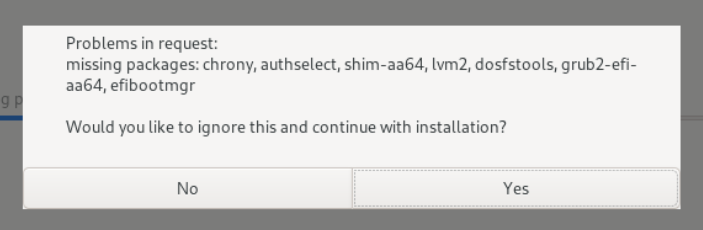
The installation reports missing packages as shown in the error screenshot:
Possible Causes
The default RPM package list lacks essential packages required for system installation. The specific missing packages vary across OS versions, as shown in the error message during installation.
Solution
Add missing packages:
- Identify required RPM packages from the installation error message.
- Append these packages to /etc/isocut/rpmlist.
- Rebuild the ISO image.
Example modified rpmlist configuration based on the reported error:
shell$ cat /etc/isocut/rpmlist kernel.aarch64 lvm2.aarch64 chrony.aarch64 authselect.aarch64 shim.aarch64 efibootmgr.aarch64 grub2-efi-aa64.aarch64 dosfstools.aarch64
Licensed under the MulanPSL2
 J.G.W.A.B. No. 11030102011597