CPU Fault Inspection Plugin
Hardware Specifications
- Only the aarch64 architecture is supported.
Installing the Plugin
Prerequisites
The sysSentry inspection framework has been installed by referring to Installation and Usage.
Installing the Software Package
yum install cpu_sentry ipmitool libxalarm -yLoading the Kernel Module
modprobe cpu_inspect
modprobe inspector-atf
CPU Inspection Parameter Configuration
The configuration of the CPU fault inspection task is saved in /etc/sysSentry/plugins/cpu_sentry.ini.
- Parameter description
| Plugin Parameter | Default Value | Value Range | Description |
|---|---|---|---|
| cpu_list | default | List of CPU core IDs in the test environment | List of CPUs for fault inspection |
| patrol_second | 60 | Integer greater than 0 | Inspection timeout period, in seconds |
| cpu_utility | 100 | Integer from 1 to 100 (including 1 and 100) | Maximum CPU usage allowed for the inspection program |
- Configuration example
[args]
cpu_list = default
patrol_second = 60
cpu_utility = 100
Loading the CPU Inspection Task
Before starting the CPU inspection task, you need to load the CPU inspection task first. Run sentryctl reload cpu_sentry to load the CPU inspection task. 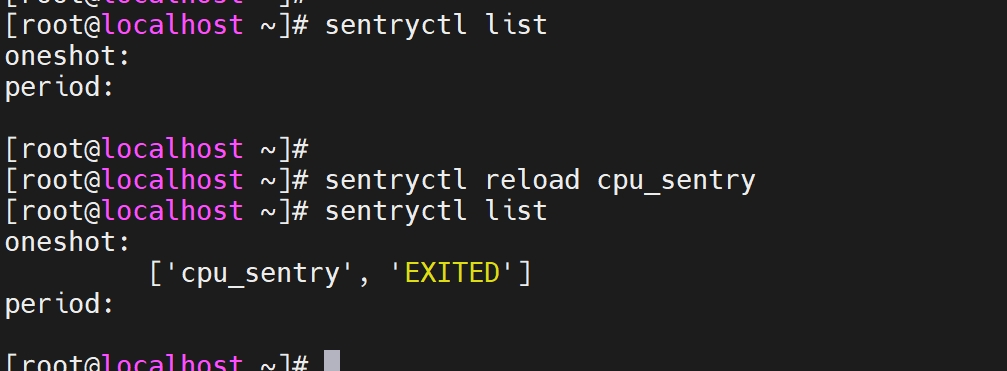
Starting the CPU Inspection Task
Run sentryctl start cpu_sentry to start the CPU inspection task.
Viewing the CPU Inspection Status
Run sentryctl status cpu_sentry to view the status of the CPU inspection task.
Stopping the CPU Inspection Task
Run sentryctl stop cpu_sentry to stop the running CPU inspection task.
Viewing the CPU Inspection Result
Command for obtaining the inspection result: sentryctl get_result cpu_sentry. For the command output, see the description of the get_result API. The details are as follows:
{
    ... ...
    "details": {
        "code":0,
        "msg":"xxx",
        "isolated_cpulist":"xxx"
    }
}
The meanings of the fields in details are as follows:
| key | Description |
|---|---|
| code | Error code returned by the CPU inspection task, which is an integer. The error codes and possible causes are as follows: 0: No problem is found on any CPU. 1001: CPU 0 is faulty and cannot be isolated. 1002: Some CPUs are faulty, and the faulty cores are isolated successfully. 1003: Invalid configuration parameters. 1004: The inspection program fails to be executed. 1005: The inspection program is killed. |
| msg | String, error description. |
| isolated_cpulist | String, list of fault-isolated cores, for example, "10-13,15-18". |
For example, if patrol_second is set to -1 and the inspection task is started, the following result is obtained: 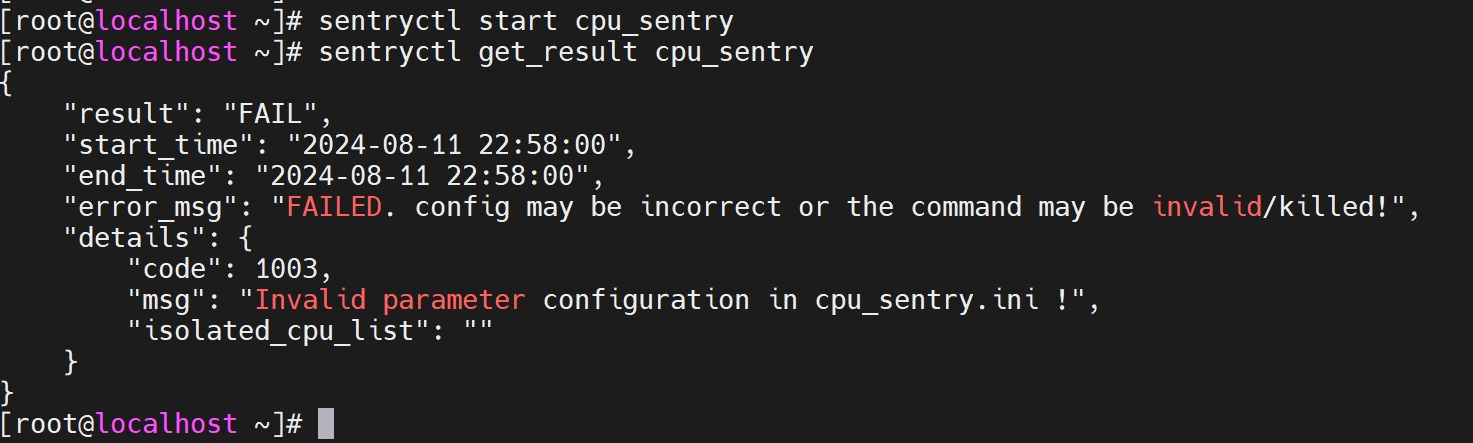
Viewing the CPU Inspection Log
The log of the CPU inspection task is recorded in the /var/log/sysSentry/cpu_sentry.log file, which mainly records error information. For example, if an invalid parameter value is configured in the configuration file, the following log content is obtained:
[root@localhost ~]# cat /var/log/sysSentry/cpu_sentry.log
ERROR:root:config 'cpu_list' (value [1--3]) is invalid in cpu_sentry.ini !
[root@localhost ~]#
FAQs
When an invalid parameter is configured, the
sentryctl start cpu_sentrycommand is called and the CPU inspection is not executed, but the exit status of the command is 0, indicating that the command is executed successfully. Is this normal, and why?The sentryctl command is used to manage inspection tasks, and its exit status is irrelevant to the execution status of the inspection task. The sentryctl process and the inspection task process are executed asynchronously and do not affect each other. When you run
sentryctl start cpu_sentry, the CPU inspection task is delivered. An exit status of 0 indicates that the task is delivered successfully, but does not indicate that the CPU inspection task is executed successfully. Before the CPU fault inspection is executed, the inspection task checks whether the task configuration parameters are valid. If the CPU inspection task configuration file contains invalid parameters, the inspection task exits directly, and the check result is reflected in the inspection task execution result. You can runsentryctl get_result cpu_sentryto obtain the inspection task execution result, as shown in the following figure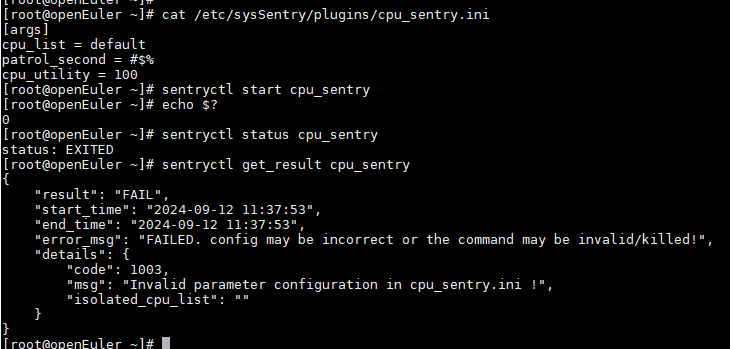
The inspector-atf module fails to be inserted, and the message
Operation not supportedis displayed. Why?This is because the current BIOS version does not support CPU fault inspection. You can view the dmesg log to obtain the related log information, for example:

The difference between end_time and start_time in the inspection result exceeds 1s. Why?
Only one CPU inspection task can run at a time. Therefore, before starting a CPU inspection task, the pgrep command is called to check whether a CPU inspection process is already running in the test environment. The time consumed by the pgrep command varies with environments. The timeout period of end_time - start_time is mainly the time consumed by the pgrep command.
版权所有 © 2026 openEuler 保留一切权利
京ICP备2020036654号-1
京公网安备 11030102011597 号