HBM ACLS/SPPR Online Repair Plugin
Introduction
This plugin ensures service reliability and maintains continuous service running. Specifically, based on the CE fault diagnosis or prediction result during service running, ACLS/SPPR is used to online-repair the fault address or fault row, preventing service interruption caused by UCE. The entire process involves the overall capabilities of FW, IMU, BIOS, OS, BMC, and other aspects. This plugin is an OS-side enabling plugin. Its main functions are to listen for and receive ACLS/SPPR messages, persistently save fault information, and online-repair faults.
Hardware Specifications
- Only the aarch64 architecture is supported.
- Only Huawei servers equipped with HaiyanHBM devices are supported.
- The FW must be capable of parsing the fault row/column address into a physical address and notifying the OS. The corresponding firmware support is required.
- The IMU/BIOS must be capable of transparently transmitting the online repair request delivered by the FW to the OS. The corresponding firmware support is required.
- The BMC must be capable of receiving the online repair request and returning the acceptance result. The corresponding firmware support is required.
Installing the Plugin
Prerequisites
The sysSentry inspection framework has been installed by referring to Installation and Usage.
Installing the Software Package
yum install hbm_online_repair -yOnline Repair Plugin Parameter Configuration
The configuration file of the online repair plugin is saved in /etc/sysconfig/hbm_online_repair.env by default.
- Parameter description
| Parameter | Default Value | Value Range | Mandatory | Description |
|---|---|---|---|---|
| HBM_ONLINE_REPAIR_LOG_LEVEL | 1 | Integer from 0 to 3 | Y | Log level of the online repair plugin. The levels that can be set are 0 (DEBUG), 1 (INFO), 2 (WARNING), and 3 (ERROR). When a lower level is set, logs of higher levels are also printed. |
| PAGE_ISOLATION_THRESHOLD | 3355443 | Integer from 0 to 2147483647 | Y | Threshold of system isolation resources, in KB. The online repair function of the plugin requires page isolation first, which occupies the isolation resources of the system. When the overall isolation resources of the system exceed this threshold, the plugin will not perform isolation or subsequent repair and online operations. |
- Configuration example
HBM_ONLINE_REPAIR_LOG_LEVEL=1
PAGE_ISOLATION_THRESHOLD=3355443
Managing the Online Repair Plugin
The plugin is managed in the same way as described in Installation and Usage, and details are not described here.
Note that when the sentryctl get_result <module_name> command is used for the plugin, the command returns only the "start_time" and "end_time" of the plugin, and other fields are empty. In this case, you need to read the log to obtain the running status and related information of the plugin.
Viewing the Online Repair Plugin Log
The log of the online repair plugin is recorded in the /var/log/sysSentry/hbm_online_repair.log file, which mainly records the initial configuration of the plugin and various processing results after messages are received.
Startup Log
After the plugin is started, the following log is usually displayed:
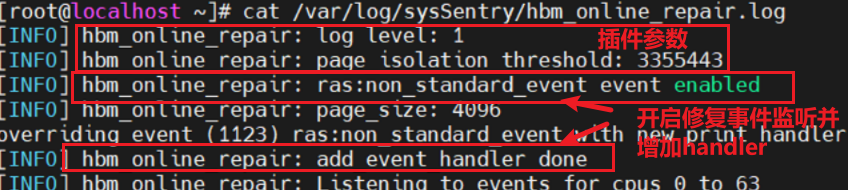
Running Log
After the plugin receives a correct ACLS/SPPR fault report, Received ACLS/SPPR repair request appears. Then the plugin processes the information and performs operations in two phases, and the information about the corresponding operations is printed in the log, as shown in the following example:

Phase 1: Persistently Saving Information
Two types of logs may appear in this phase:
write hbm fault info to flash xxx successindicates that the information is persistently saved successfully.- Other information indicates that the persistent saving fails. You can query the cause of the failure in the following table:
| Error Message | Description |
|---|---|
| fault info storage reach threshold, cannot save new record into flash | The size of the persistently saved information exceeds the threshold (128 KB by default). |
| invalid fault info | The format of the parsed persistent information is incorrect. |
| read variable xx-xx attribute failed, stop writing | Failed to read the efivar attribute at the corresponding guid position. |
| write to xx-xx failed | Failed to write the persistent information. |
Phase 2: Attempting Repair in Flat Mode
The ACLS/SPPR fault report information transparently transmitted from the BIOS to the OS has two modes: Flat mode and Cache mode. The plugin attempts repair operations only after receiving a message in Flat mode. Therefore, three types of logs may appear in this phase:
- If no log is printed, the message mode is Cache mode. In this case, the plugin only persistently saves information (Phase 1) and does not attempt repair operations.
- If
HBM ACLS/SPPR: Page xxx repair and online successappears, the Flat mode information is received and the repair is successful. - Other information indicates that a message in Flat mode is received and operations are performed, and any operation among isolation, repair, and online fails. You can query the cause of the failure in the following table:
| Error Message | Description |
|---|---|
| Page isolate failed: Get hardware_corrupted_size failed | Failed to read the isolation resource usage of the current system. The isolation fails. |
| Page isolate failed: the isolation resource is not enough | The system isolation resources exceed the threshold. The isolation fails. |
| HBM: ACLS/SPPR offline failed, address is xxx | The ACLS/SPPR isolation API is called and returns a failure. |
| Repair driver is not loaded, skip error | The repair driver is not found. The repair fails. |
| No HBM device memory type found, skip error | No HBM device is found. The repair fails. |
| Err addr is not in device, skip error | The address is not in any HBM device. The repair fails. |
| HBM: Address xxx is not supported to ACLS/SPPR repair | The address does not support ACLS/SPPR repair. The repair fails. |
| HBM ACLS/SPPR: Page xxx online failed | Failed to bring the page online. |
版权所有 © 2026 openEuler 保留一切权利
京ICP备2020036654号-1
京公网安备 11030102011597 号