Installing sysSentry
Operating System
openEuler-22.03-LTS-SP4
Environment Preparation
Install the openEuler-22.03-LTS-SP4 system. For details, see the Installation Guide.
The root permission is required to install sysSentry.
Configuring the Yum Source
Create a .repo file in /etc/yum.repos.d/ (for example, /etc/yum.repos.d/openEuler.repo), open the .repo file with an editor, and add the following content:
aarch64 architecture:
[openEuler-22.03-LTS-SP4]
name=openEuler-22.03-LTS-SP4
baseurl=http://repo.openeuler.org/openEuler-22.03-LTS-SP4/everything/aarch64/
enabled=1
gpgcheck=1
gpgkey=http://repo.openeuler.org/openEuler-22.03-LTS-SP4/everything/aarch64/RPM-GPG-KEY-openEuler

[openEuler-22.03-LTS-SP4-update]
name=openEuler-22.03-LTS-SP4-update
baseurl=http://repo.openeuler.org/openEuler-22.03-LTS-SP4/update/aarch64/
enabled=1
gpgcheck=0
x86_64 architecture:
[openEuler-22.03-LTS-SP4]
name=openEuler-22.03-LTS-SP4
baseurl=http://repo.openeuler.org/openEuler-22.03-LTS-SP4/everything/x86_64/
enabled=1
gpgcheck=1
gpgkey=http://repo.openeuler.org/openEuler-22.03-LTS-SP4/everything/x86_64/RPM-GPG-KEY-openEuler

[openEuler-22.03-LTS-SP4-update]
name=openEuler-22.03-LTS-SP4-update
baseurl=http://repo.openeuler.org/openEuler-22.03-LTS-SP4/update/x86_64/
enabled=1
gpgcheck=0
Installing sysSentry
yum install sysSentry libxalarm -yUsing sysSentry
Starting the Inspection Framework
systemctl start sysSentry
systemctl start xalarmd
# After the command is executed successfully, you can run the status command to view that the status is running
systemctl status sysSentry
systemctl status xalarmd
Configuring Inspection Tasks
The sysSentry inspection framework manages inspection tasks in the form of inspection modules. Each inspection module is defined by the corresponding .mod configuration file in the /etc/sysSentry/tasks/ directory. The name of the inspection module is the name of the .mod file. The .mod configuration file is used to configure the running parameters of the inspection task.
Managing Inspection Tasks
- Start a specified inspection task.
sentryctl start <module_name>- Stop a specified inspection task.
sentryctl stop <module_name>- List all loaded inspection tasks and their status.
sentryctl listFor example:
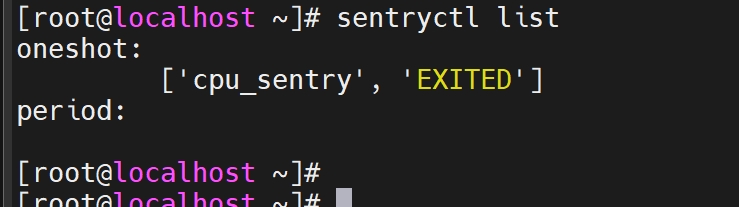
- Query the status of a specified inspection task.
sentryctl status <module_name>Inspection status information:
| Status | Description |
|---|---|
| RUNNING | The inspection task is running. |
| WAITING | Only period inspection tasks can be set to this status, which indicates that the period inspection task is waiting to be scheduled for the next execution. |
| EXITED | The inspection task has not been executed yet, or a oneshot inspection task is in this status after the execution is complete. |
| FAILED | The inspection task fails to be started, or the inspection task does not exit normally. |
- Reload the configuration of a specified task.
sentryctl reload <module_name>- Query the inspection result of a specified inspection task.
sentryctl get_result <module_name>The information is returned in JSON format, and the content format is as follows:
{
    "result": "xxx",
    "start_time": "YY-mm-DD HH:MM:SS",
    "end_time": "YY-mm-DD HH:MM:SS",
    "error_msg" : "xxx",
    "details":{}  # The details vary with inspection tasks and are provided by the inspection module.
}
The mapping between result and error_msg is as follows:
| Result | Corresponding Error Message |
|---|---|
| PASS | "" |
| SKIP | "not supported.maybe some rpm package not be installed." |
| FAIL | "FAILED. config may be incorrect or the command may be invalid/killed!" |
| MINOR_ALM | "the command output shows that the status is 'INFO' or 'GENERAL_WARN'." |
| MAJOR_ALM | "the command output shows that the status is 'WARN' or 'IMPORTANT_WARN'." |
| CRITICAL_ALM | "the command output shows that the status is 'FAIL' or 'EMERGENCY_WARN'." |
FAQs
If the sysSentry service is frequently started and stopped within a short period of time, the error message
RuntimeError: reentrant call inside <_io.BufferedWriter name='</var/run/sysSentry/sysSentry.pid>'>is displayed when you view the service startup log. Does this affect the function?Starting the sysSentry service and then stopping it within a short period of time causes the sysSentry initialization process to receive a termination signal before it ends, which may trigger the sig_handler process twice. If the first process happens to execute close() when the second sig_handler process is triggered, a RuntimeError occurs. This problem does not affect normal functions. You are advised not to stop the sysSentry service immediately after starting it.
版权所有 © 2026 openEuler 保留一切权利
京ICP备2020036654号-1
京公网安备 11030102011597 号