Understanding Services
Objective: Use the command line tool to learn about services in ROS 2.
Background
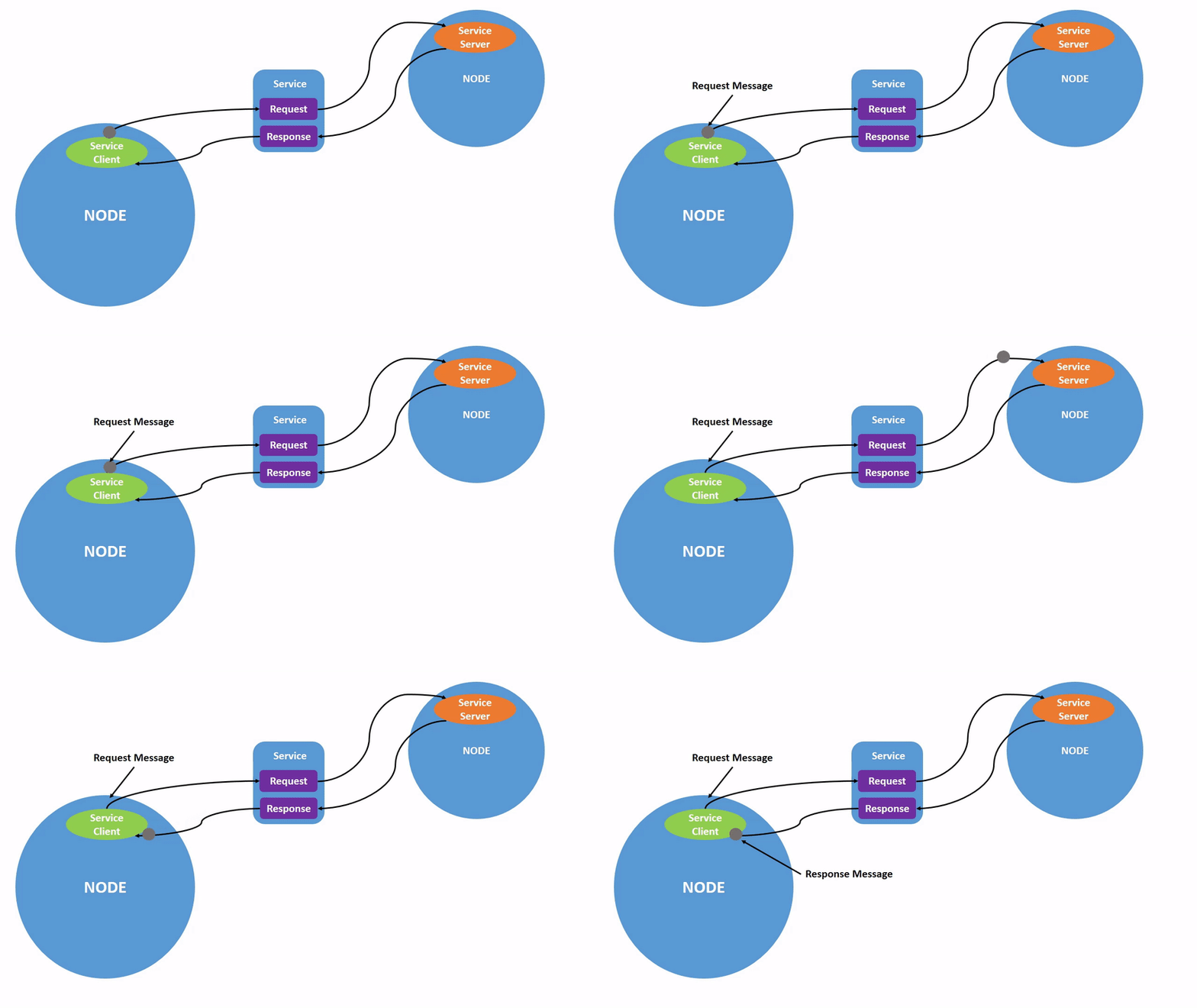
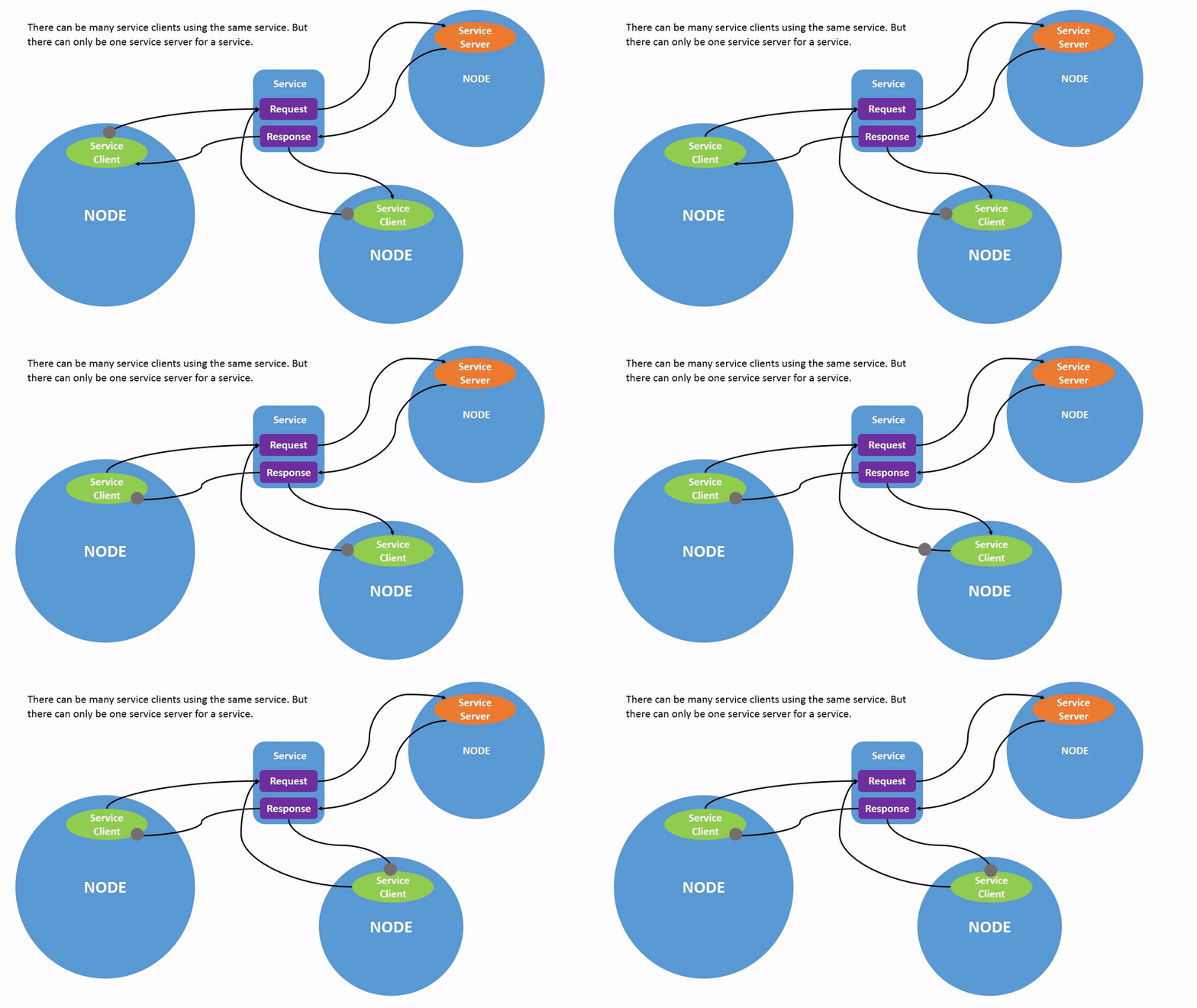
Services are another method of communication between nodes in a ROS graph. Services are based on the call-response model, rather than the publish-subscribe model of topics. While topics allow nodes to subscribe to data streams and receive continuous updates, services only provide data when a client makes a specific call.
Tasks
1 Setup
Launch two turtlesim nodes, /turtlesim and /teleop_turtle.
Open a new terminal and run:
ros2 run turtlesim turtlesim_nodeOpen another terminal and run:
ros2 run turtlesim turtle_teleop_key2 ros2 service list
Running the ros2 service list command in the new terminal will return a list of all active services in the current system.
/clear
/kill
/reset
/spawn
/teleop_turtle/describe_parameters
/teleop_turtle/get_parameter_types
/teleop_turtle/get_parameters
/teleop_turtle/list_parameters
/teleop_turtle/set_parameters
/teleop_turtle/set_parameters_atomically
/turtle1/set_pen
/turtle1/teleport_absolute
/turtle1/teleport_relative
/turtlesim/describe_parameters
/turtlesim/get_parameter_types
/turtlesim/get_parameters
/turtlesim/list_parameters
/turtlesim/set_parameters
/turtlesim/set_parameters_atomically
You will notice that both nodes have the same six services that end with parameters. These infrastructure services are present in almost every node in ROS 2, and parameters are built on top of these services. The next tutorial will cover parameters in more detail. In this tutorial, the discussion of parameter services will be omitted.
Now, let's focus on the turtlesim-specific services /clear, /kill, /reset, /spawn, /turtle1/set_pen, /turtle1/teleport_absolute, and /turtle1/teleport_relative.
3 ROS 2 Service Types
A service has a type that describes the request and response data structures of the service. The definition of a service type is similar to that of a topic type, but a service type consists of a request part and a response part.
To find out the type of a service, use the following command:
ros2 service type <service_name>Let's take a look at the /clear service of turtlesim. In a new terminal, enter the following command:
ros2 service type /clearThe expected output should be:
std_srvs/srv/EmptyThe Empty type indicates that the service call sends no data when sending the request and receives no data when receiving the response.
3.1 ros2 service list -t
To view the types of all active services at the same time, you can append the --show-types option (abbreviated as -t) to the list command:
ros2 service list -tThe following will be returned:
/clear [std_srvs/srv/Empty]
/kill [turtlesim/srv/Kill]
/reset [std_srvs/srv/Empty]
/spawn [turtlesim/srv/Spawn]
...
/turtle1/set_pen [turtlesim/srv/SetPen]
/turtle1/teleport_absolute [turtlesim/srv/TeleportAbsolute]
/turtle1/teleport_relative [turtlesim/srv/TeleportRelative]
...
4 ros2 service find
If you want to find all services of a specific type, use the following command:
ros2 service find <type_name>For example, you can find all services of the "Empty" type as follows:
ros2 service find std_srvs/srv/EmptyThe following will be returned:
/clear
/reset
5 ros2 interface show
You can invoke the service from the command line, but first you need to understand the structure of the input parameters.
ros2 interface show <type_name>Try it on the "Empty" type of the "/clear" service:
ros2 interface show std_srvs/srv/EmptyThe following will be returned:
------ separates the request structure (above) from the response structure (below). However, as you have learned, the Empty type does not send or receive any data. Therefore, its structure is naturally empty. Let's look at a service type that sends and receives data, such as /spawn. From the ros2 service list -t result, we know that the type of /spawn is turtlesim/srv/Spawn.
To view the request and response parameters of the /spawn service, run the following command:
ros2 interface show turtlesim/srv/SpawnThe following information is returned:
float32 x
float32 y
float32 theta
string name # Optional.  A unique name will be created and returned if this is empty
---
string name
The information above the --- line tells us the parameters required to call /spawn. x, y, and theta determine the 2D pose of the spawned turtle, while name is clearly optional.
The information below the underscore is not what you need to know in this case, but it can help you understand the data type of the response returned by the call.
6 ros2 service call
Now that you know what a service type is, how to find the service type, and how to find the structure of the parameters of that type, you can use the following command to call the service:
ros2 service call <service_name> <service_type> <arguments>The <arguments> section is optional. For example, you know that the service of the Empty type has no parameters.
ros2 service call /clear std_srvs/srv/EmptyThis command will clear all lines drawn by the turtle, making the turtle simulation window blank.
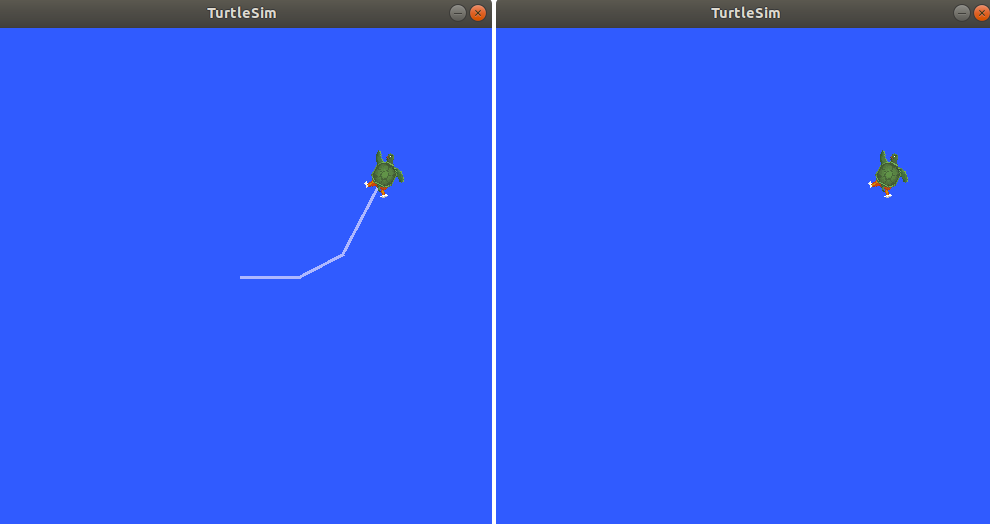
Now let's generate a new turtle by calling /spawn and setting the parameters. When calling a service from the command line, the input <arguments> must be in YAML syntax.
Run the following commands:
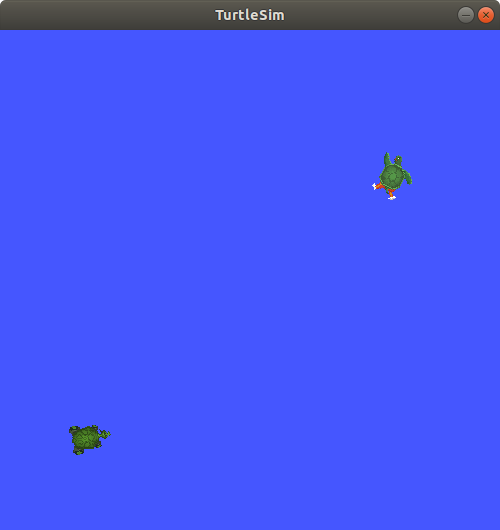
ros2 service call /spawn turtlesim/srv/Spawn "{x: 2, y: 2, theta: 0.2, name: ''}"You will see a methodical view, understand what is happening, and then get the response from the service:
requester: making request: turtlesim.srv.Spawn_Request(x=2.0, y=2.0, theta=0.2, name='')

response:
turtlesim.srv.Spawn_Response(name='turtle2')
Your turtle simulation window will be updated immediately to display the newly generated turtle:
Summary
Nodes can communicate with each other using services in ROS 2. Unlike topics, which are a one-way communication pattern where one node publishes information that can be consumed by one or more subscribers, services are a request/response pattern where a client sends a request to a node that provides the service, and the service processes the request and generates a response.
In general, you should not use services for continuous calls; instead, topics or even actions are more suitable.
In this tutorial, you used the command line tool to identify, introspect, and call services.
Reference: [1]
[1]: https://docs.ros.org/en/humble/Tutorials.html
[2]: https://github.com/ros2/ros2_documentation/blob/humble/source/Tutorials.rst
Licensed under the MulanPSL2
 J.G.W.A.B. No. 11030102011597